Using the Scan Tool
ERASING DIAGNOSTIC TROUBLE CODES (DTCs)
50 3040c
The Diagnostic Trouble Code (DTC) and related code definition
are shown in the lower section of the LCD display.
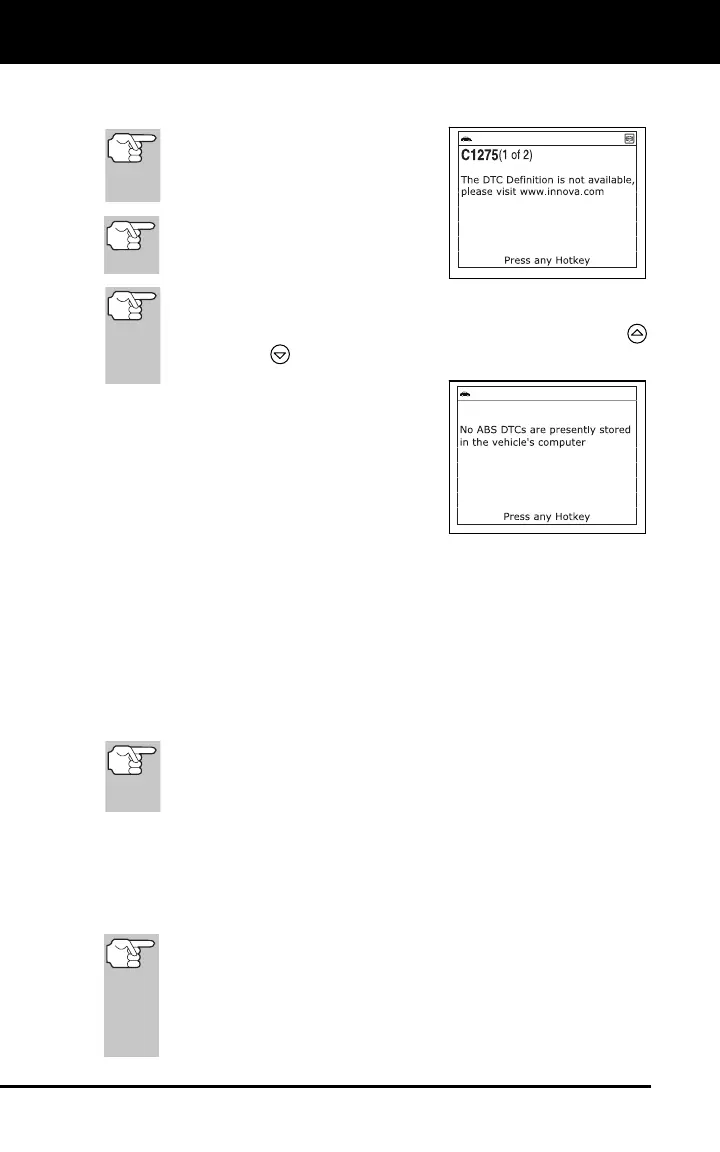
If the definition for the currently
displayed code is not available,
an advisory message shows on
the Scan Tool’s display.
I/M MONITOR STATUS icons are
not displayed when viewing ABS
DTCs.
In the case of long code definitions, a small arrow is shown in
the upper/lower right-hand corner of the code display area to
indicate the presence of additional information. Use the UP
and DOWN
buttons, as necessary, to view the additional
information.
The Scan Tool will display a code
only if codes are present in the
vehicle’s computer memory. If no
codes are present, a "No ABS DTC’s
are presently stored in the vehicle’s
computer" is displayed. Press the M
button to return to the Main Menu.
4. If more than one code was retrieved press the DTC button, as
necessary, to display additional codes one at a time.
5. When the last retrieved DTC has been displayed and the DTC button is
pressed, the diagnostic tool returns to the “Priority” code.
To exit the enhanced mode, press the M button. The Scan Tool
returns to the Main Menu.
ERASING DIAGNOSTIC TROUBLE CODES (DTCs)
When the Scan Tool’s ERASE function is used to erase
the DTCs from the vehicle's on-board computer, "Freeze
Frame" data and manufacturer-specific enhanced data are
also erased.
If you plan to take the vehicle to a Service Center for repair, DO NOT
erase the codes from the vehicle's computer. If the codes are erased,
valuable information that might help the technician troubleshoot the
problem will also be erased.
Erase DTCs from the computer's memory as follows:
When DTCs are erased from the vehicle's computer memory,
the I/M Readiness Monitor Status program resets status of all
the Monitors to a not run "flashing" condition. To set all of the
Monitors to a DONE status, an OBD2 Drive Cycle must be
performed. Refer to your vehicle's service manual for
information on how to perform an OBD2 Drive Cycle for the
vehicle under test.



 To Next Page