16
3. The clinician has already programmed the duration of this
exercise session and will provide instructions on the appropriate
level of stimulation intensity, which may or may not be the same
as the intensity used for walking.
4. The WalkAide unit will stop stimulating when the programmed
exercise session is finished.
5.
Turn the unit OFF.
6. After 1–2 seconds, the WalkAide can be turned on again
(automatically returning to walking mode) and the stimulation
intensity can be adjusted to the desired level for walking.
4.5 Changing the Battery
The expected battery life is about 42 hours
of continuous use. Dependent upon the
use, the batteries could last from 1 to 3
weeks. When the battery is low, the red
and green visual indicator lights will flash
and an audible alarm will sound 2 long
beeps each minute indicating that the
battery should be replaced immediately.
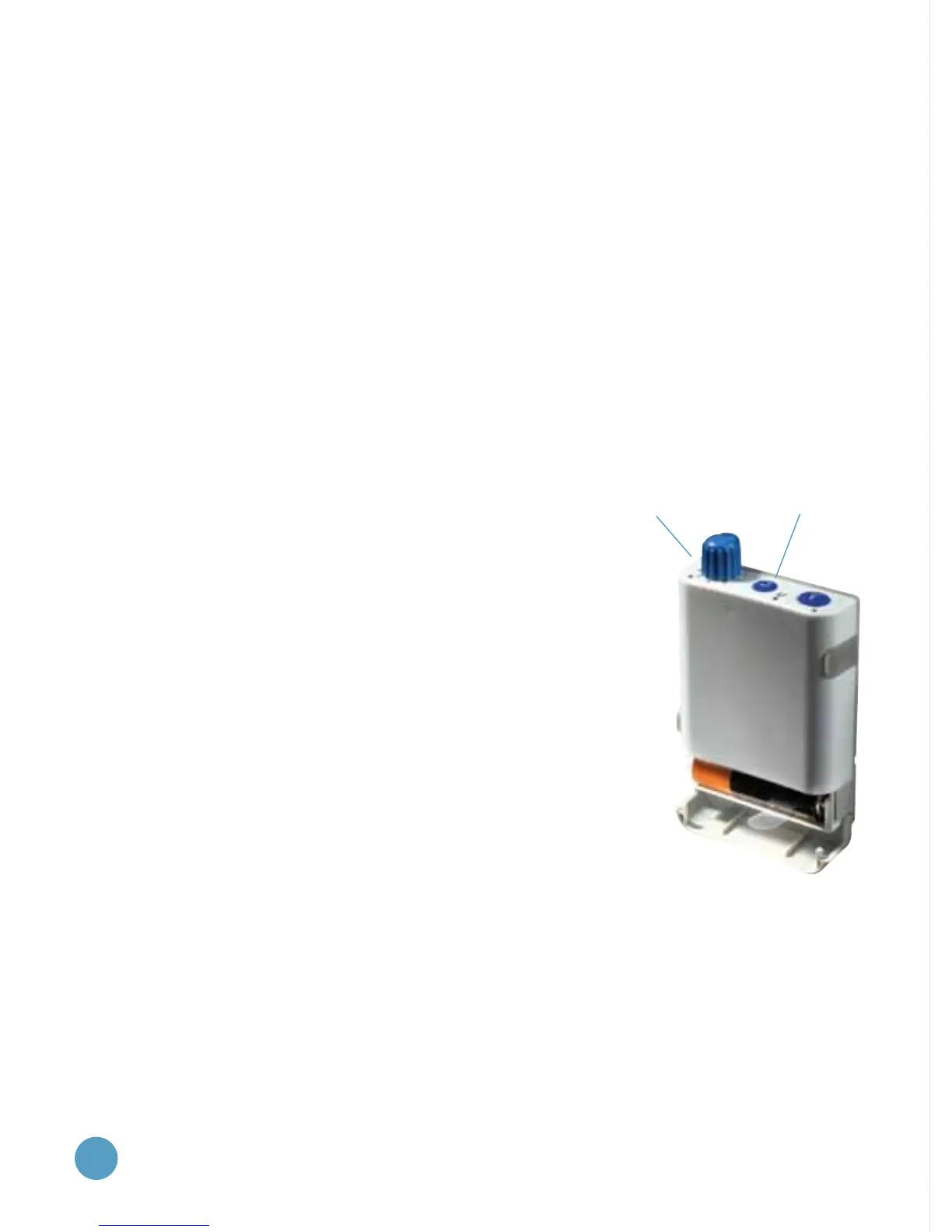
To replace the battery; first turn the unit
off, then grip the sides of the gray cover
to the battery compartment and pull
open (Figure 8). The WalkAide require
s a single
alkaline AA battery to operate. DO NOT
use
rechargeable or other types of batteries.
When the alkaline battery becomes depleted, please dispose
of the battery properly in accordance with all local and
national regulations.
Figure 8:
Changing the battery
Red visual indicators
for low battery (4)
Green visual indicator
for low battery (2)


 To Next Page