IF1200A Pilot Operating Handbook Appendix
Compass Calibration: QGroundControl
The steps that follow are excerpted from the QGroundControl (Ardupilot) User Guide,
and show a fixed-wing aircraft. The orientations apply to a copter vehicle as well.
For a full discussion of QGroundControl Compass Calibration, go the following link:
https://docs.qgroundcontrol.com/master/en/SetupView/sensors_ardupilot.html
Compass Calibration: QGroundControl (Ardupilot)
Choose a location for compass calibration, away from magnetic fields and metal.
Metal is not always obvious! Do not calibrate on top of an office table (often contains
metal bars) or next to an aircraft. Calibration can even be affected if you're standing
on a slab of concrete with uneven distribution of rebar.
Power on the ground station (with QGroundControl), and open QGroundControl.
Connect the ground station to the vehicle.
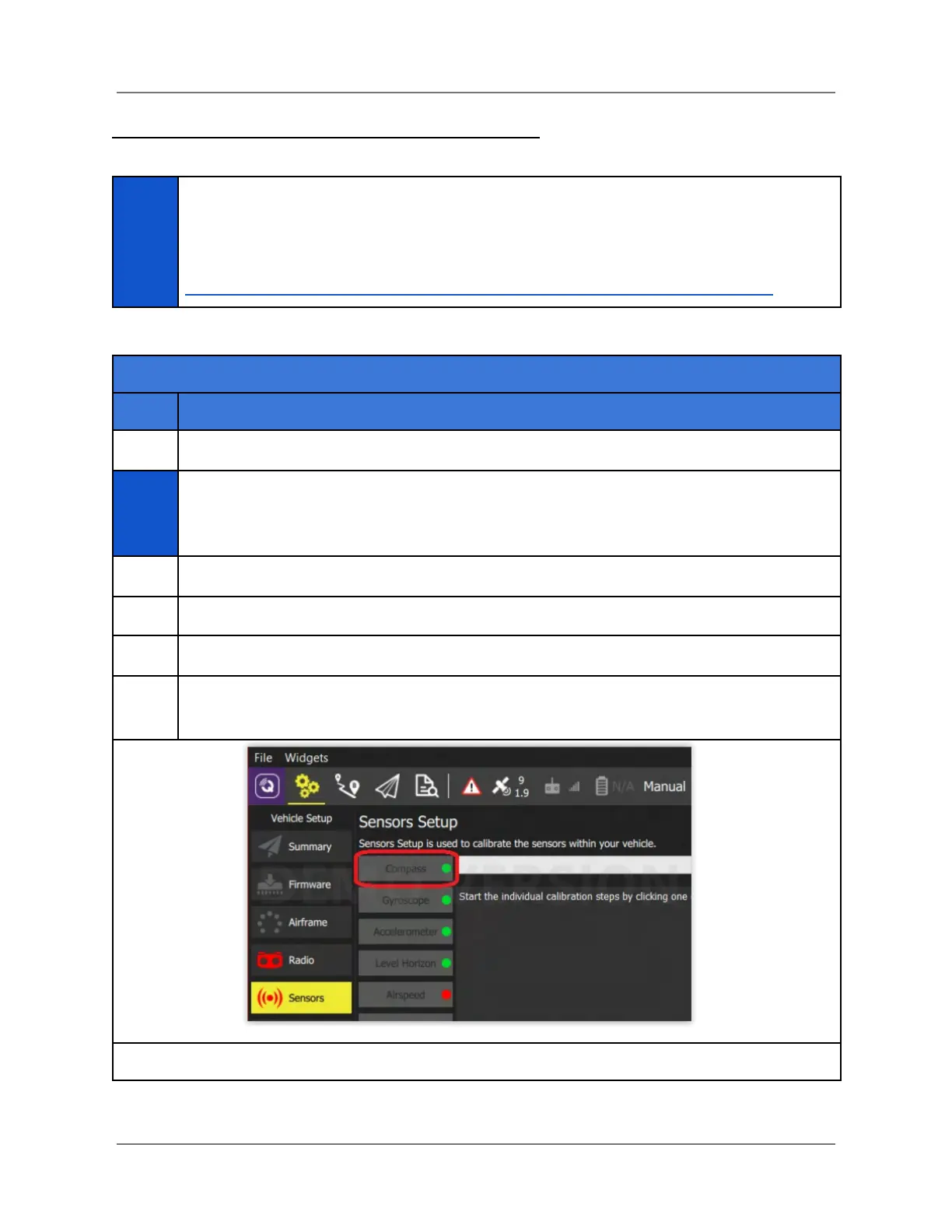
In QGC, select the gear icon (Vehicle Setup) in the top toolbar, and then Sensors in
the left sidebar (see below). Then, select Compass.
IFT Doc Num 102094, Rev 1.02 Page 69



 To Next Page