IF1200A Pilot Operating Handbook Appendix
Accelerometer Calibration: QGroundControl
The steps in this section are excerpted from the QGroundControl online documentation. A full
discussion of the topic can be found at the following link:
https://docs.qgroundcontrol.com/master/en/SetupView/sensors_ardupilot.html
Accelerometer Calibration: QGroundControl
Power on the ground station (with QGroundControl), and open QGroundControl.
Connect the ground station to the vehicle.
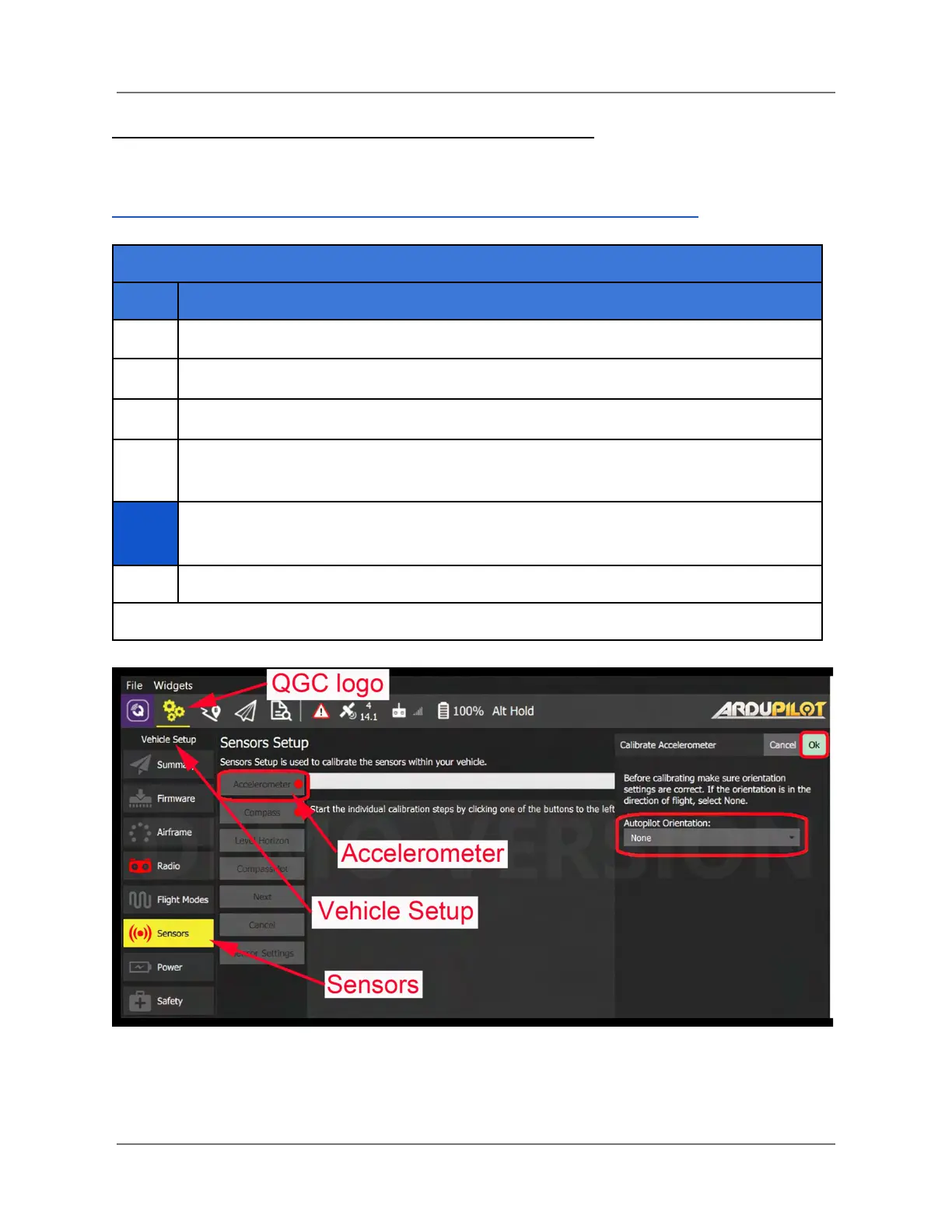
In QGC, select the gear icon (Vehicle Setup) in the top toolbar, and then Sensors
in the left sidebar (see below). Then, select Accelerometer (see the figure below).
On the right side of the screen in Figure 37 is the Autopilot Orientation. Make a
selection for the starting position.
Click on Ok in the upper-right side of the screen to start accelerometer calibration.
Figure 37. Start QGC Accelerometer Calibration
IFT Doc Num 102094, Rev 1.02 Page 79



 To Next Page