Need help?
Do you have a question about the Inspur NE5260M5 and is the answer not in the manual?
Covers component handling, power safety, and system configuration precautions.
Details on safe power supply use, extension cables, grounding, and preventing electric shock.
Precautions for environmental conditions, rack installation, and component handling.
Guidelines for safely handling components, preventing static discharge, and dealing with wet systems.
Detailed steps for ESD prevention and safe removal of internal components.
Safety rules for rack loading, ventilation, and repairing components within a rack.
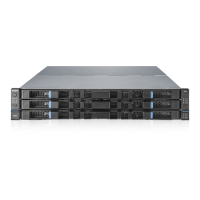
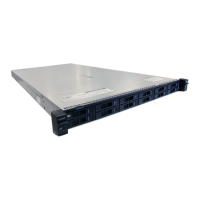
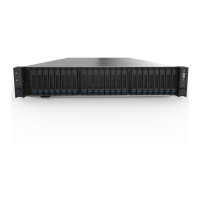
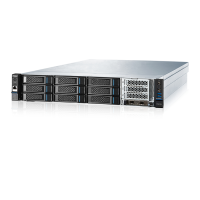
Introduces the server's design, performance, and suitability for various applications.
Lists specific details for processor, memory, I/O, display, and management interfaces.
Information on PCI expansion slots, supported drive types, and power supply options.
Explains the function of each numbered component on the server's front and rear panels.
Identifies and describes the main components on the server's motherboard.
Step-by-step procedures for safely powering the server on and off.
Detailed guide for removing and reinstalling the server's access panel.
Instructions for installing/removing the PCIE riser cage and air baffle.
Details on optimal location, space, airflow, and ventilation precautions.
Specifies temperature limits and power requirements, including safety advice.
Covers grounding standards and critical safety warnings for rack installations.
Guidance on installing the server into a rack and installing hardware options.
Final steps for rack installation, peripheral connection, and operating system installation.
Safety precautions and steps for installing or replacing the server processor.
Important notes and guidelines for installing memory modules, ensuring compatibility.
Detailed steps for inserting memory modules into DIMM slots.
Procedure for installing and removing hot-plug hard disk drives.
Steps for installing or replacing the air baffle for proper cooling.
Diagrams showing data cable routing for power board and drive backplanes.
Instructions for entering the BIOS setup and navigating its interface using keyboard shortcuts.
Table of keyboard shortcuts for interacting with the BIOS setup menu.
How to configure boot mode and related options for UEFI and Legacy environments.
Steps to view detailed CPU and memory configuration details within BIOS.
Guide to viewing HDD information and configuring RAID settings in BIOS.
Instructions for setting the SATA mode to RAID and accessing RAID controller menus.
Detailed instructions and menu options for creating RAID volumes with various levels.
Procedures for creating and deleting RAID volumes, including disk selection.
How to access and use the SATA RAID configuration utility in Legacy boot mode.
Detailed steps and examples for creating RAID volumes within the BIOS interface.
Confirmation prompts and steps for creating a RAID volume, including data loss warnings.
Procedures for resetting disks to non-RAID and masking disks as spares.
Interface for configuring BMC network settings, including static and DHCP.
Steps to configure static IP address, subnet mask, and router IP for BMC.
Instructions for configuring dynamic IP address settings for BMC using DHCP.
Explanation of parameters displayed in the main BIOS interface.
Overview of the advanced BIOS interface and its various configuration sections.
Settings for trusted computing security devices and Super IO chip configuration.
Configuration options for serial ports and console redirection.
Detailed settings for console redirection, including terminal type and baud rate.
Configuration for PCI subsystem and network stack, including PXE support.
Settings for the compatibility support module (CSM).
Information on chipset settings for SATA, USB, and ME devices.
Settings for onboard USB ports and miscellaneous common options.
Interface to display and set server ME configuration options.
Settings for enabling or disabling runtime error logging.
Interface for setting processor-related options.
Detailed settings for CPU cores, hyper-threading, and prefetchers.
Interface for setting common options like MMIO and NUMA.
Interface for setting UPI-related options.
Interface for setting memory-related options.
Detailed settings for memory frequency, scrambling, and ADR.
Settings for memory RAS features like lockstep and mirror modes.
Interface for setting options related to PCIe sockets.
Interface for setting CPU power management options.
Interface for setting CPU P state options, including frequency and turbo mode.
Interface for setting hardware power management state options.
Interface for setting CPU C state options to control power consumption.
Interface for setting package C state options.
Interface for CPU power saving performance tuning.
Interface for server management settings, including watchdog and BMC configuration.
Interface to configure BMC network settings, including static and DHCP.
Steps to configure BMC IPv4 and IPv6 management network settings.
Interface to configure BMC users through BIOS.
Procedures for adding and deleting BMC users, including security settings.
Options to modify user settings and configure BMC VLAN parameters.
Interface to display BMC FRU information read by BIOS.
Displays system and board information from FRU data.
Interface for setting administrator and user passwords for BIOS access.
Interface for setting system boot options, boot mode, and priorities.
Options for saving changes, discarding changes, and exiting the BIOS setup.
Information on updating BIOS firmware via UEFI Shell or OS.
Commands and parameters for updating BIOS and ME firmware in UEFI Shell.
Instructions for updating BIOS firmware using Linux OS tools.
Description of BMC module composition, including IPMI, command line, and WEB modules.
Details IPMI module functions and the command line interface for server management.
Step-by-step guide to logging into the BMC Web management interface.
Overview of the BMC Web interface layout and its main sections.
Explains navigation, buttons, and the "Information" section of the BMC Web interface.
Details the content of the Information section, including system config, BIOS options, FRU, and history records.
Interfaces for managing storage and performing remote control functions.
Configuration for remote sessions, virtual media, and KVM mouse modes.
Interface for monitoring and configuring power supply and fan speeds.
Settings for PSU configuration, server power control, and power peak settings.
Summary of BMC settings including network, services, NTP, SMTP, and SNMP.
Configuration for BMC network, DNS, and various services.
Settings for NTP time synchronization and SMTP alerts.
Configuration for SNMP, sensor thresholds, and access control.
Settings for BIOS boot options and configuring BMC log storage.
Management of system event logs, BMC audit logs, and one-key log collection.
Interface for fault diagnosis, BMC recovery, and viewing host POST codes.
User administration, security configuration, and firmware update options.
Settings for dual image configuration and updating BIOS firmware via BMC.
Restoring BMC defaults and logging into the BMC command line interface.
Commands for retrieving network information and sensor data via CLI.
Commands for FRU info, user management, and BMC version/reset via CLI.
Commands for fan control, power module info, and fault diagnosis via CLI.
A table listing various time zones and their corresponding GMT offsets.
Troubleshooting steps for power-on failures and no display output issues.
Troubleshooting for power module LED issues and abnormal HDD status LEDs.
Troubleshooting for fan noise, startup alarms, and unresponsive keyboard/mouse.
Troubleshooting steps for issues with USB devices and interfaces.
Solutions for system installation issues, including RAID drivers and partitioning.
Troubleshooting for abnormal memory capacity and network connectivity issues.
Safety warnings and step-by-step instructions for removing and replacing the battery.
FCC rules on RF emissions, device classification, and rating label explanation.
Details EU directives (Low Voltage, EMC) and CE marking compliance for the product.
Instructions for waste equipment disposal in the EU and a notice for China.
Precautions to avoid static damage and various grounding techniques.
Details warranty duration and how to obtain remote technical support.
Outlines warranty terms for replaced parts and conditions that void the warranty.
 General
| Processor | Intel Xeon Scalable processors |
|---|---|
| Max Processors | 2 |
| Power Supply | Redundant power supplies |
| Form Factor | 2U |
| Memory | Up to 2TB DDR4 |
| Storage | Up to 24 x 2.5" or 12 x 3.5" drives |
| Expansion Slots | Up to 7 PCIe slots |
| Operating System Support | Windows Server, Linux |

 To Next Page