LCR-800 Series User Manual
62
The other BIN setting:
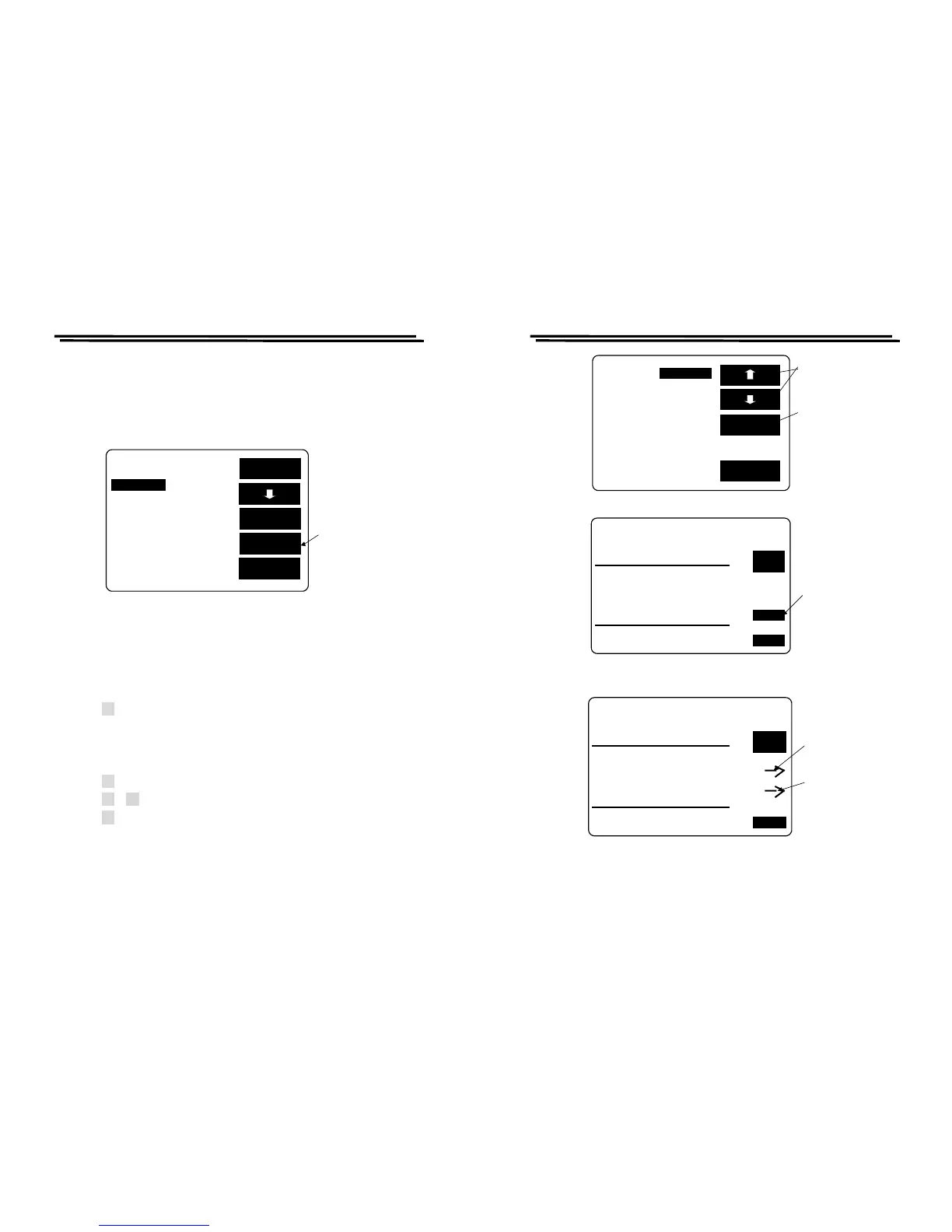
z When the BIN 1 setting is finished, press F4 key to continue the BIN 2
setting until all the Tot BIN setting is completed (BIN1~BIN13 the most),
please refer to Figure 8-23.
Figure 8-23
TEST RESULT Display Summing-up:
z Press F1/F2 key to select the white inverted characters “BIN.SUM” (Figure
8-24).
z Press F3 key to see the test result.
※ Sorting judging rule: To check whether the secondary parameter is within
the setting range, if not, just display SREJ instead of judging the primary
parameter, if yes, continue to proceed primary parameter sorting.
z Press F4 key to delete test result (Figure 8-25).
z Press F3 orF4 key to select delete or non-delete test result (Figure8-26).
z Press F2 key to see next page of test result (Figure 8-27, 8-28).
EXIT
BIN 1
SORT BY C TOt_Bin:13
C_Nom.Val: 15.000pF
EXT
BIN
BIN
CLR
LCR-800 Series User Manual
63
EXIT
SET BIN
MODE:C/D CIRCUIT:SER
SPEED:SLOW DISPLAY:BIN
C D
BIN
F :1.0000kHz MANU
V :1.000 V INT.B OFF
RANGE:1 C.V : OFF
DELAY:00000mS AVG : 1
SET
BIN SUM
Press F3 key
to the test
result
PressF1.F2
key to the
BIN SUM
Figure 8-24
SORT BY C NOM_VAL:15.000pF
D_MIN: .0010 D_MAX: 1.000
TEST RESULT
FAIL_ITEM TOTAL
PHI ( C >MAX )
PLO ( C <MIN )
SREJ( D NG ) 2
TOTAL 2
PASS_ITEM
BIN 1 - BIN 13
NEXT
PAGE
EXIT
Press F4 to
CLR
CLR.
Figure 8-25
SORT BY C NOM_VAL:15.000pF
D_MIN: .0010 D_MAX: 1.000
TEST RESULT
FAIL_ITEM TOTAL
PHI ( C >MAX )
PLO ( C <MIN )
SREJ( D NG ) 2 YES
TOTAL 2
NO
PASS_ITEM
BIN 1 - BIN 13
NEXT
PAGE
EXIT
Press F3 to
delete the
testing data
Press F4 to
maintain the
testing data
Figure 8-26



 To Next Page