1
E
HDMI Output Mo
e an
Actua
Output Si
na
s
Pr
Reso
ution
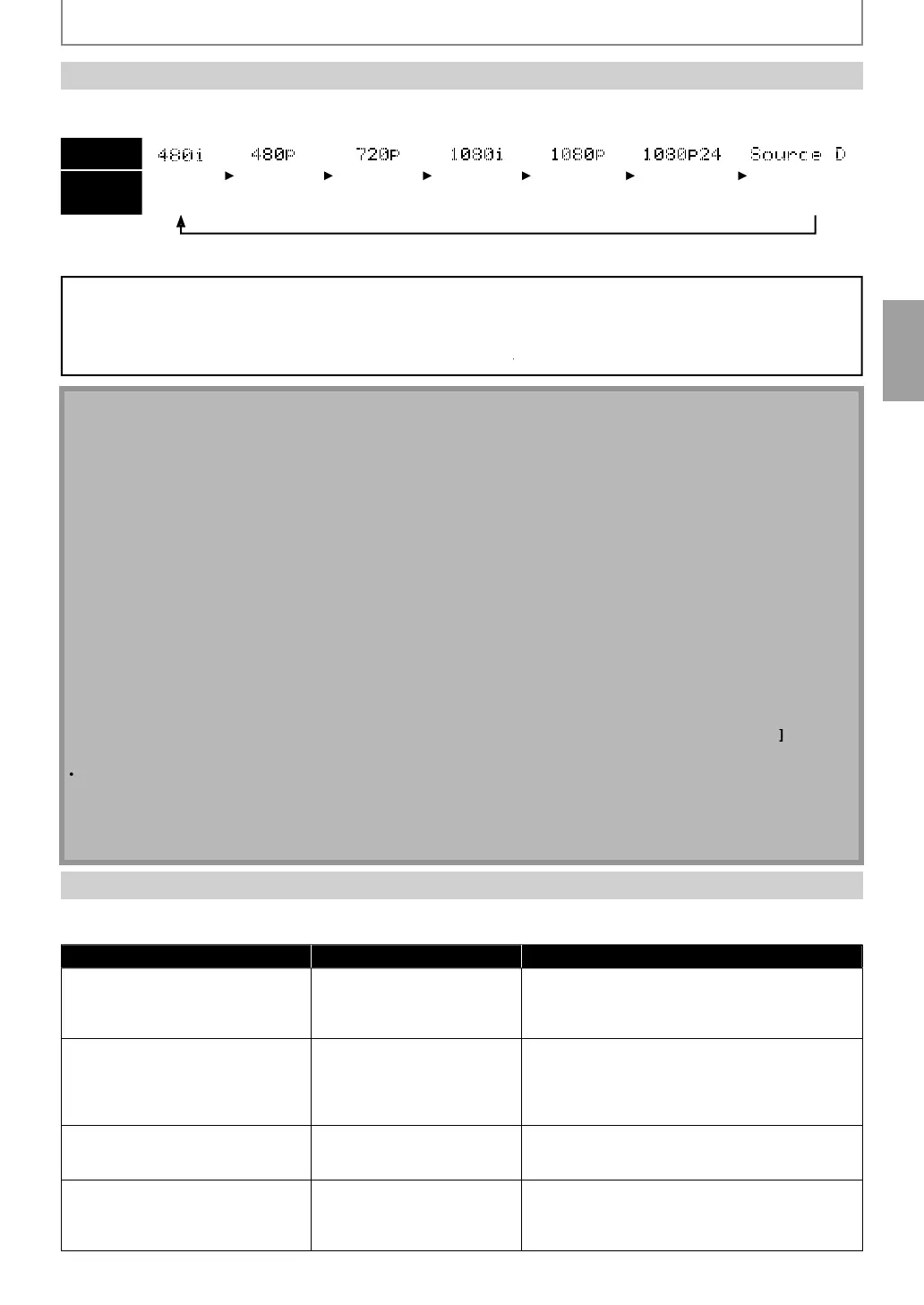
to change the resolution of the video signal being output from HDMI OUT jack. The video
resolution changes as
ollows ever
time
Reso
ution
is presse
.
Front Panel
Display
HDMI Video
Resolution
Inter
ace
4
rogress
v
7
Progress
v
1
Inter
ace
1
rogress
v
1
Progress
v
24
ram
ource D
rect
Even i
“HDMI Video Resolution” is set to “Source Direct”, HDMI video resolution will be changed when your TV is not compatible with
he video resolution o
a disc material.
Copyrig
t protection system
o pla
back the digital video images of a BD / DVD via an HDMI connection, it is necessar
that both the unit and the
or an AV receiver) support a cop
right protection s
stem called HDCP (high-bandwidth digital content protection s
stem).
DCP is cop
protection technolog
that comprises data encr
ption and authentication of the connected AV device. This
nit supports HDCP. Please read the operating instructions of
our
(or AV receiver) for more information.
N
When usin
HDCP-incompatible
the image will not be viewed properl
.
he audio signals
rom HDMI OUT jack (including the sampling
requency, the number o
channels and bit length)
may
e
imite
y t
e
evice t
at is connecte
.
Among the devices that support HDMI, some do not support audio output (e.g. pro
ectors). In connections with
device such as this unit, audio signals are not output from HDMI OUT
ack.
Video and audio signals ma
be distorted temporaril
when switching to /
rom the HDMI output mode
You can c
ange t
e HDMI output mo
e wit
[Reso
ution]
uring p
ay
ac
as we
. (T
is is not avai
a
e
uring
BD /AVCHD p
a
ac
.)
You can also chan
e the HDMI output mode from “HDMI Video Resolution” settin
in “Video” menu. In this menu,
ou can confirm what HDMI video resolutions are supported b
connected
. Refer to pa
e 43
In order to get natural and high qualit
ilm reproduction o
24-
rame
ilm material, use an HDMI cable (High Speed
HDMI cable is recommended) and select “1080
24” if the connected
is compatible with 1080p24 frame input.
I
the disc contains 1080p24
rame material, 60-
rame image will be output unless “1080p24” is selected.
For AVCHD, 24-frame film material will be out
ut as 60 frame, even if the connected device is com
atible with
080
24 frame in
ut and “HDMI Video Resolution” is set to “1080
24”or “Auto”.
I
the video is not properl
rom HDMI OUT jack a
ter
ou set the “HDMI Video Resolution” setting, change the
HDMI video resolution to the compatible resolution b
pressing
Resolution
or
ress and hold
Pla
n
h
front panel for more than 5 seconds to reset the settin
.
”HDMI Deep Co
or” is avai
a
e on
w
en t
e
isp
a
evice is connecte
HDMI ca
e an
supports HDMI Deep Co
or.
For “Auto” in “HDMI Deep Color”, usin
the Hi
h Speed HDMI cable is recommended.
he closed caption of the BD which is recorded b
1080p24 frame is not output from VIDEO OUTPUT
(COMPONENT)
acks and VIDEO OUTPUT (VIDEO)
ack when "HDMI Video Resolution" is set to "Auto", "Source
Direct
or
1080
24
.
HDMI Au
io Settin
hen using HDMI connections make “HDMI Audio Out” setting in “Audio” menu according to the speci
ications o
the
evice to be connected. Re
er to page 45
Device to be connected “HDMI Audio Out” setting Output HDMI audio signal
Device compati
e wit
Do
y
Digita
, Do
y Digita
P
us, Do
y
rueHD, DTS or DTS-HD
eco
ing
HDMI Mu
ti (Norma
)Do
y Digita
, Do
y Digita
P
us, Do
y TrueHD,
DTS, or DTS-HD bitstream are output
rom HDMI
OUT jac
. Ma
e t
e spea
er settings on t
e
connecte
AV receiver, etc.
Device com
atible with 3 or more
channels of audio in
uts (not
Dolb
Digital, Dolb
Digital Plus,
Dolb
TrueHD, DTS® or DTS-HD®
com
atible)
HDMI Multi
LPCM
Multi-channel audio si
nals are output from
HDMI OUT
ack. Make the speaker settings with
the speaker setting items appear after
ou select
“HDMI Multi(LPCM)”. Refer to pa
e 45.
Device com
ati
e wit
2-c
anne
audio in
ut or device not
com
atible with audio in
ut
HDMI 2
Down-mixe
2-c
anne
au
io signa
s are output
from HDMI OUT
ack.
DMI connection to a TV an
igita
au
io connection
(optica
/ coaxia
) to an AV receive
Au
io Mut
HDMI au
io wi
e mute, an
Do
y Digita
/ DTS
bitstream or LPCM will be output
rom AUDIO
OUTPUT (DIGITAL OPTICAL / COAXIAL) jac
s
depending on “Digital Out” setting. Re
er to page 46
CONNECTIONS
E5SF0UDDBS50.2ENv2.indd15E5SF0UDDBS50.2ENv2.indd15 2010/08/0515:16:332010/08/0515:16:33



 To Next Page