E
SPECIAL SETTINGS
justing t
e Pictur
BD-V
DVD-V
AVCHD
You can a
just t
e picture qua
it
an
store t
e setting
ou
ave a
juste
on memor
1-5
ring pla
back, press [
] repeatedl
to select "HD Picture Control" o
SD Pict
re
Control", then
ress [
n
r
“HD Pict
re
ntr
”
ective
or the video signal o
VIDEO OUTPUT (COMPONENT)
acks (480p, 720p and 1080i) and HDMI OUT
ack.
“SD Pict
re
ntr
l”
ffective for the video signal of VIDEO OUTPUT (COMPONENT)
acks (480i), VIDEO OUTPUT (VIDEO)
ack.
Use
] to select a memory
rom “Memory 1” to “Memory 5” to store your setting,
en press [Enter].
Memory1
Use
] to se
ect a item to
e a
juste
, t
en use
or [Enter] to a
just t
e setting.
2. Brightness
15. Progressive Mode
1. Contrast
0
Auto
+1
sB
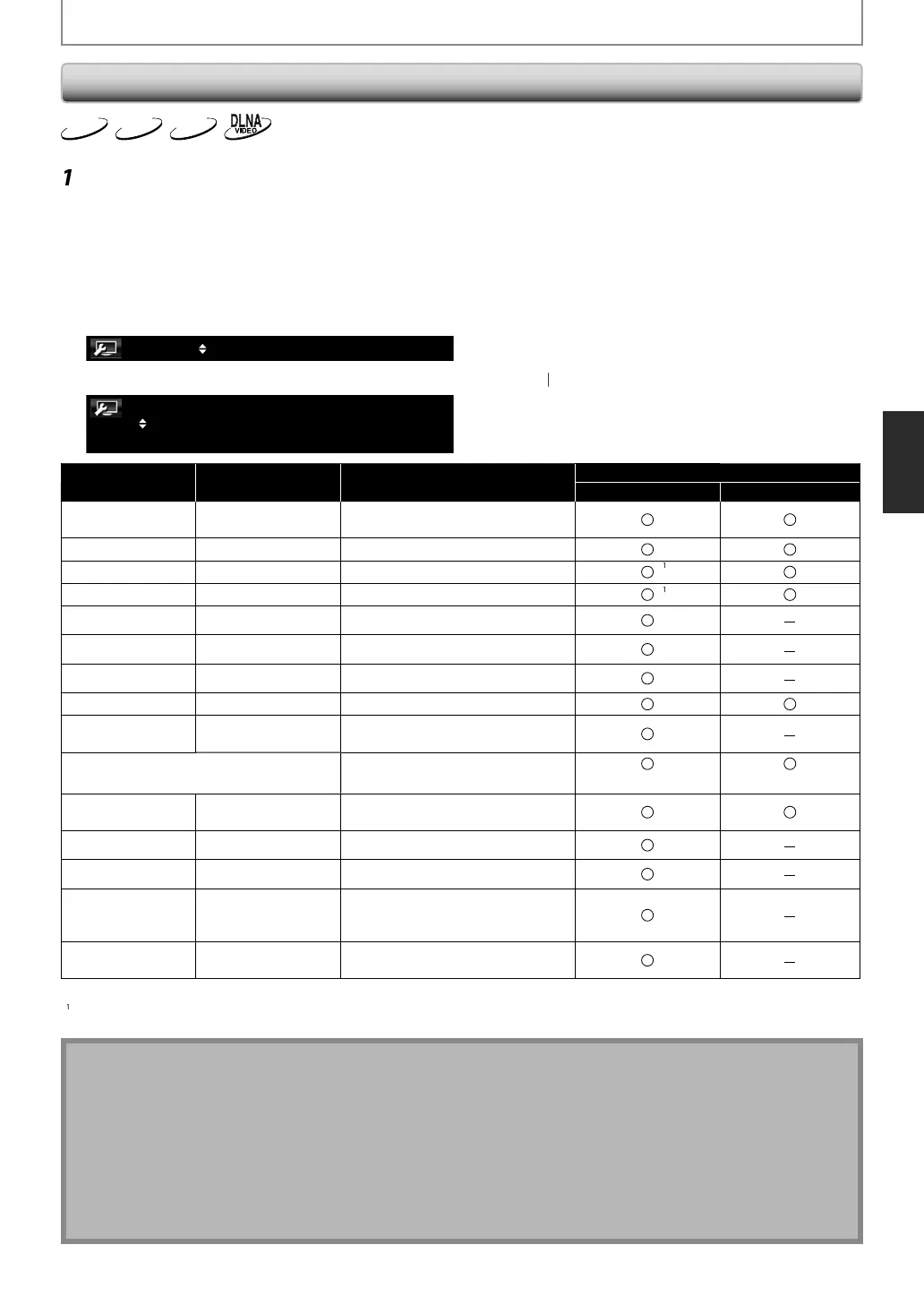
Item Adjustment range Description
Picture Control Setting
“HD Picture Control“ “SD Picture Control“
1.
ontrast
7 to +7
0*
djusts the di
erence between the
right and dark parts o
the picture.
2. Bri
tness
to +15
0*
d
usts the brightness o
the picture
3. Shar
nes
2 to +2
0*
d
usts the sharpness o
the picture
G
mm
rr
i
2 to +2
0*
d
usts the dark positions of the picture.
5. ICR Re
to +7
0*
djusts the red color o
the picture.
I
R Bl
to +7
0*
d
usts the blue color of the picture.
7. I
R Green
to +7
0*
d
usts the green color of the picture.
l
7 to +7
0*
djusts the color densit
of the picture.
9.
u
7 to +7
0*
justs t
e
a
ance
etween t
e
reen an
re
1
Bl
k L
v
d
usts the black level.
Off*, Middle, Hi
Off
On
11
N
i
R
i
ff*
1to
educes noise in the luminance si
nal
nd chroma si
nal
12
MPE
N
*, 1to
e
uces
oc
noise an
mosquito noise.
13. E
ge En
ancer
*, So
t, Middle, Strong
mphasizes the edge o
the picture
14.
deo True Color
ff*, Low, Middle, Hi
h
d
usts the smoothness of the
icture. It is available for 10 or 12 bit
ispla
.
.
Progressive Mo
uto*, Vi
e
elects the setting of the progressive
) Default settin
) It ma
take several seconds to re
lect the adjusted setting.
) For optimal video performance, THX recommends the followin
settin
s: “Black Level“ = “Off“.
ote
•
he setting remains even
ou turn the unit into the standb
mode except unplug the AC cord.
•
CR is the abbreviation o
Intelli
ent Color Remappin
.
deo True Color Processing (QTC) dynamically expands 8-bit video to use the
ull dynamic range o
ered by 10
n
12
it
isp
ays, e
iminating contours w
i
e preserving
etai
.
•
deo True Color is adjustable and effective when this unit is connected with the displa
device which is
om
atible with Dee
Color.
•
ou press
Mode
during pla
ing back Net
lix / CinemaNow / Blockbuster, picture control setting will not appear
n the TV screen, but the selected setting is available. Please adjust the setting when another mode, then pla
back Net
lix
CinemaNow
Blockbuster.
E5SF0UDDBS50.2ENv2.indd37E5SF0UDDBS50.2ENv2.indd37 2010/08/0515:17:122010/08/0515:17:12



 To Next Page