E
-
e
e
BD-V
DVD-V
CD
AVCHD
You can pla
back the speci
ic part (between point A and
point B) repeatedl
.
During p
ay
ac
, press [A-B] at t
e
esire
starting point A.
During p
ay
ac
, press [A-B] at t
e
esire
en
ing point B.
s soon as you set t
e point B, t
e part
etween point
an
point B wi
start p
a
ac
repeate
.
o cancel the A-B re
eat,
ress
A-B
a
a
n
ote
• P
in
B
h
l
wi
hin
h
m
i
l
r
r
k
oint A
-B re
eat is not avai
a
e wit
some scenes.
To cance
t
e A point w
ic
was set, press [C
ear]
•
-B repeat does not function durin
chapter, title,
track, group or all repeat pla
back.
• For some video
iles on DLNA home server
A-B
repeat pla
back ma
not
unction.
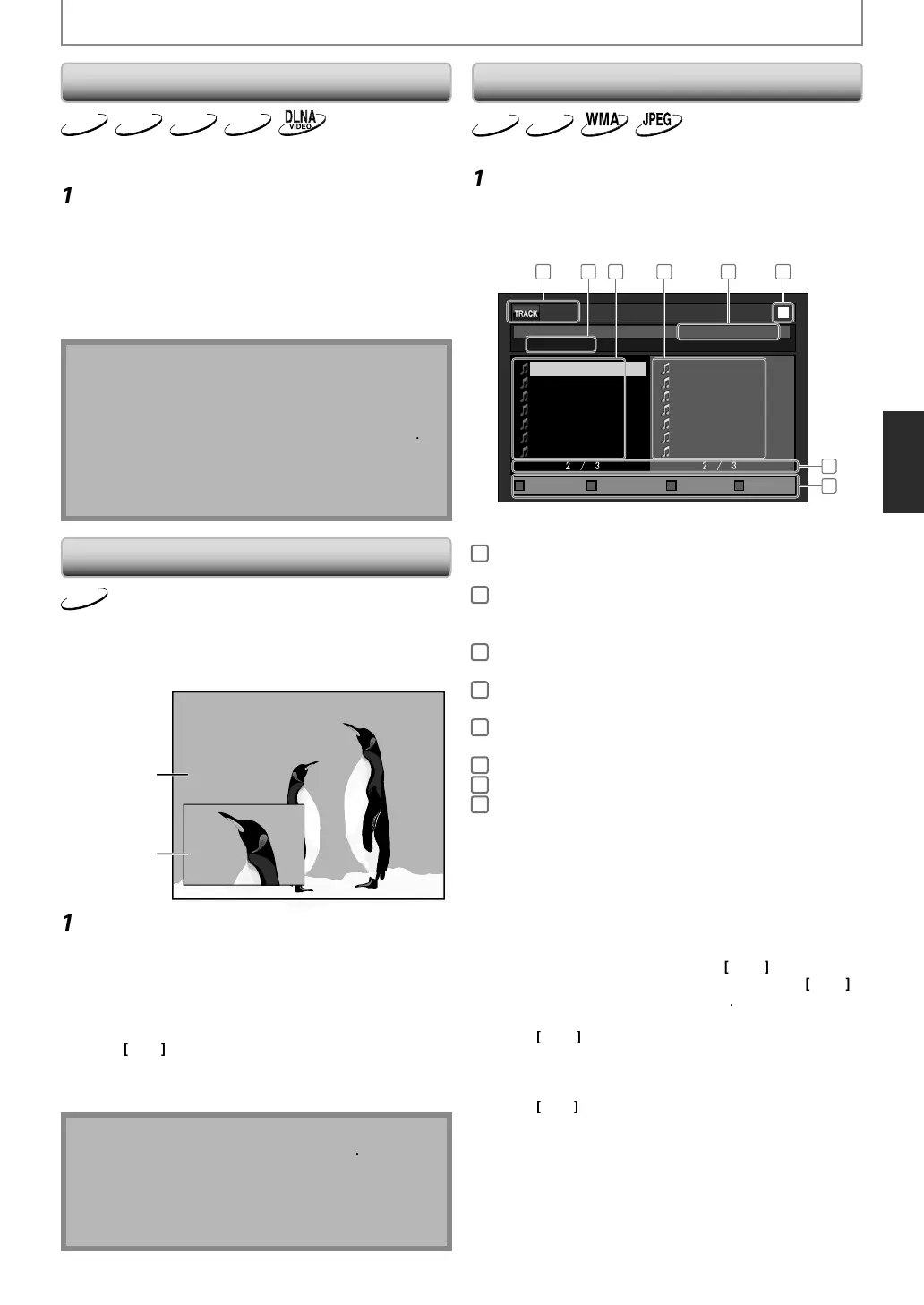
PIP (P
cture
n P
cture) (BONUSVIEW) Sett
BD-V
ome BD-videos have the PIP (
icture-in-
icture) function
which enables
ou to displa
the secondar
video in the
primar
vi
eo. You can ca
up t
e secon
ar
vi
eo
pressing
PIP
whenever the scene contains the secondar
video
vi
econ
ary
vi
e
During pla
back, press [PIP]
IP in
ormation will appear.
Use
to se
ect t
e secon
ar
vi
eo
ou wan
.
e secon
ary vi
eo wi
e
isp
aye
an
t
e
secon
ar
au
io wi
e output.
to switch between current setting and “O
”.
Press
Return
or
PIP
to remove t
e PIP
in
rm
ti
n
N
Mo
e
n
l
in
PIP
T
e secon
ar
au
io wi
not
e output w
en t
e
econdary audio is set to “O
” or when “BD Audio
Mode” is set to “HD Audio Output”. Re
er to
Switc
ing Au
io Soun
trac
” on page 35 an
“Setting
t
e BD Au
io Mo
e” on page 36.
Program P
a
ac
CD
MP3
ou can p
ay
ac
t
e
isc in your
esire
or
er.
In sto
mo
e,
ress [Mo
e]
T
e program screen wi
appear.
Use
to select a track / folder / file
then press [Enter].
e.
.) audio C
0 : 26 : 24
CD_DA
0:36
1:14
0:45
0:50
0:53
0:20
0:54
8
9
10
11
12
13
14
1:14
0:50
1:14
0:50
0:53
0:54
0:36
2
4
9
11
12
14
8
- - / 16
1 62 3 4
7
5
8
latoTmargorP
Page Prev Page NextPage DownPage Up
1
au
io CD :Track in
ormation
P3
WMA
JPEG :File in
ormation
2
i
D
: “CD-DA” will be displa
ed
P3
WMA
JPEG
rrent
i
c
r
l
er n
me will
e displa
ed.
3
rack
Folder
ile li
t
: Track
older
File list in the
ri
inal order
4
ro
rammed list : Track
File list in the
ro
rammed orde
5
Cumulative pla
back time of all tracks in the
rogrammed list (audio CD onl
)
6
la
back statu
7
Current pa
e / Total pa
e number
8
Operation
uide : Press [A] to
o to the previous
a
e in the track / file list
ress [B] to
o to the next pa
e
n the track
file list.
ress [C] to
o to the previous
a
e in the pro
rammed list.
ress [D] to
o to the next pa
e
n the pro
rammed list
• For MP3
WMA or JPEG files
use
l
folder, then
ress
Enter
first
and then use
to select a file, then
ress
Enter
•Pr
Clear
to erase the last file of the pro
ram
•
l
“All
l
r”
h
m
f
h
list to erase all the tracks / files in the pro
ram.
The programmed tracks /
iles is displayed in the
rig
t
an
screen.
se
to go back
orward between the
hierarchy o
olders.
SPECIAL PLAYBACK
E5SF0UDDBS50.2ENv2.indd31E5SF0UDDBS50.2ENv2.indd31 2010/08/0515:17:062010/08/0515:17:06



 To Next Page