CONNECTIONS
Networ
Connection wit
LAN
B
connecting this unit to the Internet,
ou can update the software via the Internet, pla
contents stored on DLNA home
media servers or access BD-Live
Net
lix
CinemaNow and Blockbuster services.
For more information about software update, refer to “Network Update” on page 55.
For more information about DLNA, refer to “Pla
ing Video / Music / Photo Files from DLNA Certified Home Media Servers”
on pa
e 28.
For more information about BD-Live, refer to “Enjoying BD-Live Discs with Internet” on page 33.
For more in
ormation about Net
lix, re
er to “NETFLIX OPERATIONS” on page 38.
For more information about CinemaNow and Blockbuster, refer to “CINEMANOW / BLOCKBUSTER OPERATIONS” on pa
e 39.
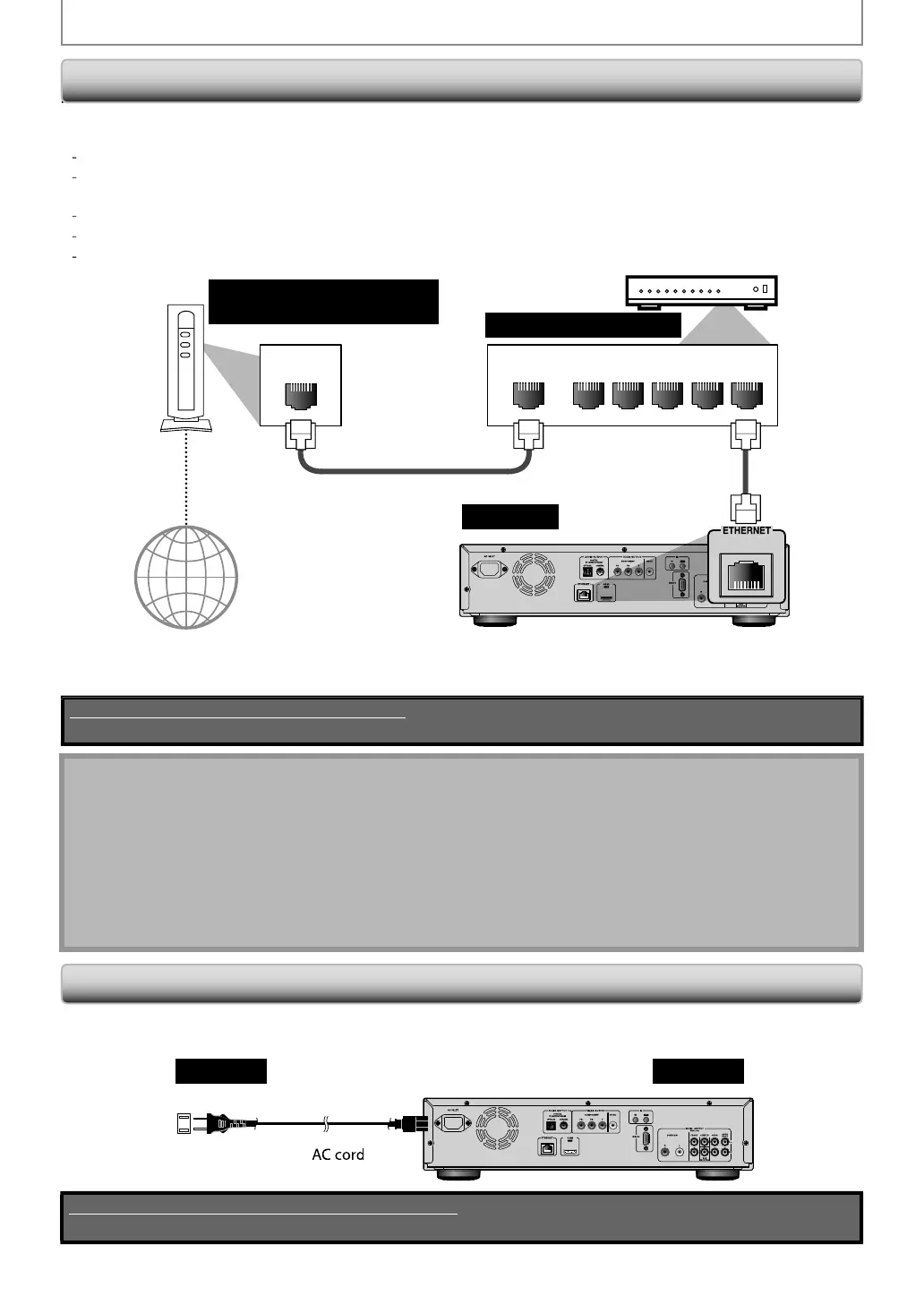
LAN
NALNAW
12345
Telecommunications
equipment (modem, etc.)
this unit
Hub or broadband router
nternet
AN
l
LAN ca
e
ake sure to connect the telecommunications e
ui
ment (modem, etc.) to the ETHERNET terminal via hub or
r
n
r
r
No supplied cables are used in this connection:
Please purchase the necessary cables at your local store.
ote
•
fter connecting to the Internet, set up necessar
network settings.
• Do not insert an
cable other than a LAN cable to the ETHERNET terminal to avoid damaging the unit.
•
f
our telecommunications equipment (modem, etc.) does not have broadband router functions, connect a broadband router.
•
f
our telecommunications equipment (modem, etc.) has broadband router functions but there is no vacant port, use a hub.
•
or a broadband router, use a router which su
orts 10BASE-T / 100BASE-TX.
• Do not connect
our PC directl
to the ETHERNET terminal of this unit.
•
or the network setup, refer to “Network Connection” on pa
es 52-55.
•
or more information about cables or connections, see the manual accompan
ing modem, broadband router and hub
ou use.
• Please purchase shielded LAN cables at
our local store and use them when
ou connect to network equipment.
Connecting t
e AC Cor
ter you made all necessary connections, connect the AC cord to the AC INLET. Then connect the AC cord to the AC outlet.
nsert the plugs securel
. Incomplete connections will result in the generation of noise.
this unit
AC 120V
60 H
AC outlet
Supplied cables used in this connection are as follows:
• AC cord x 1
E5SF0UDDBS50.2ENv2.indd20E5SF0UDDBS50.2ENv2.indd20 2010/08/0515:16:402010/08/0515:16:40



 To Next Page