83
En
■ Zone 2 Power On Volume,
Zone 3 Power On Volume
` Last, Min, 1 to 99 or Max (Absolute display)
` Last
, –QdB, –81dB to +18dB (Relative display)
This setting determines what the volume will be for
Zone 2/3 each time the AV controller is turned on.
To use the same volume level as when the AV controller
was last turned off, select “Last”.
The “Zone 2 Power On Volume” and “Zone 3 Power On
Volume” cannot be set higher than the “Zone 2 Maxi-
mum Volume” and “Zone 3 Maximum Volume” setting.
■ Zone 2 Component Out
` Use:
Select if a TV in Zone 2 is connected the COMPO-
NENT VIDEO ZONE 2 OUT.
` Not Use:
Select if no TV in Zone 2 is connected the COMPO-
NENT VIDEO ZONE 2 OUT.
If you’ve connected the COMPONENT VIDEO ZONE 2
OUT to a TV in Zone 2, this setting is set to “Use”.
Note
If the “Zone 2 Component Out” setting is set to “Not
Use”, the same video signal as COMPONENT VIDEO
MONITOR OUT is output from ZONE 2 OUT (compo-
nent).
This section explains how to turn Zone 2/3 on and off,
how to select an input source for Zone 2/3, and how to
adjust the volume for Zone 2/3.
Controlling Zone 2/3 from the AV Controller
Note
• When Zone 2/3 is turned off, the output from the 12V TRIG-
GER OUT goes low (0 volts).
Using Zone 2/3
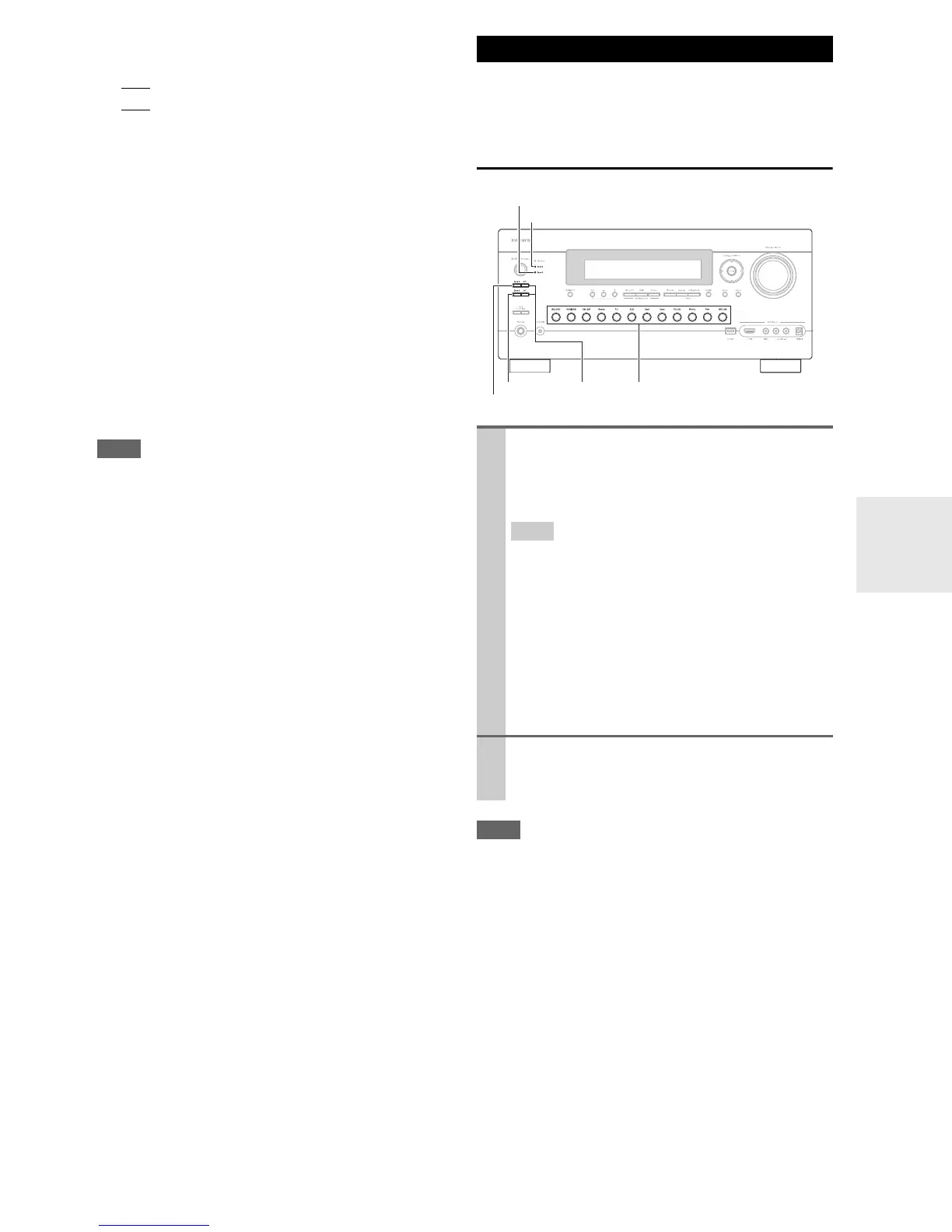
1
To turn on Zone 2/3 and select an input source,
press Zone 2 or Zone 3 followed by an input
selector button within 8 seconds.
Zone 2/3 turns on, the Zone 2/3 indicator lights.
Tip
•The 12V TRIGGER OUT goes high (+12 V).
To select AM or FM, press Tuner input selector and
Zone 2 or Zone 3 repeatedly.
(North American models) You can also select SIR-
IUS.
To select the same source as that of the main room,
press Zone 2 or Zone 3 twice. “Zone2 Selector:
Source” or “Zone3 Selector: Source” appears on
the display.
2
To turn off Zone 2/3, press Off for each Zone.
The zone is turned off, and the Zone 2 or Zone 3
indicator goes off.
Zone 3
Zone 2
Off
Zone 2 indicator
Input selector buttons
Zone 3 indicator



 To Next Page