Connections
En-15
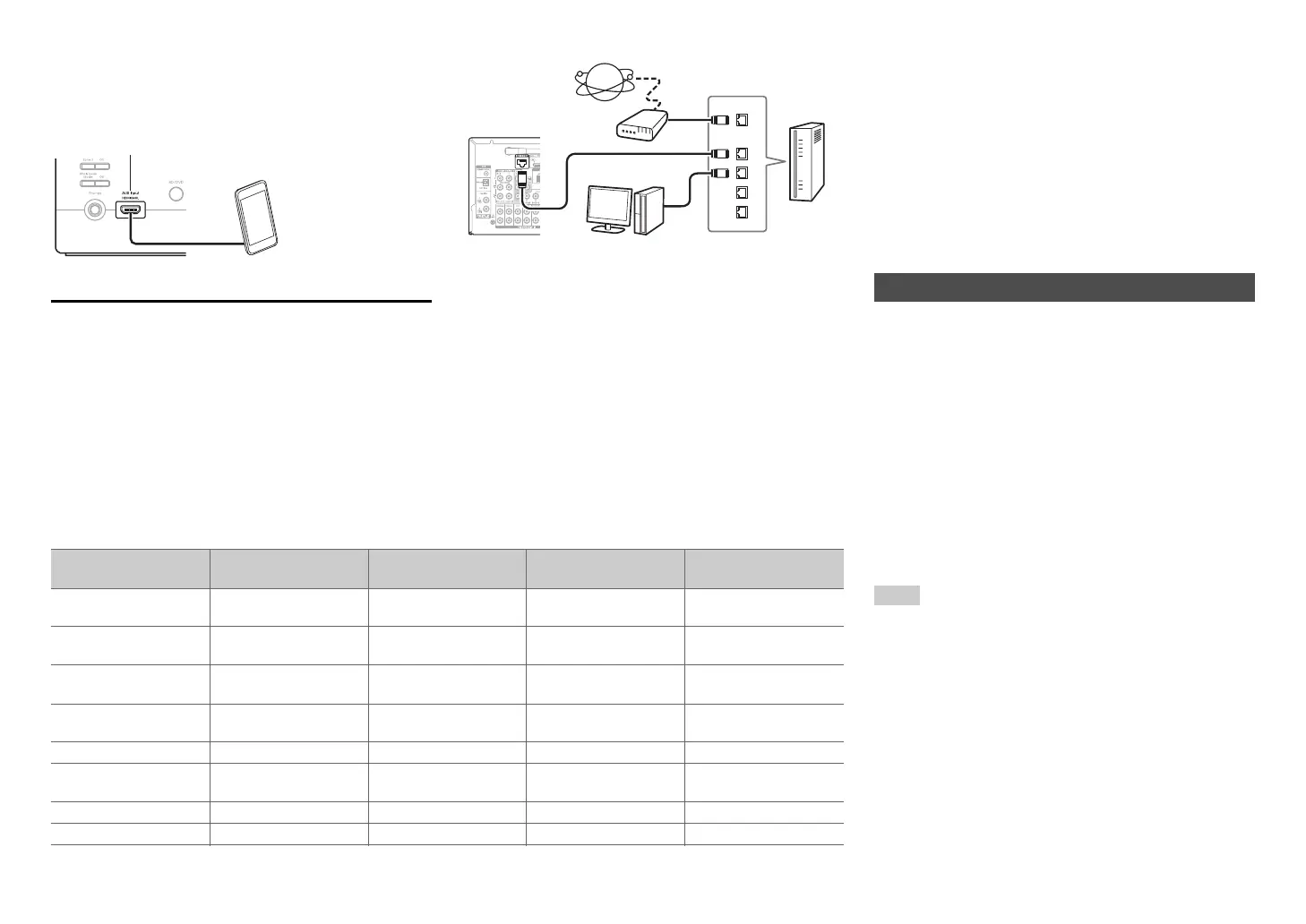
■ MHL (Mobile High-Definition Link)
With its support for MHL (Mobile High-Definition Link),
the AUX (Front) input allows you to deliver high-
definition video from a connected mobile device.
Connecting to the Network (Optional)
The following diagram shows how you can connect
the AV receiver to your home network. In this
example, it’s connected to a LAN port on a router,
which has a 4-port 100Base-TX switch built-in.
Network connection by wireless LAN is possible. See
“Performing Wireless LAN Setup” for connections
(➔ page 26).
Do not connect the AV receiver’s USB port to a USB
port on your computer. Music on your computer
cannot be played through the AV receiver in this way.
The default of the assignment for the input selector buttons and jacks are as shown below. These settings can
be changed. (The assignment for the AUX Input Video jack, analog audio jacks, and HDMI AUX Input jack
cannot be changed.)
K
MHL-enabled
mobile device, etc.
WAN
LAN
Internet radio
Modem
Computer or media server
Router
Input selector buttons HDMI jacks COMPONENT VIDEO
jacks
DIGITAL IN COAXIAL
and OPTICAL jacks
Composite video and
analog audio jacks
BD/DVD HDMI IN 1 COMPONENT VIDEO
IN 1
DIGITAL IN
COAXIAL 1
VIDEO IN 1/AUDIO IN
BD/DVD
CBL/SAT HDMI IN 2 COMPONENT VIDEO
IN 2
DIGITAL IN
COAXIAL 2
VIDEO IN 2/AUDIO IN
CBL/SAT
STB/DVR HDMI IN 3 VIDEO IN 3/AUDIO IN
STB/DVR
Game HDMI IN 4 VIDEO IN 4/AUDIO IN
GAME
PC HDMI IN 5 AUDIO IN PC
AUX HDMI AUX Input AUX Input
Video/Audio
TV/CD DIGITAL IN OPTICAL AUDIO IN TV/CD
Phono AUDIO IN PHONO
p
The AV receiver allows interoperability of the CEC
(Consumer Electronics Control) specified in the HDMI
standard, which is known as RIHD. Various linked
operations can be performed by connecting the AV
receiver to an RIHD-compatible TV, player, or
recorder.
Default setting is set to off, so it is required to change
the setting to on.
Perform this setting after the initial setup.
The following components are p-compatible
(As of January 2013).
■ TV
•Sharp TV
■ Players/Recorders
• Onkyo and Integra p-compatible players
• Toshiba players and recorders
• Sharp players and recorders (only when used
together with Sharp TV)
*
Models other than those mentioned above may have some
interoperability if compatible with CEC, which is part of the
HDMI Standard, but operation cannot be guaranteed.
Note
• For proper linked operations, do not connect more
p-compatible components than the quantities
specified below, to the HDMI input terminal.
– Blu-ray Disc/DVD players: up to three.
– Blu-ray Disc/DVD recorders/Digital Video Recorders: up
to three.
– Cable/Satellite Set-top boxes: up to four.
• Do not connect the AV receiver to another AV receiver/AV
amplifier via HDMI.
• Proper linked operations are not guaranteed when more
p-compatible components than the above-
mentioned quantities are connected.
About RIHD-compatible components


 To Next Page