En-28
Playback
Playback
This section describes the basic operation such as
playback, listening mode, and other useful functions.
Reading this manual from the beginning to this
section helps you to understand the basic
connection/setup/operation.
■ Screen Saver
If there is no video signal on the current input source
and no operation for a specific time (three minutes by
default), a screen saver automatically comes on.
Tip
• The time until the screen saver activates itself can
be changed in the “Screen Saver” setting
(➔ page 68).
• The screen will return to its previous state if the AV
receiver is operated.
See also:
• “Playing an Audio from Bluetooth-enabled Device”
(➔ page 30)
• “Playing a USB Device” (➔ page 31)
• “Listening to TuneIn” (➔ page 31)
• “Registering Other Internet Radio” (➔ page 33)
• “Playing Music Files on a Server (DLNA)”
(➔ page 33)
• “Playing Music Files on a Shared Folder”
(➔ page 35)
• “Remote Playback” (➔ page 36)
• “Listening to AM/FM Radio” (➔ page 37)
• “Playing Audio and Video from Separate Sources”
(➔ page 39)
• “Controlling Other Components” (➔ page 79)
• “Using the Integra/Onkyo Dock” (➔ page 83)
Tip
• When listening to an HDMI component through the AV
receiver, set the HDMI component so that its video can be
seen on the TV screen (on the TV, select the input of the
HDMI component connected to the AV receiver). If the TV
power is off or the TV is set to another input source, this
may result in no sound from the AV receiver or the sound
may be cut off.
Playback
4
3
2
1
1
3
24
1
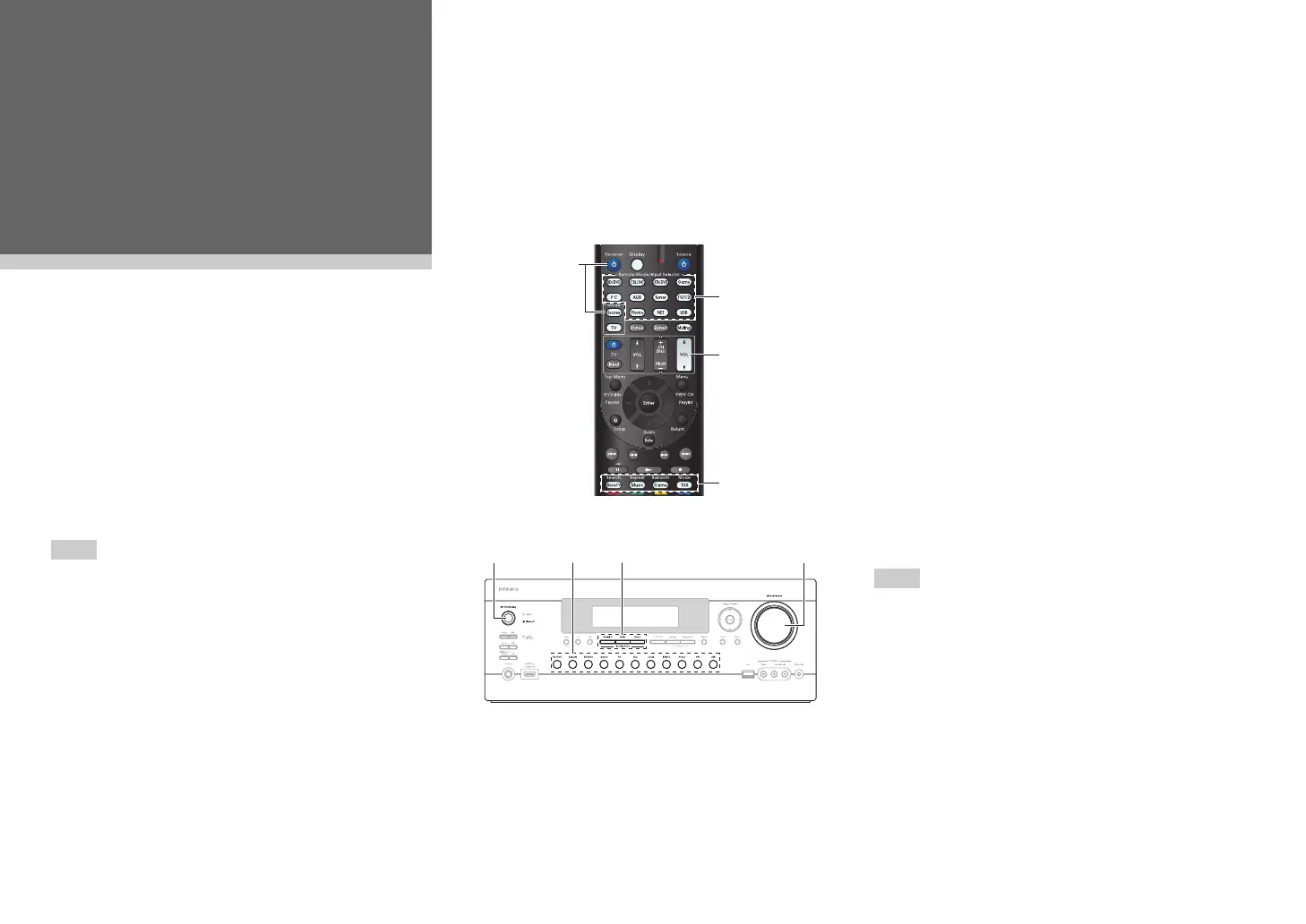
Turn on the AV receiver, the TV and the AV
components.
* When you operate the AV receiver with the remote
controller, press the Receiver button first.
2
Select the input on the AV receiver to play the
AV components.
Press the input selector button to which the AV
components to be played is connected.
Press the TV/CD button to play the audio of the
TV. Switching the input on the TV is also
required. Select the input to which the AV
receiver is connected by using the TV remote
controller.
* For the CEC compatible TV and the AV components
connected with HDMI connections, switching the input
is automatically performed. Switch the input manually
for other AV components.
3
Select the desired listening mode.
You can enjoy various types of listening mode.
The listening mode is switched by pressing
Listening mode button on the AV receiver or the
remote controller.
4
Adjust the volume.
You can enjoy the surround sound.


 To Next Page