Advanced Operations
En-57
Operating
procedure
(➔ page 55)
HDMI Input
If you connect a video component to an HDMI input,
you must assign that input to an input selector. For
example, if you connect your Blu-ray Disc/DVD player
to HDMI IN 2, you must assign “HDMI2” to the
“BD/DVD” input selector.
If you’ve connected your TV to the AV receiver with
an HDMI cable, composite video and component
video sources can be upconverted
*
and output by the
HDMI output. You can set this for each input selector
by selecting the “-----” option, but the video signal
coming from the HDMI output depends on the
assignments of “Component Video Input” and
“Composite Video Input”. See “The video and audio
signal flow” for more information on video signal flow
and upconversion (➔ page 16).
Here are the default assignments.
■ BD/DVD, CBL/SAT, STB/DVR, GAME, PC, TV/CD,
PHONO
` HDMI1, HDMI2, HDMI3, HDMI4, HDMI5, HDMI6,
HDMI7:
Select the input to which the component has
been connected.
` -----:
Output composite video and component video
sources from the HDMI output. The video signal
coming from the HDMI output depends on the
assignments of “Component Video Input” and
“Composite Video Input”.
Each HDMI input cannot be assigned to two input
selectors or more. When HDMI1 - HDMI7 have
already been assigned, you must first set any
unused input selectors to “-----” or you will be
unable to assign HDMI1 - HDMI7 to other input
selectors.
Note
• If no video component is connected to the HDMI input (even
if the HDMI input is assigned), the AV receiver selects the
video source based on the setting of “Component Video
Input” and “Composite Video Input”.
• When an HDMI IN is assigned to an input selector as
explained here, the same HDMI IN will be set as a priority
in the “Digital Audio Input”. In this case, if you want to use
the coaxial or optical audio input, make the appropriate
selection in the “Audio Selector” setting (➔ page 67).
• Do not assign an HDMI IN to the TV/CD selector while
“HDMI CEC (RIHD)” is set to “On” (➔ page 70), otherwise
appropriate CEC (Consumer Electronics Control) operation
will not be guaranteed.
• If you assign “-----” to an input selector that is currently
selected in “HDMI Through” (➔ page 70), the “HDMI
Through” setting will be automatically switched to “Off”.
•“AUX” is used only for input from the front panel.
• In order for the AV receiver to upconvert component input
to HDMI output, the source output must be set to 480i/576i.
When signal is input at resolution of 480p/576p and more,
error message will be displayed.
Component Video Input
If you connect a video component to a component
video input, you must assign that input to an input
selector. For example, if you connect your Blu-ray
Disc/DVD player to COMPONENT VIDEO IN 2, you
must assign “IN2” to the “BD/DVD” input selector.
Here are the default assignments.
■ BD/DVD, CBL/SAT, STB/DVR, GAME, PC, AUX,
TV/CD, PHONO
` IN1, IN2:
Select the input to which the component has
been connected.
` -----:
Output composite video sources from the HDMI
output. The upconverted output from HDMI
depends on the assignment of “Composite
Video Input”.
Note
• When composite video and component video sources are
upconverted for HDMI OUT SUB, only signals with a
resolution of 480i/576i are output and the resolution
remains the same. If your TV doesn’t support this
resolution, there will be no picture (➔ page 92).
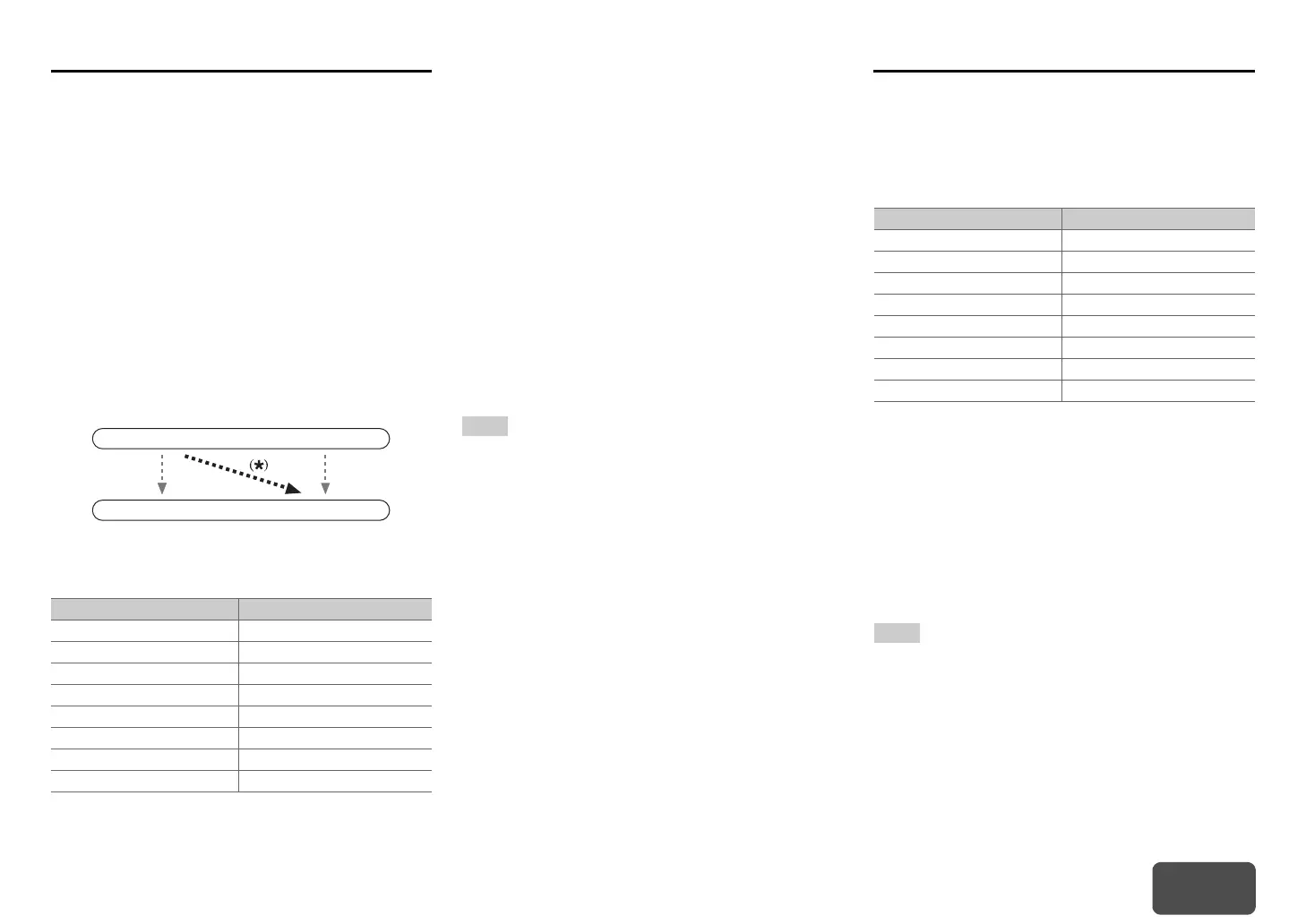
Input selector Default assignment
BD/DVD HDMI1
CBL/SAT HDMI2
STB/DVR HDMI3
GAME HDMI4
PC HDMI5
AUX Front/MHL (Fixed)
TV/CD -----
PHONO -----
IN
OUT
Composite video,
component video
HDMI
HDMI
Composite video,
component video
Input selector Default assignment
BD/DVD IN1
CBL/SAT IN2
STB/DVR - - - - -
GAME -----
PC -----
AUX -----
TV/CD -----
PHONO -----


 To Next Page