78
En
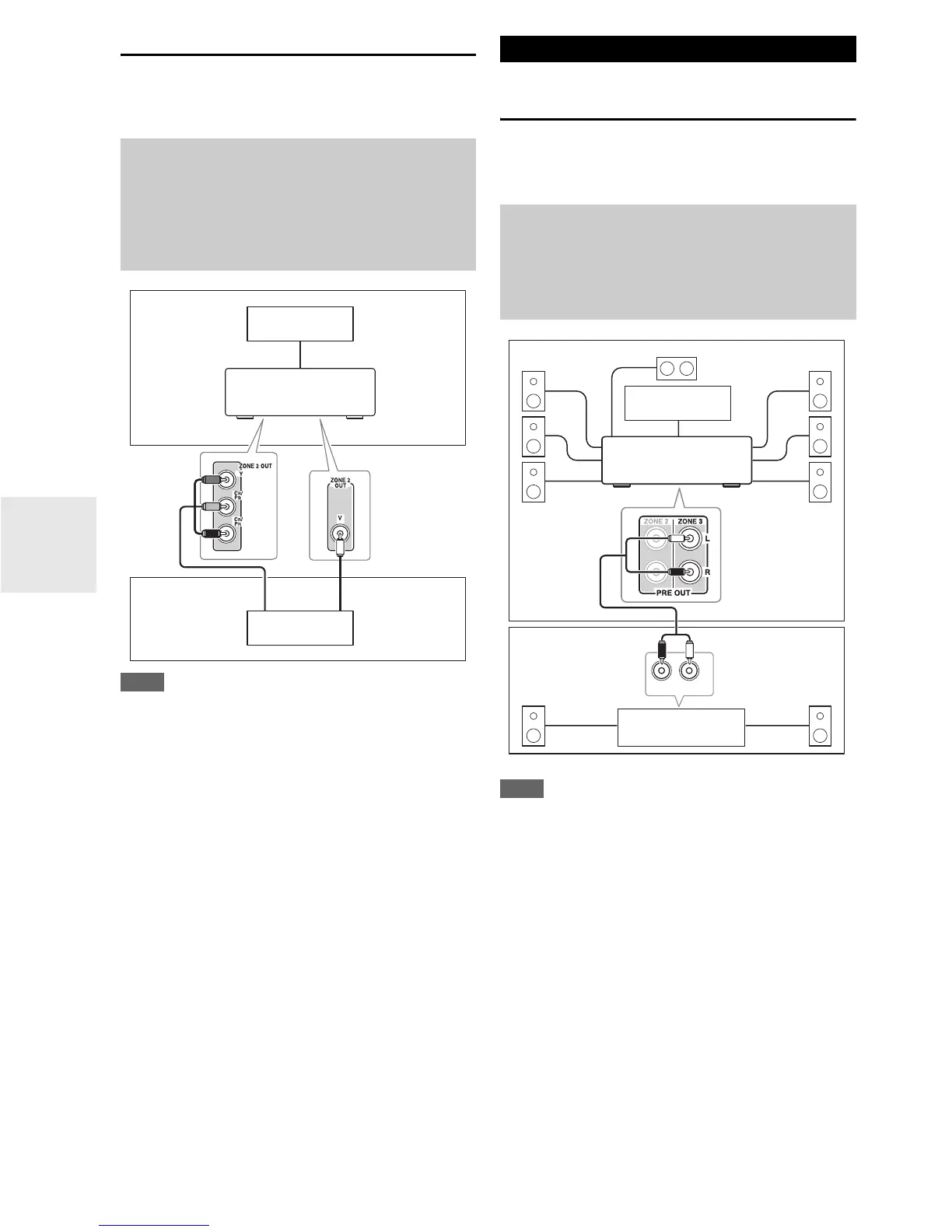
Zone 2 Video Output
The AV receiver features a composite video output for con-
nection to a TV in Zone 2, so you can enjoy both audio and
video in that zone.
Note
• If you use the COMPONENT VIDEO ZONE 2 OUT, you
must set the “Zone 2 Component Out” setting to “Use” (➔ 80).
•The COMPONENT VIDEO ZONE 2 OUT outputs video only
from components connected to component video inputs.
•The ZONE 2 OUT V jack outputs video from components con-
nected to composite video inputs.
Connecting Your Zone 3 Speakers to an
Amp in Zone 3
This setup allows 7.1-channel playback in your main lis-
tening room and 2-channel stereo playback in Zone 3,
with a different source in each room.
Note
• With the default settings, the Zone 3 volume must be set on the
Zone 3 amp. If your Zone 3 amp has no volume control, set the
“Zone 3 Out” setting to “Variab le ” so that you can set the
Zone 3 volume on the AV receiver (➔ 79).
Hookup
• Use a composite video cable to connect the AV receiver’s
ZONE 2 OUT V jack to a composite video input on your
Zone 2 TV.
• Alternatively, use a component video cable to connect the AV
receiver’s COMPONENT VIDEO ZONE 2 OUT jacks to a
component video input on your Zone 2 TV.
Main room
TV
Zone 2
AV receiver
TV
or
Connecting Zone 3
Hookup
• Use an RCA audio cable to connect the AV receiver’s
ZONE 3 PRE OUT L/R jacks to an analog audio input on
your Zone 3 amp.
• Connect your Zone 3 speakers to the speaker terminals on
your Zone 3 amp.
R
L
IN
Main room
TV
Zone 3
AV receiver
Receiver/
integrated amp



 To Next Page