Advanced Settings
27
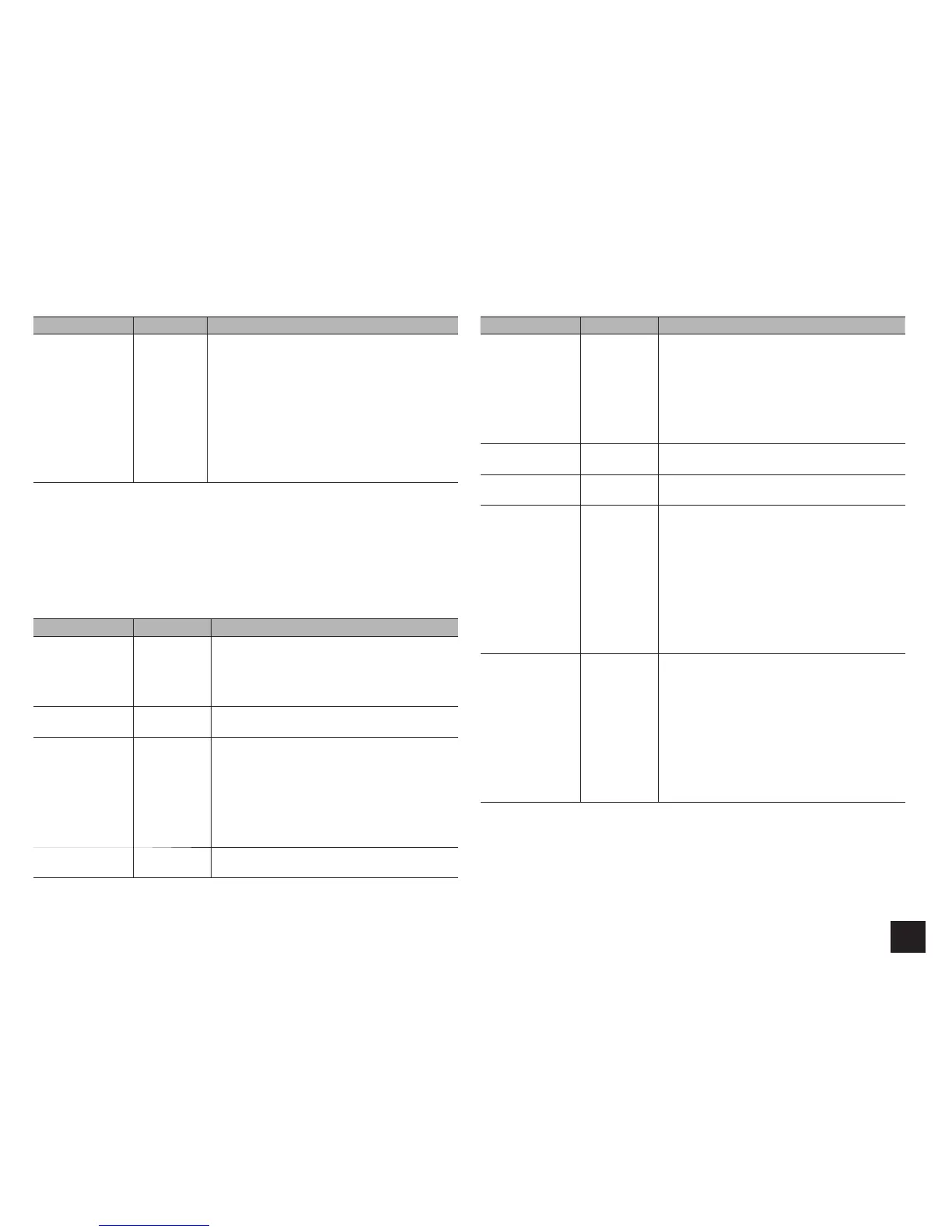
Setting Item Default Value Setting Details
Double Bass ----- Boost bass output by feeding bass sounds from
the front left and right, and center speakers to the
subwoofer.
"On": Bass output will be boosted.
"Off(THX)": Bass output will not be boosted.
r The setting will not automatically be configured
even if you performed the automatic speaker
setup.
r The setting cannot be changed if "Subwoofer" is
set to "No" or if "Front" is set to other than "Full
Band".
r If you're using THX-certified speakers, we recommend the following settings:
– Set a value "80Hz(THX)" in Crossover frequency.
– Set a value "80Hz(THX)" in LPF of LFE.
– Set a value "Off(THX)" in Double Bass.
Speaker Distance
Set the distance from each speaker to the listening position. Settings are automatically
configured if you use the automatic speaker setup.
Setting Item Default Value Setting Details
Unit feet/meters Specify the unit of distance for configuring settings.
"feet": When setting in feet (0.1ft to 30.0ft, in
increments of 0.1ft)
"meters": When setting in meters (0.03m to 9.00m,
in increments of 0.03m)
Front Left 12.0ft/3.60m Specify the distance between each speaker and the
listening position.
Wide Left 12.0ft/3.60m Specify the distance between each speaker and the
listening position.
r This setting cannot be changed in any of the
following cases.
– "Speaker Settings" - "Front Speakers Type" is
set to "Bi-Amp".
– "Speaker Settings" - "Powered Zone 2" is set
to "Yes".
Center 12.0ft/3.60m Specify the distance between each speaker and the
listening position.
Setting Item Default Value Setting Details
Wide Right 12.0ft/3.60m Specify the distance between each speaker and the
listening position.
r This setting cannot be changed in any of the
following cases.
– "Speaker Settings" - "Front Speakers Type" is
set to "Bi-Amp".
– "Speaker Settings" - "Powered Zone 2" is set
to "Yes".
Front Right 12.0ft/3.60m Specify the distance between each speaker and the
listening position.
Surround Right 7.0ft/2.10m Specify the distance between each speaker and the
listening position.
Back Right 7.0ft/2.10m Specify the distance between each speaker and the
listening position.
r The setting is not displayed if "Speaker
Configuration" - "Back" is set to other than
"None" and also "Back ch" is set to "1ch".
r This setting cannot be changed in any of the
following cases.
– "Speaker Settings" - "Front Speakers Type" is
set to "Bi-Amp".
– "Speaker Settings" - "Powered Zone 2" is set
to "Yes" and also Zone2 is set to on.
Back Left 7.0ft/2.10m Specify the distance between each speaker and the
listening position.
r The setting is not displayed if "Speaker
Configuration" - "Back" is set to other than
"None" and also "Back ch" is set to "1ch".
r This setting cannot be changed in any of the
following cases.
– "Speaker Settings" - "Front Speakers Type" is
set to "Bi-Amp".
– "Speaker Settings" - "Powered Zone 2" is set
to "Yes" and also Zone2 is set to on.


 To Next Page