46
Using Multi-Room Remote System
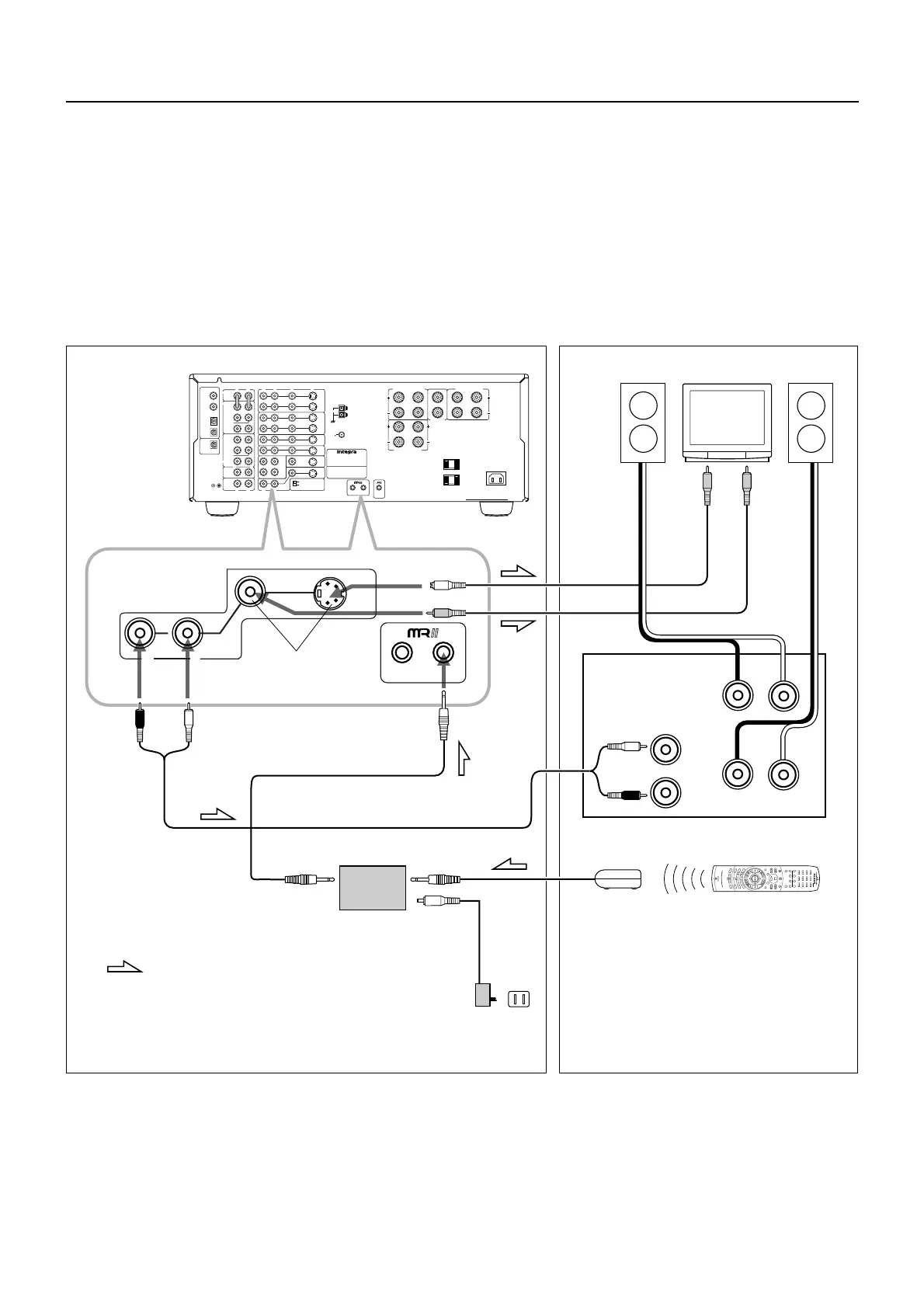
Outline of Multi-room Remote System
If you connect Onkyo Multi-room Remote System components as shown in the figure below, you can control the components from a sub-
room as well as from the room where the DTR-7/DTR-6 is located. The Multi-Room Remote System allows remote operation when the A/V
system is mounted in a cabinet or rack.
The following equipment (sold separately) is essential for using the Onkyo Multi-Room System:
• Onkyo's Multi-Room System kits HKT-600 or HKT-700 (IR Remote Controller Extension System), or
• Multiroom A/V distribution and control systems from Niles® and Xantech® to name a few
Make connection as shown below. Do not plug the equipment into the power source until the connection is complete.
R
V
L
R
L
R
L
R
L
VIDEO-1
OUT
IN
VIDEO-2
VIDEO-3
OUT
IN
IN
TAPE
VIDEO
S VIDEO
OSD SELECTOR
(REC)
OUT
IN
(PLAY)
DIGITAL OUTPUT
DIGITAL INPUT
COAXIAL
1
COAXIAL
2
OPTICAL
1
OPTICAL
2
OPTICAL
FRONT
FRONT
CENTER
SUB
WOOFER
SURROUND
FRONT
CENTER
CD
PHONO
SUB
WOOFER
SURROUND
AMP IN
PRE OUT
GND
MONITOR
OUT
S
REMOTE
CONTROL
REMOTELOCAL
IN
DVD
LRLR
LR
SURROUND SPEAKERS
FRONT SPEAKERS A
CENTER
SPEAKER
FRONT SPEAKERS B
MULTI CHANNEL
INPUT
MULTI SOURCE
OUT
R
L
AV RECEIVER
CAUTION: SPEAKER IMPEDANCE
6 OHMS MIN. / SPEAKER
ANTENNA
AM
FM
75
AC INLET
AC OUTLETS
AC 120V 60Hz
SWITCHED
TOTAL 120W 1A MAX.
MODEL NO.
DTR-7
REMOTELOCAL
MULTI SOURCE
OUT
R
L
R
L
R
+
+
-
-
L
LR
: Signal flow
Main room Sub room
Mini Plug cable
HB-100
Connecting block
120V AC
(unswitched)
Power
supply
Remote sensor HR-600
Additional Amplifier
S-Video
conection
cable
speaker
TV
speaker
Video connection cable
Remote contoroller
DTR-7 only
Audio connction cable
DTR-7/DTR-6
Connection
example of Onkyo
Multi-room System
kit HKT-600
1
5
2
3
2
4
1. Connect the receiver to the power amplifier.
2. Connect the sub-room speaker cables to the speaker terminals on the power amplifier.
3. Connect the receiver to the TV.(DTR-7 only)
4. Install the Connecting block in the main room, then connect it to the REMOTE jack on the receiver.
5. Install the remote sensor in the sub-room, then connect it to the connecting block in the main room.
Enjoying Music and Movies in the Sub-room



 To Next Page