EasyManua.ls Logo

Intel D955XBK - User Manual

Intel D955XBK
74 pages
Print Icon
To Next Page IconTo Next Page
Loading...
Intel
®
Desktop Board
D955XBK Product Guide
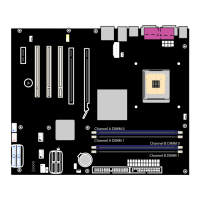
Channel A
Channel B
Channel A DIMM 0
Channel A DIMM 1
Channel B DIMM 0
Channel B DIMM 1
Order Number: C98666-002

Table of Contents

Other manuals for Intel D955XBK

Question and Answer IconNeed help?

Do you have a question about the Intel D955XBK and is the answer not in the manual?

Intel D955XBK Specifications

General IconGeneral
BrandIntel
ModelD955XBK
CategoryMotherboard
LanguageEnglish

Summary

1 Desktop Board Features

2 Installing and Replacing Desktop Board Components

Installing and Removing the Desktop Board

Detailed procedure for installing and removing the desktop board from the chassis.

Installing and Removing a Processor

Step-by-step guide for installing a CPU onto the desktop board.

Installing and Removing Memory

Guides on installing and removing RAM modules.

Connecting the IDE Cable

Connecting the Serial ATA Cable

Connecting Internal Headers

Installing the Rear Panel USB 2.0 Adapter

Installing the Front Panel USB;IEEE 1394;Audio Solution

Connecting Fans

Connecting Power Cables

Setting the BIOS Configuration Jumper

Clearing Passwords

Replacing the Battery

3 BIOS

Updating the BIOS

Overview of methods for updating the system BIOS.

Recovering the BIOS

4 Configuring for RAID (Intel Matrix Storage Technology)

Configuring the BIOS for Intel Matrix Storage Technology

Steps to enable RAID functionality in the system BIOS.

Creating Your RAID Set

Guide to creating RAID volumes using the Intel Matrix Storage Manager.

A Error Messages and Indicators

B Regulatory Compliance

Related product manuals