Installing and Replacing Desktop Board Components
43
USB 2.0 Headers
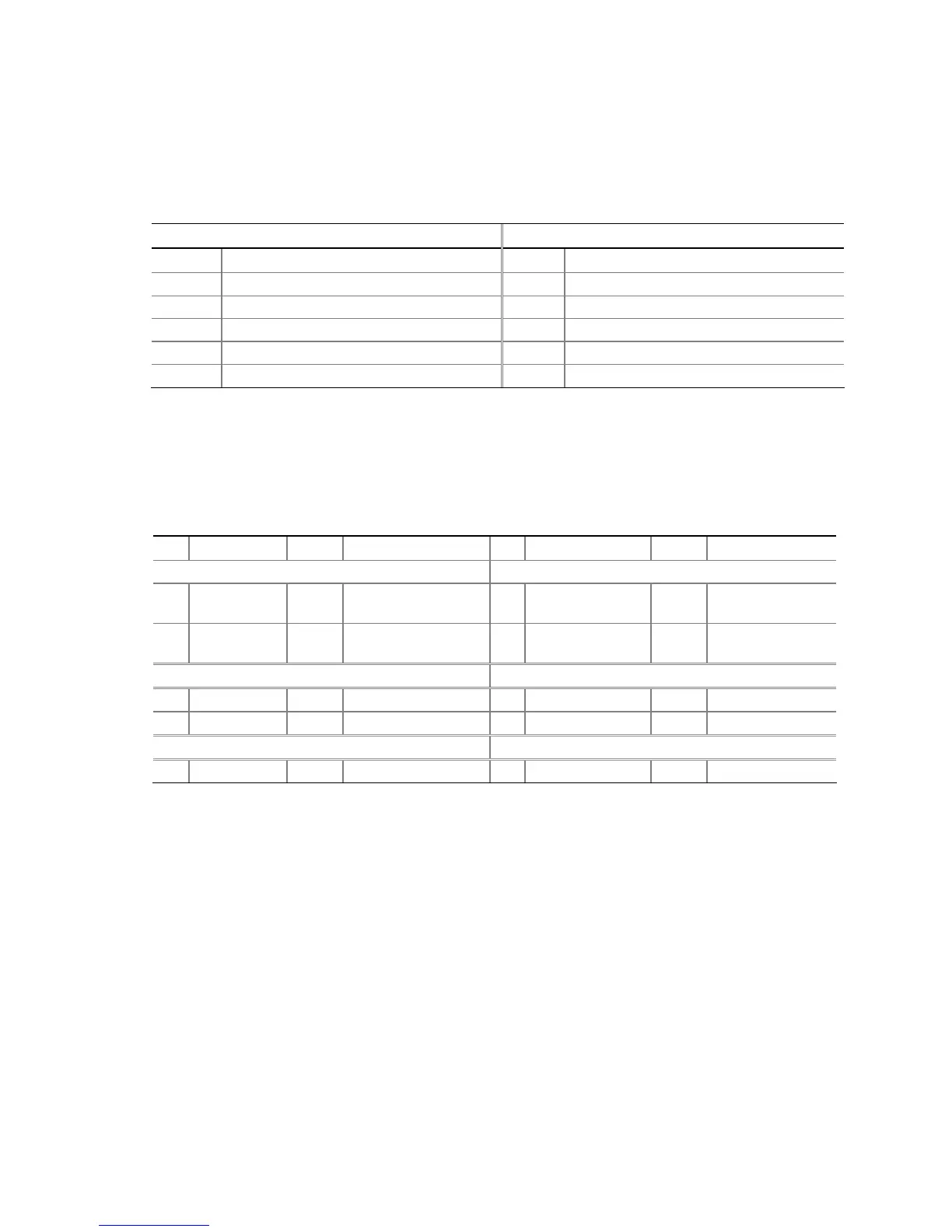
See Figure 22, A for the location of the black USB 2.0 headers. Table 8 shows the pin assignments
for the headers.
Table 8. USB 2.0 Header Signal Names
USB Port A USB Port B
Pin Signal Name Pin Signal Name
1 Power 2 Power
3 D- 4 D-
5 D+ 6 D+
7 Ground 8 Ground
9 Key 10 No connect
Note: USB ports may be assigned as needed.
Front Panel Header
Figure 22, C on page 41 shows the location of the multi-colored front panel header. Table 9 shows
the pin assignments for the front panel header.
Table 9. Front Panel Header Signal Names
Pin Signal In/Out Description Pin Signal In/Out Description
Hard Drive Activity LED (Yellow) Power LED (Green)
1 HD_PWR Out Hard disk LED pull-
up (330 Ω) to +5 V
2 HDR_BLNK_GRN Out Front panel green
LED
3 HDA# Out Hard disk active LED 4 HDR_BLNK_YEL Out Front panel yellow
LED
Reset Switch (Purple) On/Off Switch (Red)
5 Ground Ground 6 SWITCH_ON# In Power switch
7 FP_RESET# In Reset switch 8 Ground Ground
9 N/C Not connected 10 No pin
Alternate Power LED Header
Figure 22, B on page 41 shows the location of the alternate power LED header. If you have a three-
pin power LED cable, connect it to this header.


 To Next Page