10
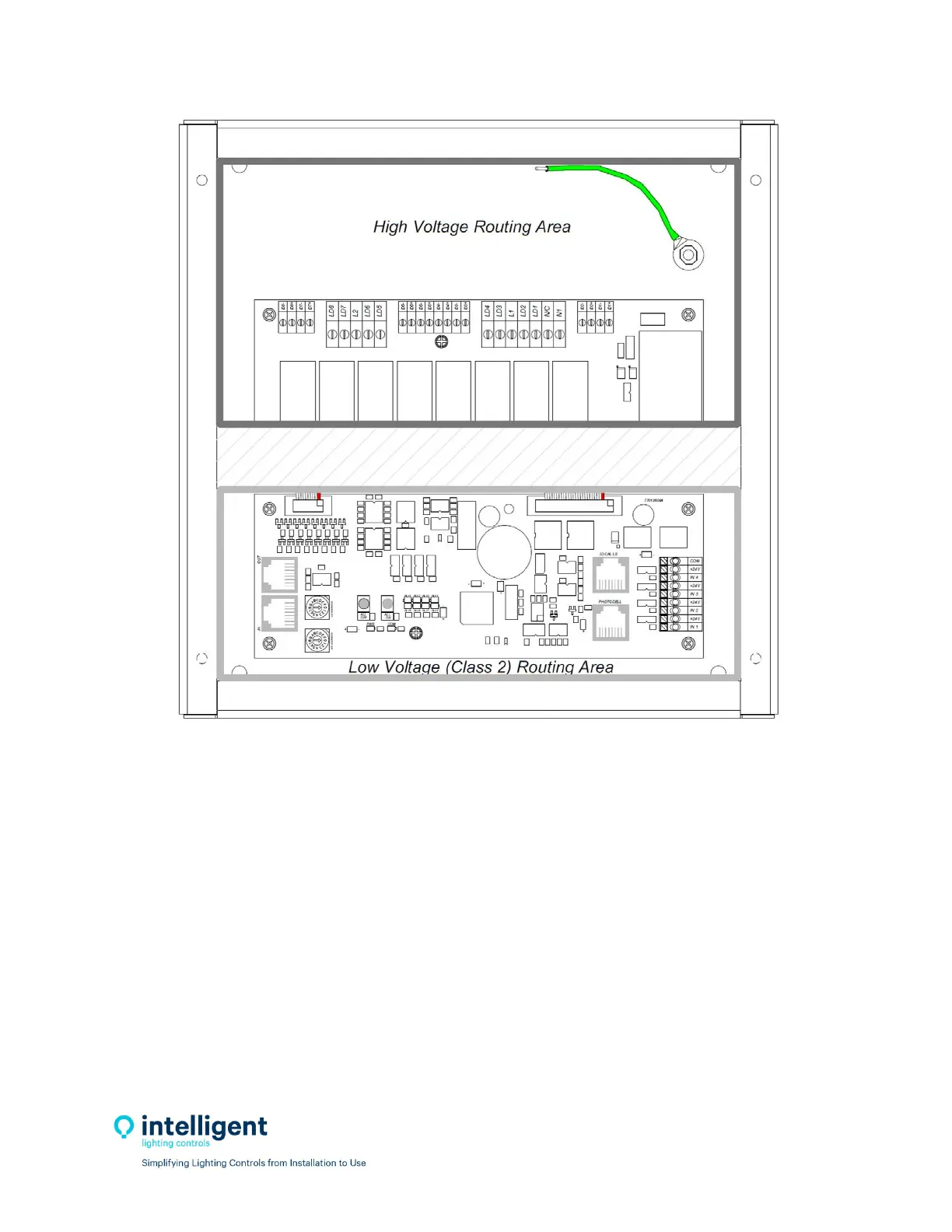
Figure2.2–Class2andHVwiringareas
2.3 NetworkCableInstallation
2.3.1CableInstallationGuidelines
ObserveallILCDataCableRequirementsandLightSyncCableRunDistanceRequirementsasthey
pertaintoyourprojectinlayingoutthecableruns.
Maintainthetwistsofthepairsallthewaytothepointoftermination,ornomorethan1”
untwisted.
Makegradualbendsof
thecable,wherenecessary.Nosharperthana1”radius
Dressthecablesneatlywithcableties.Uselowtomoderatepressure.
Uselowtomoderateforcewhenpullingcable.
Usecablepullinglubricantforcablerunsthatmayotherwiserequiregreatforcetoinstall.
Do
notpullANYdatacableorswitchwireswithoralonganyhighvoltagewires.
KeepalllowvoltagetotallyseparatefromALLhighvoltage.FailuretodosowillvoidtheILC
warranty.


 To Next Page