14
2.5.4SettheInternalClock
Clocksettingsmustbesetinthecontrollerifthepanelrunstimeschedulesorturnson/offlightsin
referencetosunrise/sunset.IntheILCLightLEEDerSoftware,connecttothepanelwithadiagnostictool
onthenetworkport.Onceconnectednavigatetothevirtualkeypadonthe“Connect”screen.From
the
keypad/displaypush“Edit”andscrolldowntothe“Clock”menu.Fromthispartofthemenu,youcan
setthetimeanddate,setupthedaylight‐savingtimesettings,settheastronomicalparameters,and
viewthecurrentsunrise/sunsetsettings.SeeSection3formoredetails.
Section3:Programming
3.0Overview
TheLightLEEDerProSinglePanel&LightLEEDerNetworkConfigurationSoftwareareILCpriority
softwarepackagesdesignedfortheILCLightLEEDerserieslightingcontrolpanels.TheLLProSingle
panelcanbeutilizedonsinglepanels,whiletheLLProNetworkConfigurationSoftwarerequiresan
NetworkControllerinthesystem.
Note:
ForprogramminginformationandsoftwareinstallationseeLightLEEDerProSoftwareManual.
Section4:Appendix
AppendixA:LightSyncEVO‐4X/8X
Inadditiontotheon‐boardrelaysprovidedwiththeLightLEEDerEVOIntegratedRelayPanel,additional
relayscanbeaddedwiththeLightSyncEVO‐4X/8XPanel.TheLSEVO‐Xisavailablein4or8relay
configurationsandexpandsanyLightLEEDercontrollertooperateadditionalrelays.Connectthe“Local”
portof
theLLEVO‐INTControllertothe“In”portofyourfirst4X/8Xboard,andthe“Out”porttoeach
subsequentLightSyncdevice.TheLLEVO‐INTcanoperateupto20totalrelays,includingtheon‐board
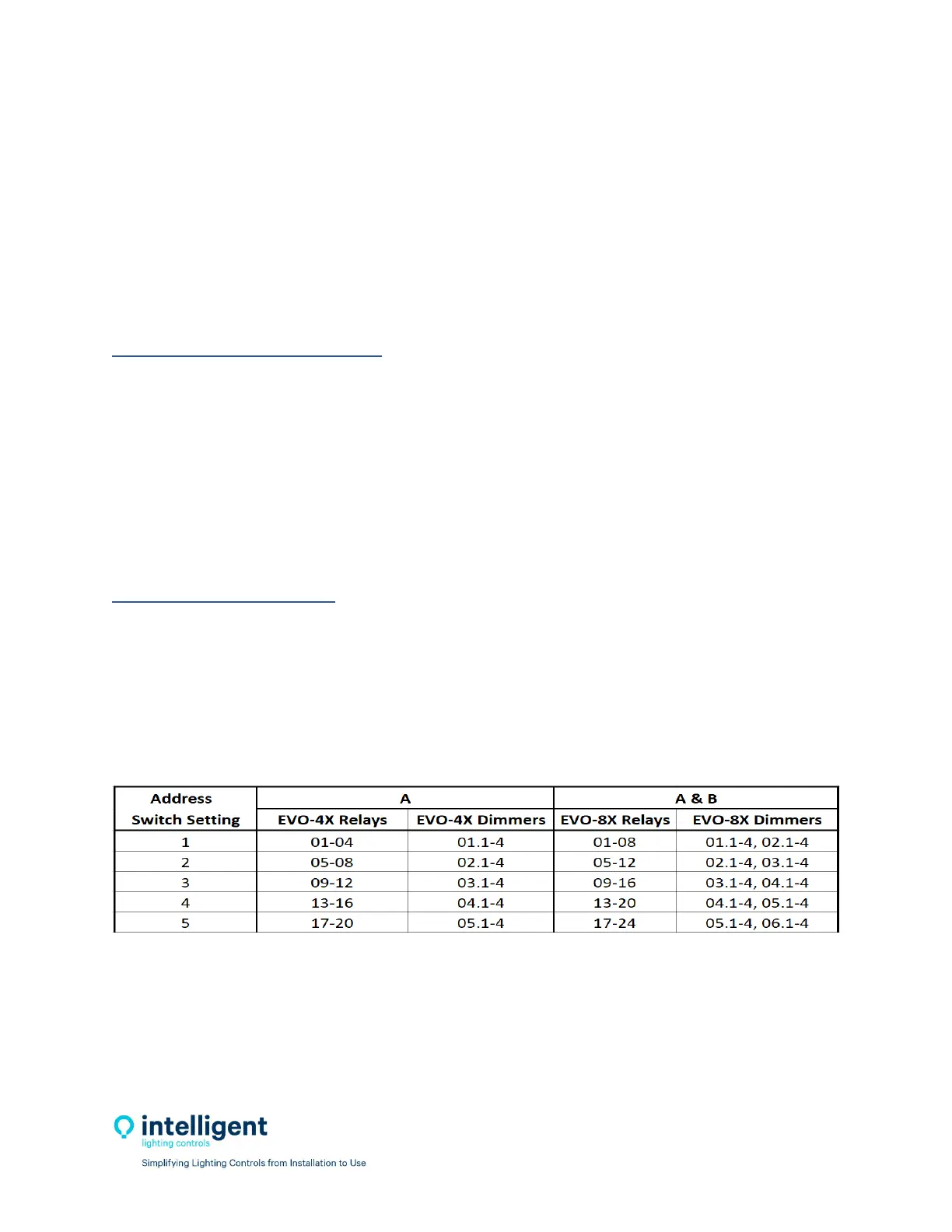
relays.RefertoFigure4.1forLSEVO‐04X,8Xaddressswitchsettings.
Figure4.1–
LSEVO‐4X/8XAddressSwitchSettings


 To Next Page