Service manual
EyeSeeCam vHIT
9
2.2.6 The fan filter
This paragraph applies to EyeSeeCam models with integrated fan, only.
During time, the fan filter may clog. It is possible to clean the fan filter or exchange the filter cover. The latter is
available as spare part (see Appendix B - Parts
& Accessories).
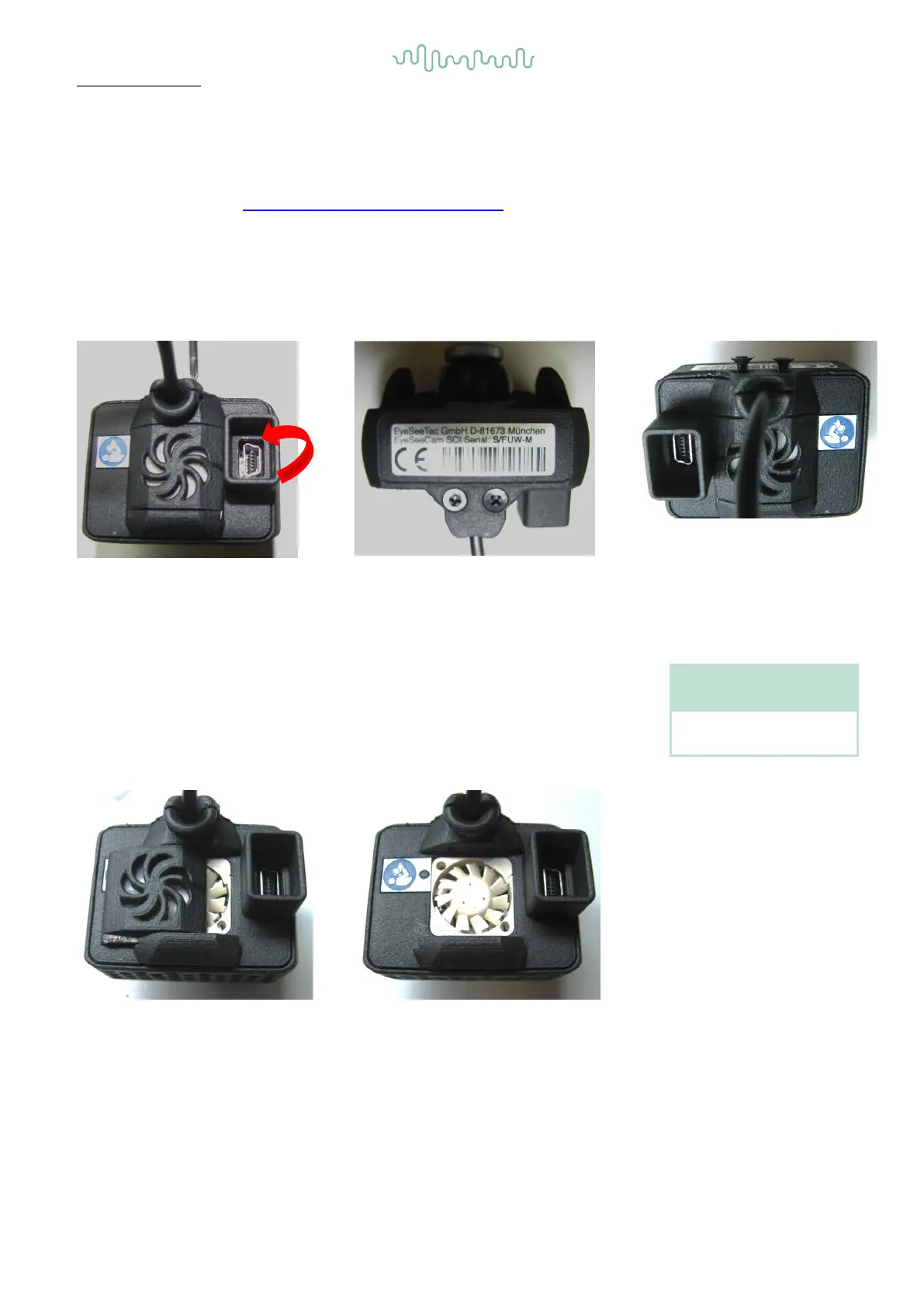
This is how to exchange the filter case:
Use a Phillips screwdriver (size PH0) to open the case screw for approximately 3mm.
Flip around the filter case.
With the backside upwards, open
the case screws.
Use a Phillips screwdriver
22
Figure 23
cautiously sliding the fan cover
aside.
Be careful not to touch the fan’s
blades, while completely
removing the fan
cover.
Mount the new fan cover by
inserting it from the side and then
re-tighten the case screws.
Be careful not to use too much
torque.
Recommended screw tightening
torque is 50mNm.
Phillips screwdriver PH0






 To Next Page