16 Ga. Medium Crown Stapler
Drives 7/16" Crown Staples (1" to 2" / 25 to 51mm)
Model No. SN5016
Item No. 64405
13
Interchange Brands Operator’s Manual
When loading staples into Stapler
■ Do not pull trigger
■ Do not depress safety/push lever
■ Keep stapler pointed downward
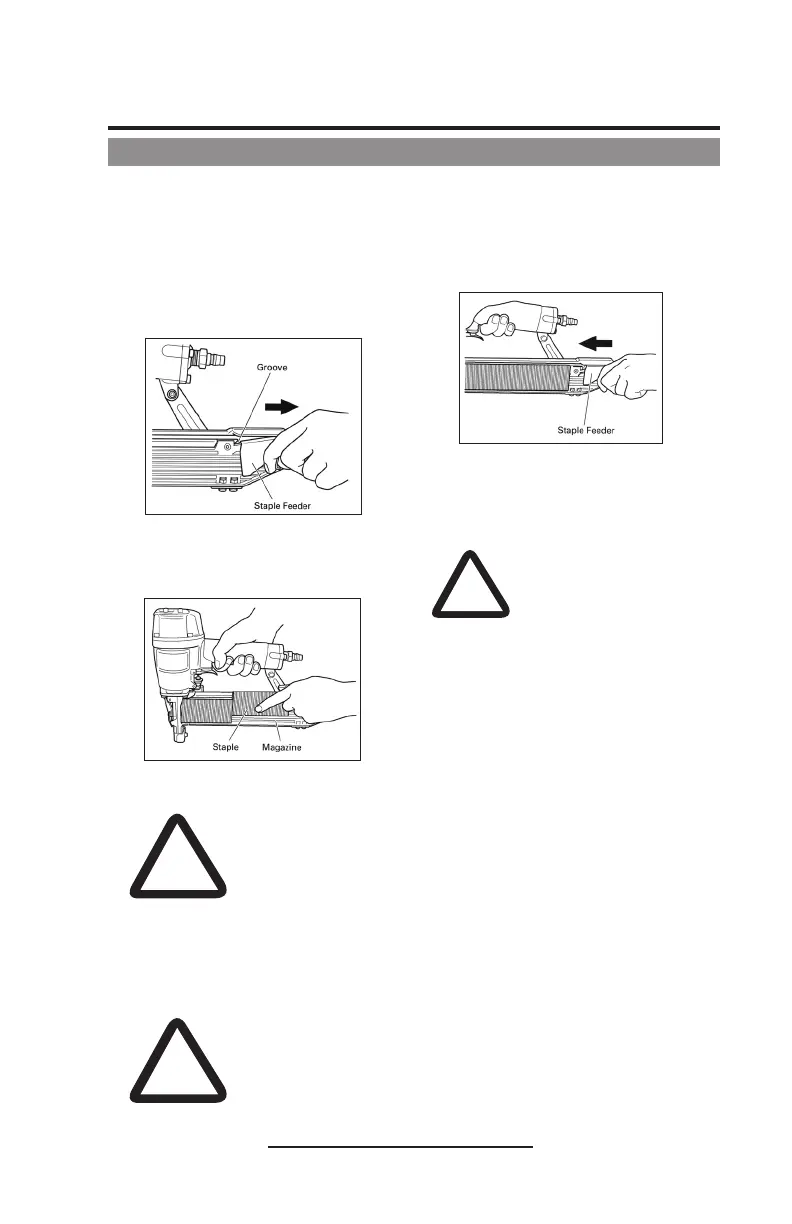
1. Pull the staple feeder backward and
attach it securely to a groove of the
magazine.
2. Place the staple strip over the
magazine. Make sure that the staple
strip slides freely on the magazine.
3. Pull the staple feeder backward.
The, detach it from the groove
of magazine and softly bring the
staple back as if it were being gently
pushed, avoiding any impact.
4. The stapler is now ready to operate.
Staple Loading
!
WARNING
NEVER connect stapler to pressure which potentially
exceeds 150psi.
NEVER USE NON-RELIEVING COUPLER ON STAPLER.
The stapler and air hose must have a hose coupler so that
all pressure is removed from the stapler when the coupler is
disconnected. The connector on the tool must not hold pressure
when the air supply is disconnected. If the wrong fitting is
used, the tool can remain charged with air after disconnecting
and thus will be able to drive a staple even after the air line is
disconnected, possibly causing injury.
DANGER
NEVER use oxygen or other bottled gases, as an
explosion may occur.
!
!
CAUTION
If the staple feeder is suddenly
released, it can return abruptly,
causing deformation and/or scatter,
eventually ending up in clogged
staples.
Be sure to bring back the staple
feeder, avoiding any impact.


 To Next Page