16 Ga. Medium Crown Stapler
Drives 7/16" Crown Staples (1" to 2" / 25 to 51mm)
Model No. SN5016
Item No. 64405
14
Interchange Brands Operator’s Manual
Testing The Stapler
Before using the stapler, test it by using the check list below. Conduct the test in
the following order. If abnormal tests occur, stop using the stapler and contact an
authorized service center immediately.
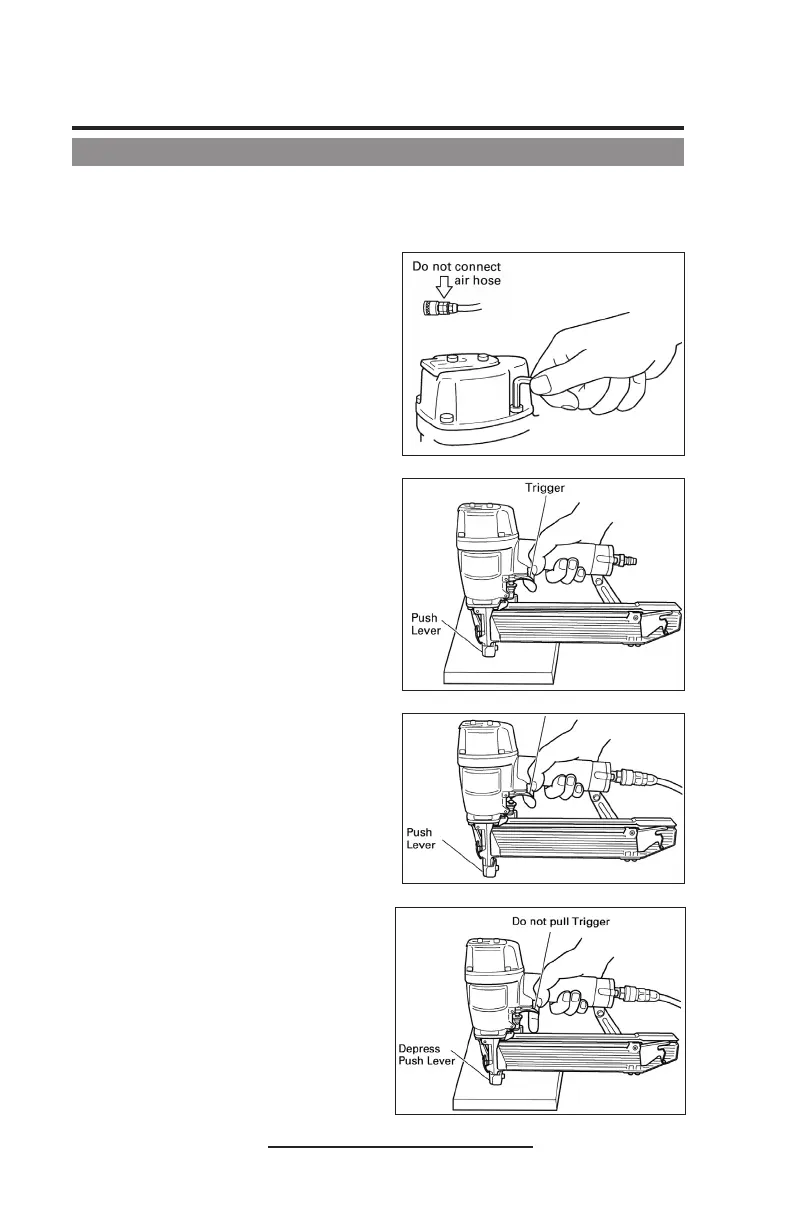
1. Disconnect air hose from stapler.
Remove all staples from stapler.
ALL SCREWS MUST BE TIGHTENED.
If any screws are loose, tighten them.
THE SAFETY/PUSH LEVER AND
TRIGGER MUST MOVE SMOOTHLY.
2. Adjust the air pressure to 70psi.
Connect the air hose.
Do not load any staples in the
stapler.
THE STAPLER MUST NOT LEAK AIR.
Hold the stapler downward and pull
the trigger.
THE STAPLER MUST NOT LEAK AIR.
3. Remove the finger from the trigger
and press the safety/push lever
against the wood.
THE STAPLER MUST NOT OPERATE.
4. Without touching the trigger, depress
the safety/push lever against the
work piece.
Pull the trigger.
THE STAPLER MUST OPERATE.
5. With the stapler off of the work
piece, pull the trigger. Depress the
push lever against the work piece.
THE STAPLER MUST OPERATE.
6. If no abnormal operation is
observed, you may load staples in
the stapler.
Drive staples into a test piece that
is the same type to be used in the
actual application.
THE STAPLER MUST OPERATE
PROPERLY.


 To Next Page