BSC4 Operating Manual
Interface Inc. ● 7401 East Butherus Drive, Scottsdale, Arizona 85260 USA ● Phone 480.948.5555 ● Fax 480.948.1924
www.interfaceforce.com ● Email: contact@interfaceforce.com ● 800.947.5598
Document Number 15-183 Rev B Page 59 of 74
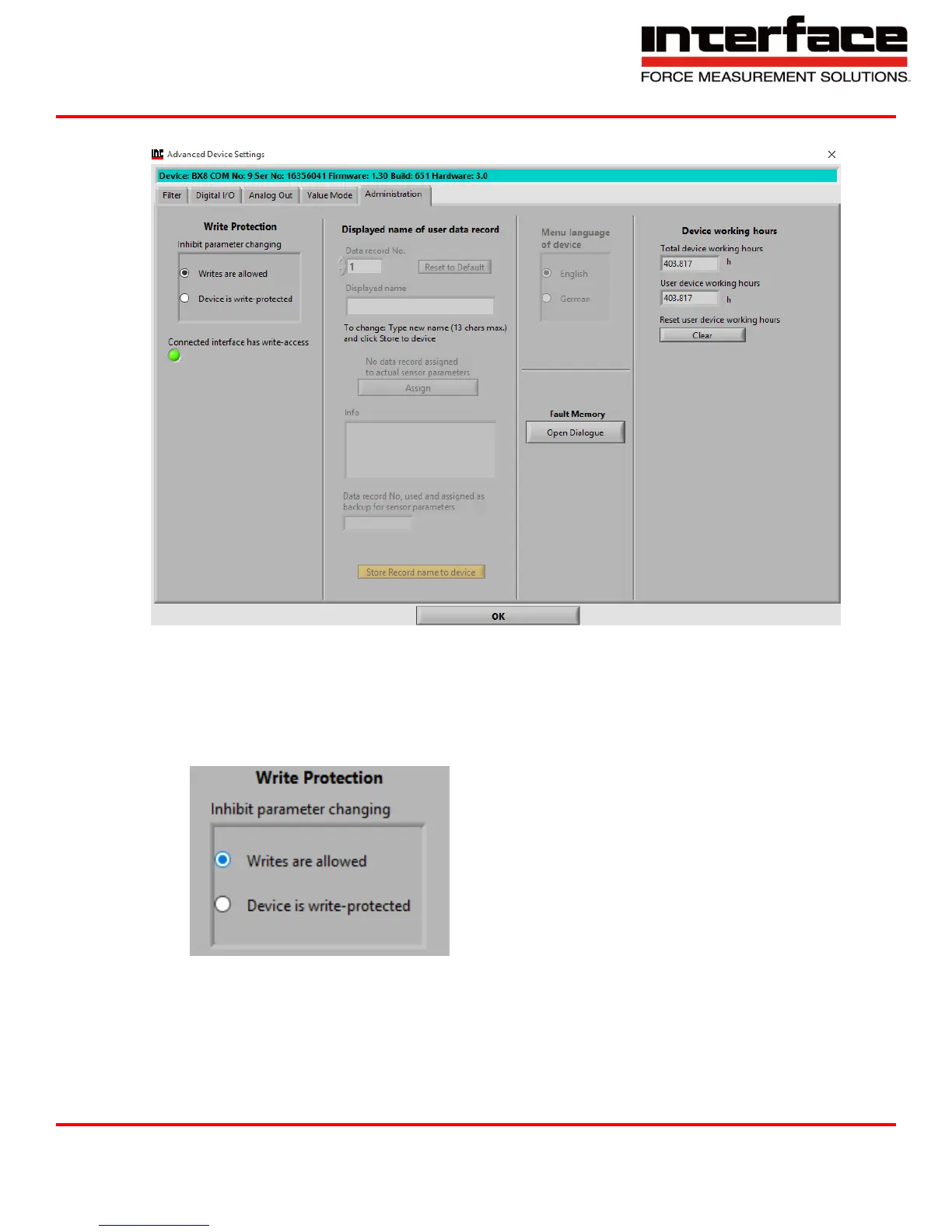
4.6. Administration
FIGURE 75 - ADMINISTRATION
4.6.1. Write Protection
A. Inhibit parameter changing – If the device is write-protected, the device parameters are
secured from unintentional changing. To disable write-protection, a device-depended
password must be entered.
FIGURE 76 - WRITE PROTECTION
4.7. Displayed name of user data record
4.7.1. Data record No. – Six different parameter records can be saved and restored; in the main
window with “Save Settings” and “Load Settings”. User-defined names for each data record


 To Next Page