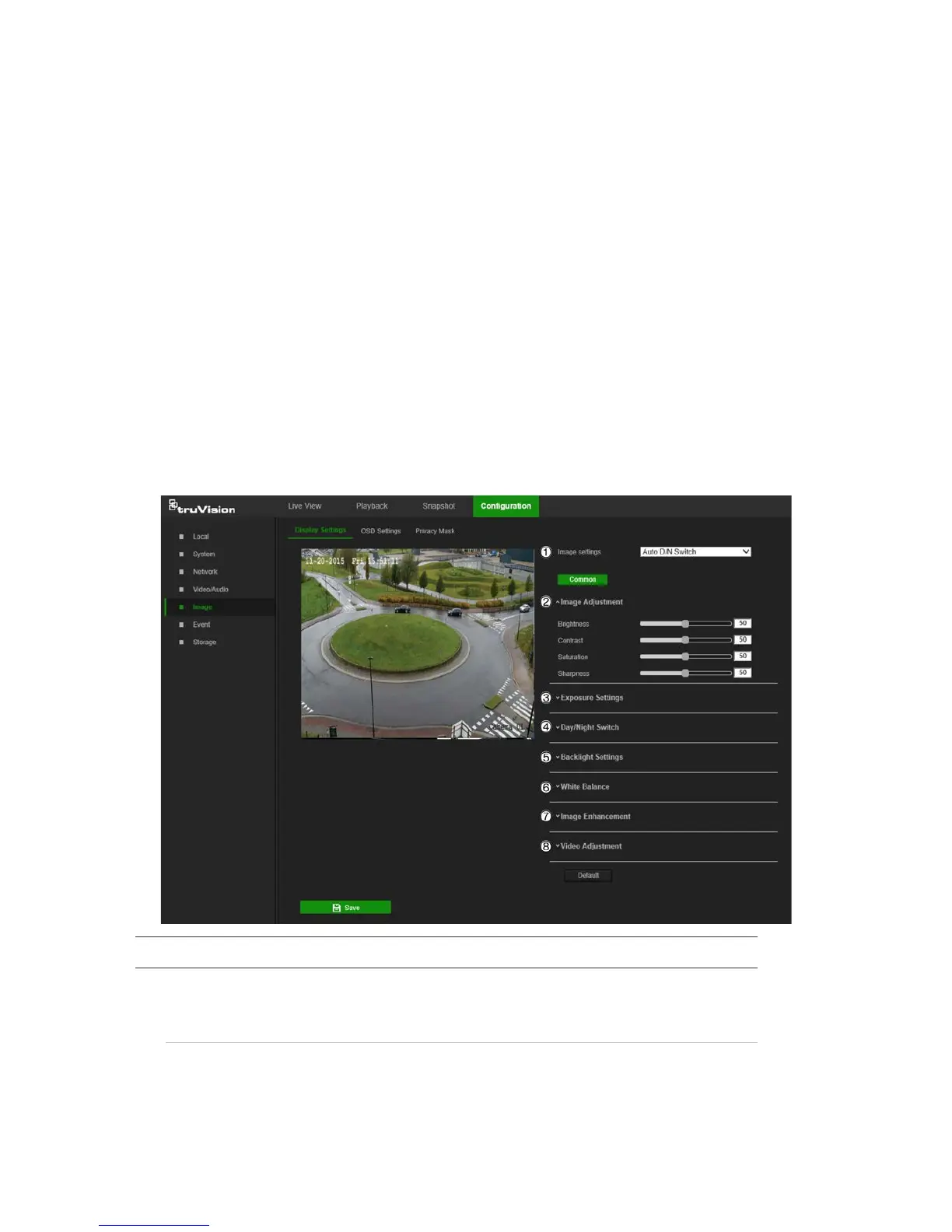
3. Select the stream type from the Stream Type drop-down list to set the ROI
encoding.
4. Select Enable under Fixed Region to manually configure the area.
Region No.: Select the region.
ROI Level: Choose the image quality enhancing level.
Region Name: Type the required region name.
5. Click Save to save changes.
Image
The camera image may need to be adjusted to obtain the best image qualitydepending
on the camera model or location background. Adjust the brightness, contrast, saturation,
hue, and sharpness of the video image using the Image menu.
Use this menu to also adjust camera behavior parameters such as exposure time, iris
mode, video standard, day/night mode, image flip, WDR, digital noise reduction, white
balance, and indoor/outdoor mode.
Parameter Description
1.
Switch The camera automatically switches between day and night modes.
All image settings remain the same for both modes.
24 TruVision 81 Series IP Camera Configuration Manual




 To Next Page