21
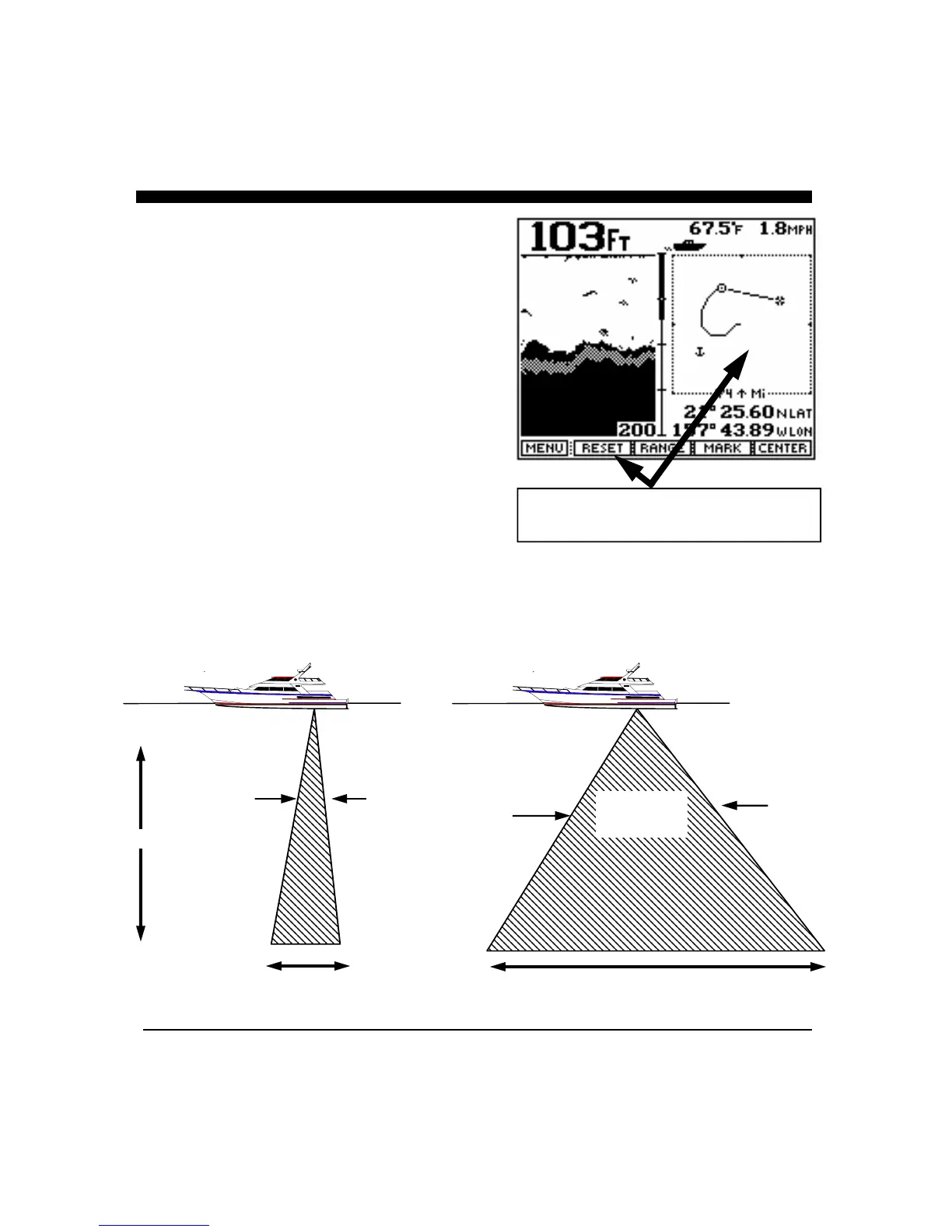
For example, when you are in the split screen Chart/Track
Plotter display, the Track Plot will appear on the right side of
the display and the softkey menu will allow you to change the
Track Plotter settings. In order to make changes to the down
looking Chart display, you must go to a display where the
Chart display is on the right side of the display (such as the
Chart mode).
In addition to the fact that the softkey menu typically relates to
only the right side of the split screen displays, other features
such as Bottom Hardness and Fish Symbols will not appear in
Zoomed, Bottom Track or Bottom Locked displays.
Frequency and Beam Width
The Advantage’s operates with a wide beam 50 khz frequency
(45 degrees @ -3dB) and/or a narrow beam 200 khz frequency
( 15 degrees @ -3dB). The picture below shows the
approximate bottom coverage at a depth of 100 feet. At 1,000
feet the coverage shown will be ten times larger.
The smaller 200 kHz beam angle results in outstanding
resolution of bottom structure while the wider 50 kHz beam
can be used to search wide areas and to track down riggers.
In Split Screen Views, the Softkey Menu
Relates to the Right Side of the Display
100 FT Deep
~26 Ft. Diameter
Bottom Coverage
~82 Ft. Diameter
Bottom Coverage
200 kHz 50 kHz
45 Degree
Beam Angle
15 Degree
Beam Angle



 To Next Page