18 User Manual
Speed, date, time). The simulated ship's position is placed at the current cursor
position by the time the simulation is activated. To start the Simulator:
Place the cursor at your desired position + [MENU] + "MENU" + [ENTER] +
"SIMULATION" + [ENTER] + "SIMULATION MODE" + [ENTER] + "ON" +
[ENTER]
You might insert the Speed, Course, date and time values:
[MENU] + "MENU" + [ENTER] + "SIMULATION" + [ENTER] + "COURSE"/
"SPEED"/"DATE"/"TIME" + [ENTER] + enter values + [ENTER]
To select the Cursor Control in Chart page use the cursor up/down to adjust the
Speed and the cursor left/right to adjust the Course:
[MENU] + "MENU" + [ENTER] + "SIMULATION" + [ENTER] + "CURSOR
CONTROL" + [ENTER] + "ON" + [ENTER]
2.6 CONTROLLING THE DISPLAY
This paragraph describes how to change the display mode and how to move
around the chart by changing the chart scale.
Changing Display Mode
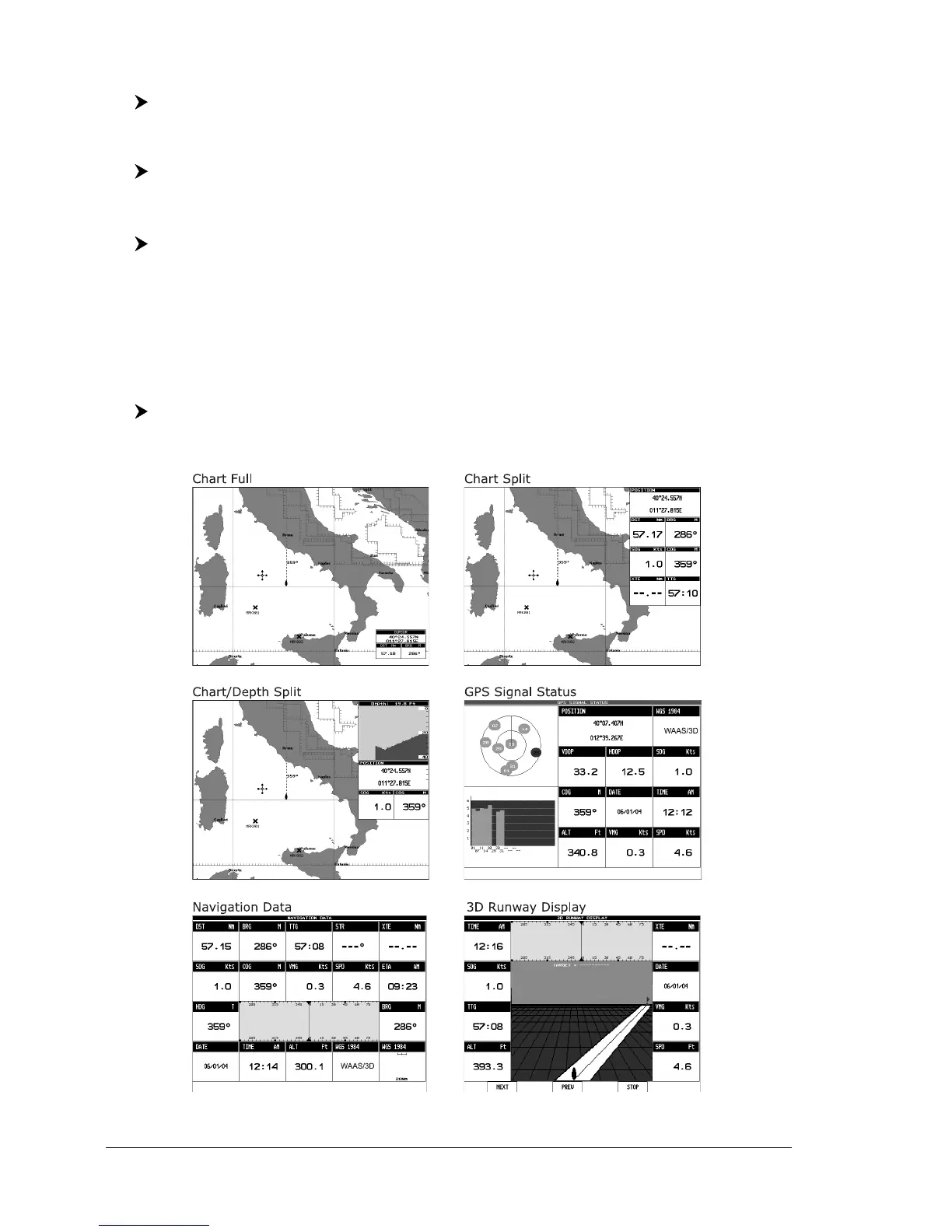
[PAGE] + move the cursor up/down + [ENTER]
The selected page appears on the screen.
CM V6/V6i: The page configuration may be different in the boxes position.
Fig. 2.6 - Available chart and data pages


 To Next Page