31
User Manual
Shows the list of all ports stored on the C-CARD in closest distance order and
allows to locate the ports on the map.
Finding Lakes Information
Searches for Nearest Lakes Info:
[MENU] + "FIND" + [ENTER] + "LAKES INFO" + [ENTER]
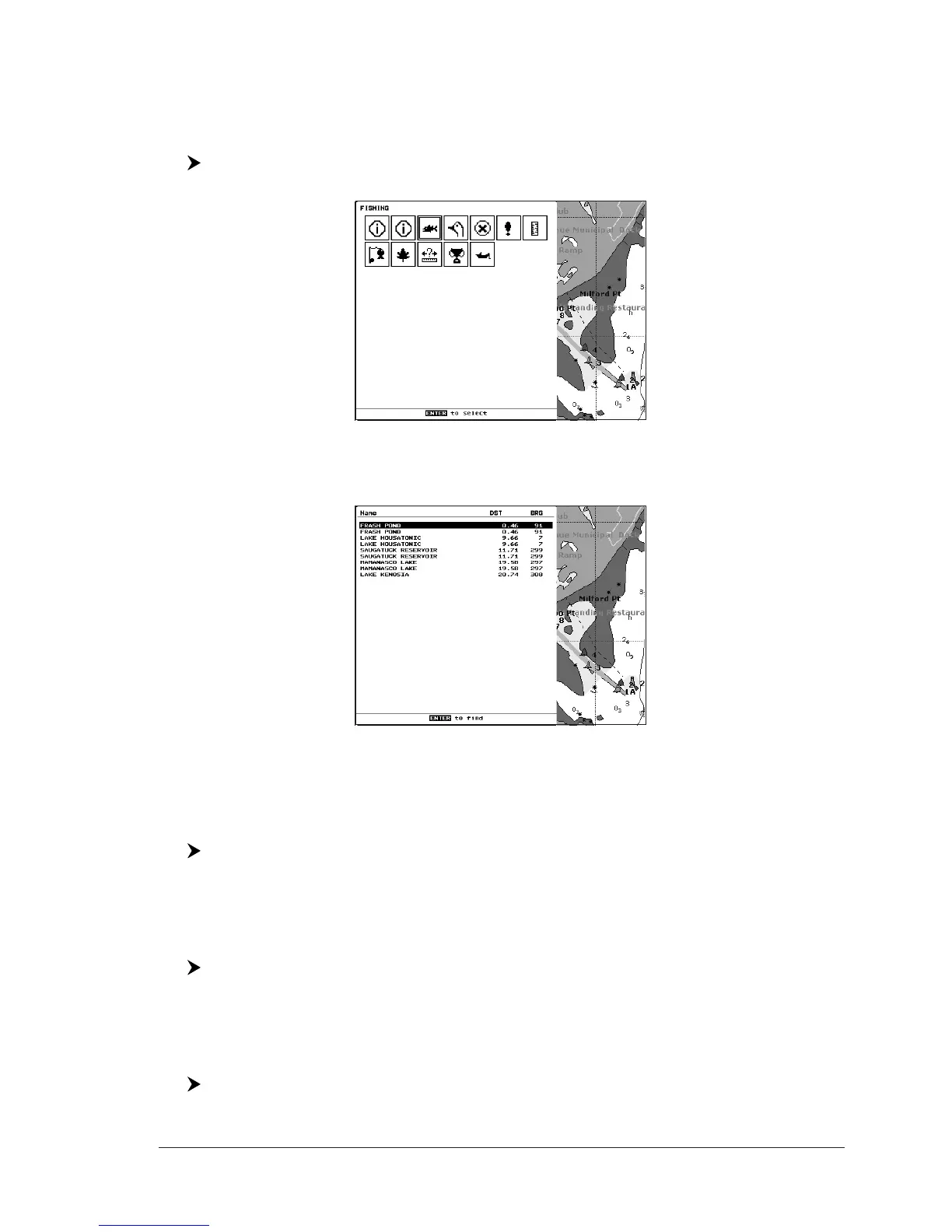
It founds the Outdoor Recreational Area objects. See the following picture:
Fig. 3.8 - Outdoor Recreational Area objects
Use the cursor key to select any objects and press [ENTER]. The list of the near-
est lakes containing the facility will be shown on the screen.
Fig. 3.8a - Nearest Lakes list
Then choose the lake you want and press [ENTER]: the Full Info page is shown.
Finding Lakes by Name
To select the Lakes By Name function following the procedure:
[MENU] + "FIND" + [ENTER] + "LAKES BY NAME" + [ENTER]
Shows the list of all lakes stored on the C-CARD in alphabetic order. Pressing
[MENU] to insert the Lake name.
Finding Points Of Interest
Searches for nearest Points Of Interest (POI):
[MENU] + "FIND" + [ENTER] + "POINTS OF INTEREST" + [ENTER]
A sub-menu is opened to find different categories of POIs.
Finding Tide Stations
To show the nearest Tide Stations to the boat position (or to the cursor position if
the position fix is not received).
[MENU] + "FIND" + [ENTER] + "TIDE STATIONS" + [ENTER]


 To Next Page