70 User Manual
When the package containing the chart plotter is first opened, please check it for
the following contents (if any parts are missing contact the dealer the chart plot-
ter was purchased from):
♦ Quick disconnect bracket and its protective cover
♦ Handbag and protective cover
♦ Fuse 2 Amp. + fuseholder (ONLY on color chart plotter)
♦ User Manual
♦ Flush mounting kit (ONLY on chart plotter with EXTERNAL SMART GPS Receiver)
♦ Smart DGPS WAAS Receiver with cable 15 mt/45 feet (ONLY on chart plotter
with EXTERNAL SMART GPS Receiver)
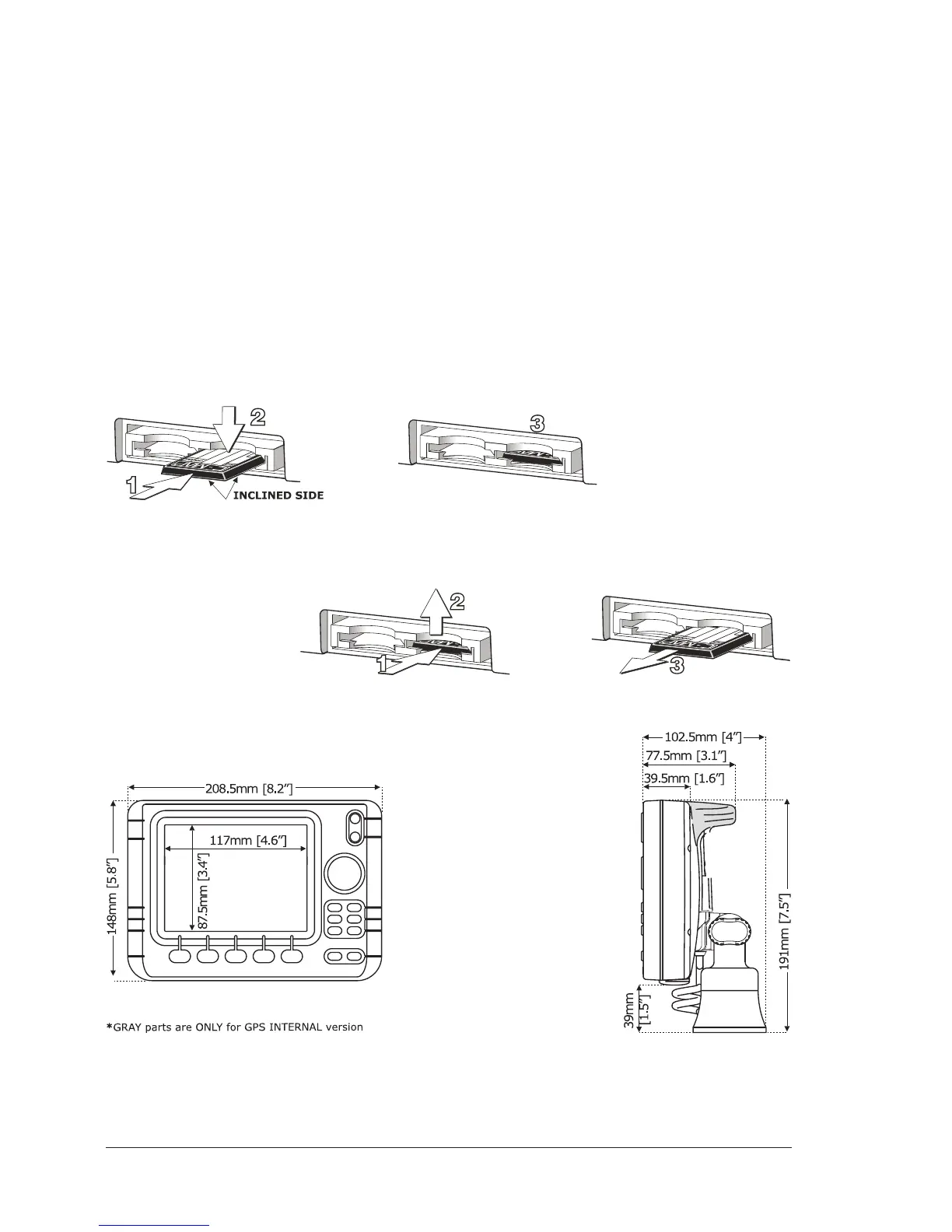
C-CARD INSERTING/REMOVING PROCEDURE
Inserting the C-CARD
Hold the C-CARD by the short inclined side. Gently push the C-CARD into one of
the two slots (1); push the C-CARD in as far as it will go, then move it to the
bottom (2) to hold fixed into the slot (3).
Removing the C-CARD
Press lightly the C-CARD you wish to remove (1) and move it to the top (2) until
you hear a click: the C-CARD will eject out of the slot (3).
CHART PLOTTER DIMENSIONS


 To Next Page