17
7. INSTALLATION
Telephone
Network
Outlet
Plantronics Telephone
Interface Cable
Interquartz EHS Cable
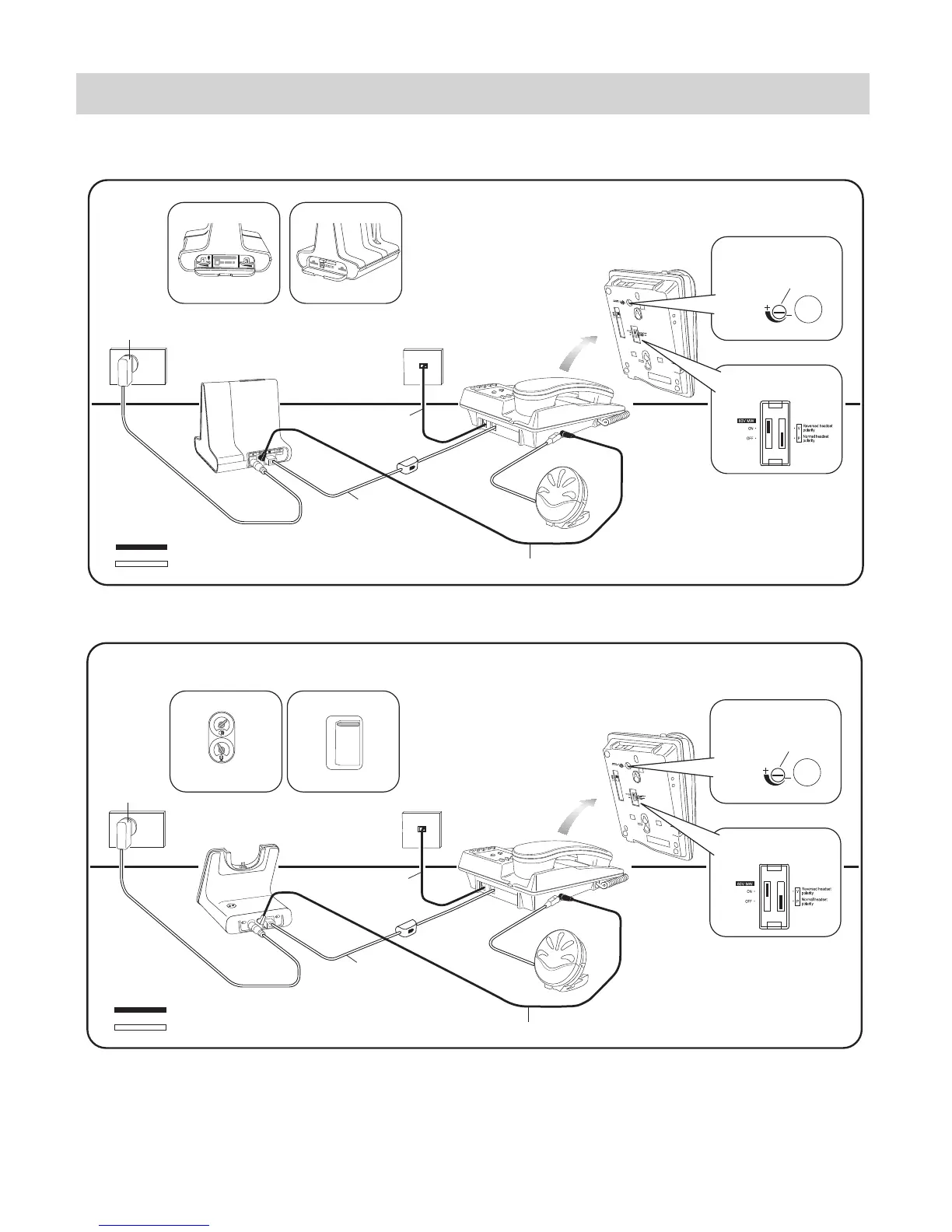
Savi Office (WO100, WO200 etc) & OLI Connection Diagram for IQ333EHS
IQ333EHS
Savi Office
(WO100, WO200 etc)
Interquartz
Line Cord
Interquartz Cable
Plantronics Cable
Plantronics
Base Power Supply
Mains
Power
Outlet
OLI
Set Headset Polarity Switch to "P"
Step 1
Set Configuration Switch to "A"
Step 3
HEADSET
MIC ADJUST
Step 2
Set Headset Mic Adjust Control
fully clockwise to Recommended
Setting Position as shown
Set Desk Phone Speaking Volume
to "1" and Desk Phone Listening
Volume to "3"
Step 4
Telephone
Network
Outlet
Plantronics Telephone
Interface Cable
Interquartz EHS Cable
IQ333EHS
Interquartz
Line Cord
Interquartz Cable
Plantronics Cable
Plantronics
Base Power Supply
Mains
Power
Outlet
OLI
Set Headset Polarity Switch to "P"
Step 1
HEADSET
MIC ADJUST
Step 2
Set Headset Mic Adjust Control
fully clockwise to Recommended
Setting Position as shown
Set Configuration Switch to "A"
Step 3
Set Desk Phone Speaking Volume
to "3" and Desk Phone Listening
Volume to "3"
Step 4
A
B
C
D
E
F
G
1 4
2 3
1
4
5
6
2
3
CS510, CS520, CS530, CS540 Series & OLI Connection Diagram for IQ333EHS
CS510, CS520,
CS530, CS540 Series
FIGURE 2: CONNECTION DIAGRAMS



 To Next Page