Da Vinci Firefly Imaging System User Manual Addendum 552064-10 Rev. A
Restore Settings to Factory Defaults
The following Firefly settings can be reset to factory default values.
• Brightness: 50% (of full slider value)
• Firefly Intensity: 50% (of full slider value)
• Firefly Background Brightness: 50% (of full slider value)
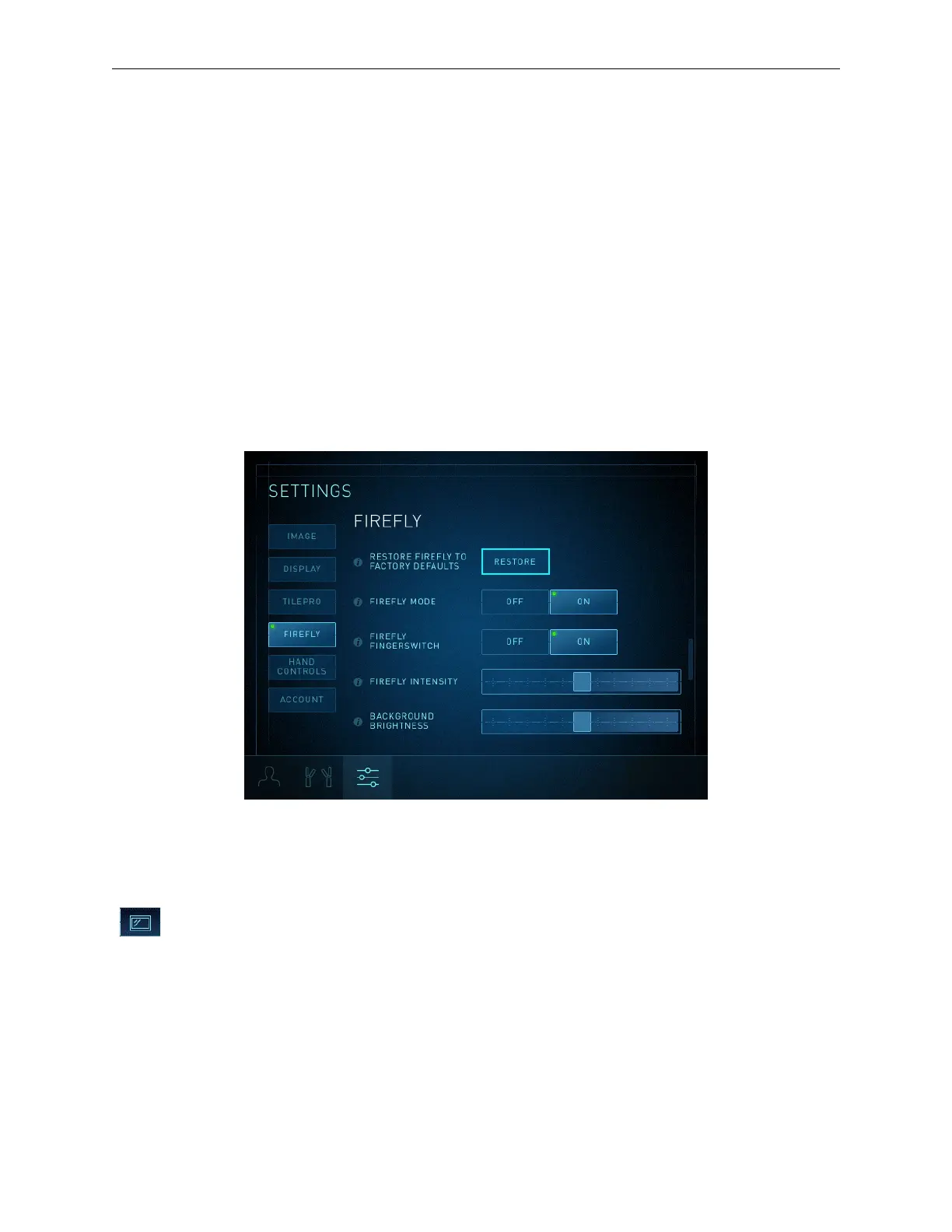
In the Firefly section of the Settings tab when Firefly is activated:
1. Touch the Settings tab, then touch the Firefly button or scroll to view the Firefly section
(Figure 19).
2. Touch Restore.
For information about all of the system settings that can be reset to factory values, refer to the
applicable system user manual.
Figure 19 Restore Firefly to factory defaults button
Image Adjustment on Vision Cart Touchscreen
Firefly Intensity Slider
Touch the Display tab and move the Firefly Intensity slider to change the contrast
between the fluorescing image and non-fluorescing image. This slider is disabled in visible
light mode.
Firefly Imaging Operation | Adjust Image
21


 To Next Page