SECTION 6—OPERATION OF THE POWERED SCOOTER
Zoom
™
300 and Zoom
™
400 28 Part No. 1118395
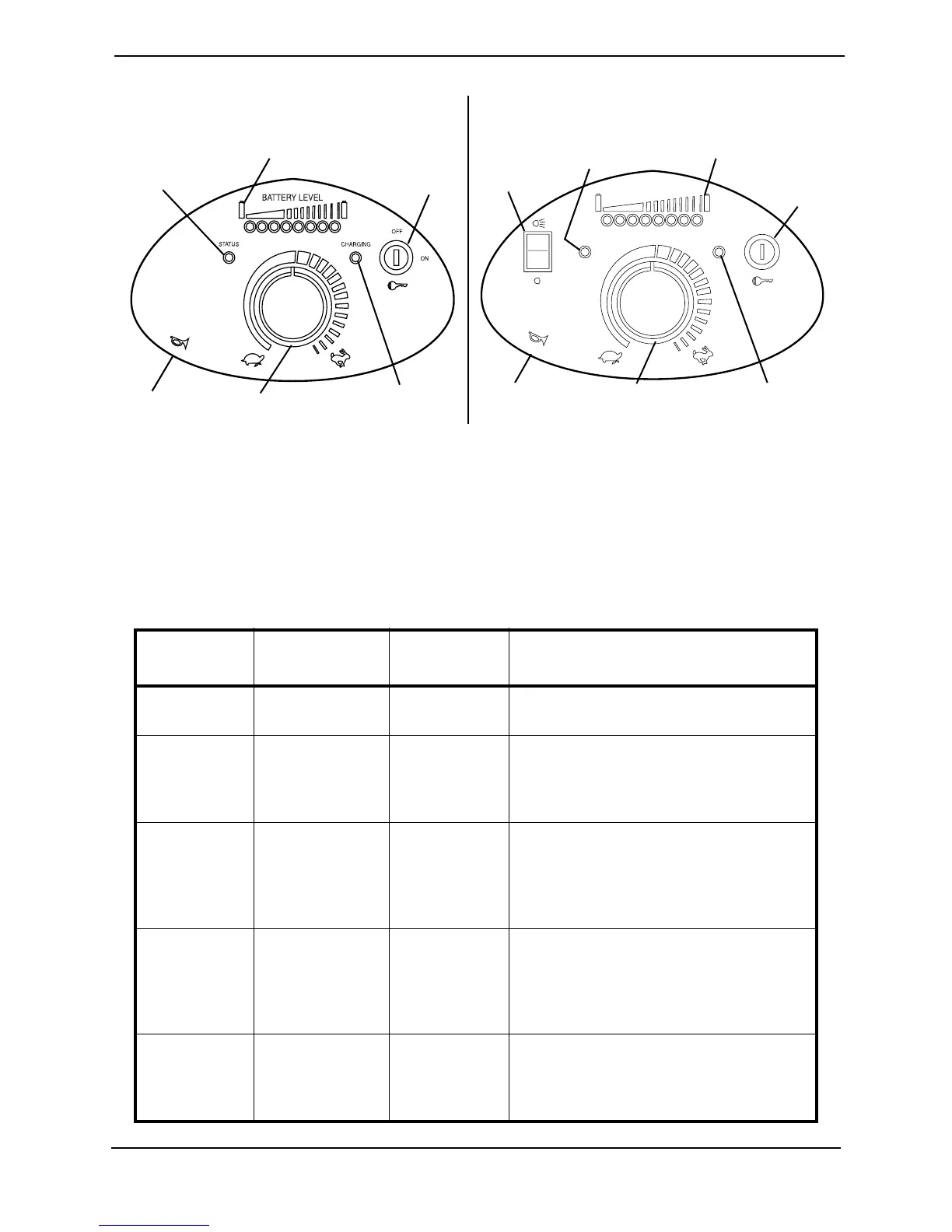
FIGURE 6.1 - CONTROL PANEL
3. CHARGING INDICATOR - Located on the TOP face of the control panel as shown in
FIGURE 6.1. Solid RED indicates the charger is on (plugged into wall receptacle).
4. STATUS INDICATOR - Located on the TOP face of the control panel as shown in
FIGURE 6.1. Status LED will flash intermittently, separated by a pause, to provide
diagnostic information. Refer to the following table.
NUMBER
OF FLASHES
FAULT IMPACT ON
SCOOTER
NOTES
1 Battery needs
recharging.
Will Drive Battery charge is running low. Recharge the
batteries as soon as possible.
2 Battery voltage
too low.
Drive Inhibited Battery charge is empty. Recharge the batter-
ies. If the scooter is left off for a few minutes,
battery charge may recover sufficiently to
allow driving for a short period of time.
3 Battery voltage
too high.
Drive Inhibited Battery charge is too high. Scooter will charge
batteries when traveling down slopes or
decelerating. Excessive charging in this man-
ner may cause this fault. Turn the scooter
power off and then back on again.
4 Current limit
time-out.
Drive Inhibited The scooter has drawn too much current for
too long, possibly because the motor has
been over-worked, jammed or stalled. Turn
the scooter power off and then turn back on
again after a few minutes.
5 Brake fault. Drive Inhibited Check that the brake release lever is in the
engaged position. The park brake coil or wir-
ing is faulty. Check the park brake and wiring
for open or short circuit.
BATTERY LEVEL
STATUS
CHARGING
OFF
ON
On/Off Key
Switch
Horn
Speed
Control Knob
Charging
Indicator LED
Battery Charge
Indicator LED
Status
Indicator LED
On/Off Key
Switch
Horn Speed
Control Knob
Charging
Indicator LED
Battery Charge
Indicator LED
Status
Indicator LED
Headlight
Switch
DETAIL “A” - ZOOM 300
DETAIL “B” - ZOOM 400






 To Next Page