SECTION 4—SEAT/BACK
2 4
Installing/Removing the Back-brace
W A R N I N G
If a back brace is already installed, you don’t have to re-install the back-cane inserts
(for fixed back-canes only).
After ANY adjustments, repair or service and before use, make sure all attaching
hardware is fitted and tightened securely - otherwise injury or damage may occur.
N
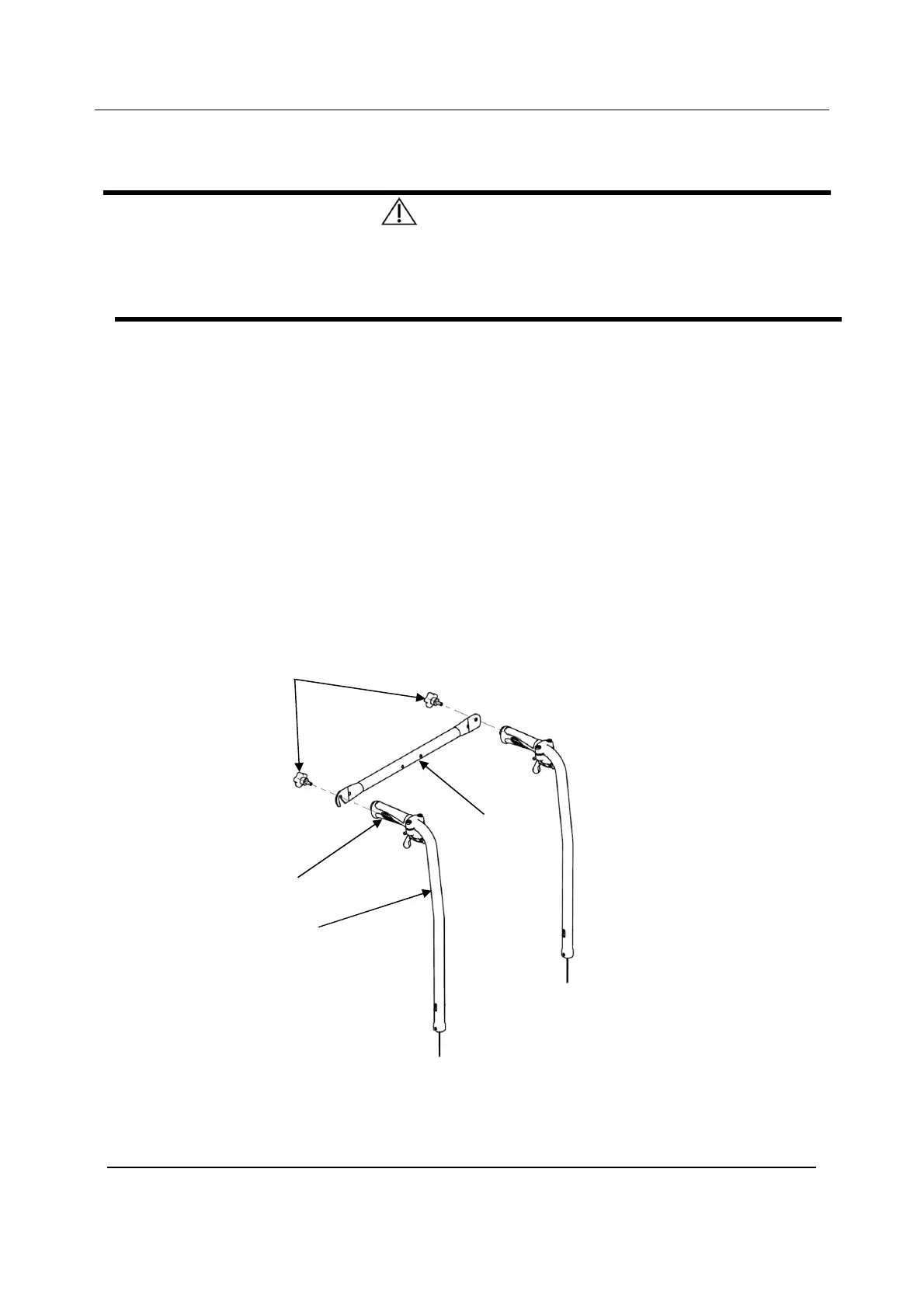
OTE: For this procedure, refer to FIGURE 4.12.
NOTE: To remove the back-brace, reverse this procedure.
1. Remove the end caps from the back-canes.
2. Remove the handles from the back-canes (Cut the handle lengthwise thanks to an
appropriate sharp tool).
3. Install the inserts into the canes (fixed back-canes only).
4. Secure the inserts with mounting screws (fixed back-canes only).
5. Install the handles on the back-canes (Previously, spray a solution of neutral alcohol
inside the handle and settle it immediately on the back-cane).
6. Align the back-brace ends with the handles of the back-canes.
7. Secure the back-brace to the back-canes with the hand screws.
Installing/Removing the Back
Hand Screws
Handle
Back-brace
Back-canes





 To Next Page