To Next Page


S
stephaniewaltersSep 12, 2025
What to do if problem 10 occurs with Invacare Leo?
- SsmithcarmenSep 12, 2025
Turn the scooter off and then on again.

What to do if problem 10 occurs with Invacare Leo?
Turn the scooter off and then on again.
How to fix issue 9 with Invacare Leo Scooter?
Check all connections & wiring.
What to do for problem 3 with Invacare Leo?
If traveling down a slope, reduce your speed to minimize the amount of regenerative charging. Turn the scooter off and on again. If the battery charger is connected, disconnect it from the scooter. Check the battery and associated connections and wiring.
How to resolve issue 2 with Invacare Scooter?
Recharge the batteries.
Why won't my Invacare Scooter drive?
There are several reasons why your Invacare Scooter might not drive. Ensure the brake release lever is engaged. Charge the batteries if they require charging. Make sure the key is fully inserted into the keyswitch. Unplug the charger from the scooter. Check all battery connections and secure any loose connections.
Why do the batteries of my Invacare Scooter draw excessive current when charging?
If your Invacare Scooter batteries draw excessive current when charging, it is likely due to battery failure. In this case, the batteries should be replaced.
What does it mean when the status bar indicator is blinking on my Invacare Scooter?
If the status bar indicator on your Invacare Scooter is blinking, it means an error has occurred. Count the number of blinks and refer to the Service Indicator Error Codes.
Why do the batteries on my Invacare Leo Scooter draw excessive current when charging?
The batteries may draw excessive current when charging due to battery failure. If this occurs, replace the batteries.
Why is my Invacare Scooter driving distance so limited?
If your Invacare Scooter has a limited driving distance, it could be due to the batteries not being charged long enough. Ensure you charge the batteries overnight or for at least eight hours between uses. Weak batteries that won’t hold a charge can also cause this issue; consider replacing them.
How to fix Invacare Scooter that runs too slowly?
If your Invacare Scooter is running too slowly, the operating console might be defective, requiring replacement. Another possibility is that the batteries are defective and also need replacement.
Details safety symbols used in the manual, including general risks, explosion, burn hazards, and crushing risks.
Explains symbols found on the product, focusing on environmental responsibility and recycling.
Classifies the vehicle and outlines its intended use for persons with impaired walking ability, tested to EN 12184.
Outlines the terms and conditions of the warranty specific to individual countries.
Estimates the product's life expectancy based on usage, maintenance, and technical advancements.
Covers essential safety precautions for operating the scooter, including risks of injury from misuse, impairment, and accidental motion.
Highlights the importance of regular inspections and maintenance for safety and guarantee validity.
Warns about potential malfunctions due to electromagnetic interference and provides precautions.
Provides safety instructions for driving, especially concerning gradients, obstacles, and tipping hazards.
Guides users on familiarizing themselves with the scooter's operation and controls before the first trip.
Explains how to safely climb and descend kerbs and obstacles, with warnings about tipping.
Provides safety advice for driving up and down slopes, including speed limits and avoiding slippery surfaces.
Instructs on how to park the scooter safely, including switching off the power supply.
Details the procedure for disengaging the scooter's motors for manual pushing, with safety warnings.
Identifies and describes the components and controls on the operating console.
Explains how to safely operate the scooter using the drive levers and speed controller.
Describes how to customize acoustic signals for various functions using specific key combinations.
Details the electronic system's diagnostic capabilities and fault reporting through blink codes.
Provides a comprehensive list of error codes, their consequences, and troubleshooting comments.
Instructions on how to adjust the seat forwards or backwards using the disengaging lever.
Details the process of adjusting the width of the armrests using handwheels under the seat.
Explains how to disengage, rotate, or remove the seat for easier access or maintenance.
Provides steps for adjusting the seat height using specific tools and components.
Information on postural belts, including types, fitting, and correct adjustment for user support.
Details the optional rollator bracket, approved rollators, weight limits, and tipping risks.
Describes the overload-protection system for the vehicle's electronics and potential overheating scenarios.
Provides essential information about the 12V batteries, their maintenance, charging, and handling.
Details the charger's features, characteristics, instructions for use, LED display, and troubleshooting steps.
Instructions for cleaning the scooter, emphasizing the use of a damp cloth and gentle detergent.
Lists routine inspection jobs for the user, including checks for tires, wheels, and electrical systems.
Provides guidance on repairing flat tyres, including safety warnings and procedures for tyre removal and fitting.
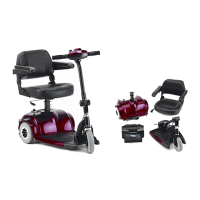
Step-by-step instructions for removing the seat for easier transport.
Guides on how to remove the battery and drive unit for dismantling the scooter.
Specifies the permissible temperature ranges for operation and storage according to ISO standards.
Details the motors, batteries, and main fuse specifications for the electrical system.
Lists the specifications for the charger, including output current, voltage, and input voltage.
Provides key driving performance data such as speed, braking distance, slope capability, and turning diameter.
Lists the physical dimensions of the scooter, including overall size, seat dimensions, and weight.
Provides contact information for the primary manufacturer, Chien Ti Enterprise Co. Ltd.
Identifies the European representative, Emergo Europe, with its address.
Lists distribution contacts for various European countries including France, Italy, Spain, Portugal, UK, and Ireland.
Provides contact details for distribution in Sweden, Denmark, Netherlands, Germany, and Eastern Europe.
 General
| Maximum Speed | 8 km/h |
|---|---|
| Weight Capacity | 136 kg |
| Ground Clearance | 7 cm |
| Battery | 2 x 12V |
| Seat Width | 47 cm |
| Seat Depth | 41 cm (16.1 inches) |
| Maximum Safe Slope | 10 degrees |
| Turning Radius | 43.3 inches (110 cm) |