EasyManua.ls Logo

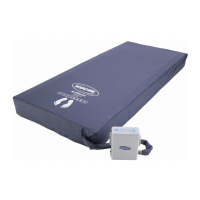
Invacare Softform Premier Active 2 - User Manual

Invacare Softform Premier Active 2
32 pages
Print Icon
To Next Page IconTo Next Page
Loading...
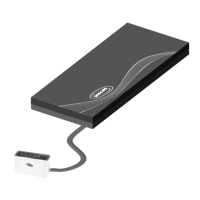
Invacar
SoftformPremierActive2
withRXpump
enHybridmattress
UserManual
ThismanualMUSTbegiventotheuseroftheproduct.
BEFOREusingthisproduct,thismanualMUSTbereadandsavedfor
futurereference.

Other manuals for Invacare Softform Premier Active 2

Questions and Answers

  • D
    daniellehatfieldAug 4, 2025
    What to do if Invacare Personal Care Products mattress is not inflating or alternating properly?
    • R
      robertdavisAug 4, 2025
      If your Invacare Personal Care Product mattress is not inflating or alternating correctly, check the following: * Ensure the CPR hose is connected and locked in place. * Inspect the CPR hose and tube connectors for kinks or splits; unkink or replace them as necessary. * Examine the air cells for major leaks; replace any leaking air cells. If these steps do not resolve the issue, the control unit may need repair by Invacare.
  • J
    jennifergriffinAug 11, 2025
    Why does my Invacare Personal Care Products have a pressure failure/low pressure indication?
    • M
      Mr. Austin HenryAug 11, 2025
      A pressure failure or low pressure indication in your Invacare Personal Care Product may be due to several reasons. First, check the CPR connection hose is properly connected. Next, ensure all connector tubes to the air cells in the air insert are correctly connected. Also, make sure the connection hose is free from kinks or bends.
  • R
    Robert MccormickAug 16, 2025
    How to fix Invacare Indoor Furnishing mattress not inflating?
    • M
      molinathomasAug 16, 2025
      If the Invacare Indoor Furnishing mattress is not inflating properly, start by checking the CPR hose connection and ensure it is securely locked in place. Inspect the CPR hose and tube connectors for any kinks or splits, and unkink or replace them as necessary. If you notice a major leak in an air cell, replace the air cell. If the control unit does not come on, isn't alternating, or there is no air, send the control unit back to Invacare for repair.
  • J
    Jessica WillisAug 23, 2025
    What to do if Invacare Personal Care Products show no power/power failure indication?
    • M
      Melissa ReedAug 23, 2025
      If your Invacare Personal Care Product indicates a power failure, first ensure the control unit is switched on and properly connected to a power source. Check the power cord is correctly connected and the power outlet is switched on. If there is still no power, have the power outlet repaired by an electrician.
  • V
    Valerie KiddAug 28, 2025
    What to do if my Invacare Indoor Furnishing has no power?
    • C
      Curtis FowlerAug 29, 2025
      If your Invacare Indoor Furnishing unit has no power, first ensure the control unit is turned on and check that the power cord is properly connected to a working power source. Verify the power source itself has power. If there was a power outage, wait for the power to be restored. Finally, check the fuse on the power inlet connector and replace it with a spare or identical replacement if it's blown, consulting a trained engineer if needed.

Summary

General Information

Introduction to User Manual

Manual provides important handling information. Read carefully and follow safety instructions.

Document Symbols and Warnings

Explains symbols and signal words used for hazards and unsafe practices.

Warranty and Liability

Details manufacturer's warranty, liability limitations, and claim process.

General Information

Service Life

Expected service life is five years with correct usage and maintenance.

Safety

General Safety Information

Discusses preventing pressure injuries, risks of injury/damage, fire/explosion.

EMC Information

Precautions regarding EMC and effects of RF communication equipment.

Transport Safety

Guidelines for handling and transporting the mattress safely.

Product Overview

Product Description

Describes the mattress system's function and features.

Intended Use and Indications

Details purpose, settings, and suitability for pressure injury management.

Contraindications and Components

Lists users it's not suitable for and included product components.

Product Overview

Product Labels

Shows examples of labels found on the control unit and their meanings.

Product Overview

Product Symbols

Explains symbols used on the mattress and control unit.

Setup

Setup Safety Information

Electrical shock hazards, entrapment risks, and modification warnings during setup.

Installing the System

Step-by-step guide for connecting and setting up the control unit and mattress.

Usage

Usage Safety Information

Patient repositioning, cover orientation, and damage risks during use.

Control Unit Operation

Overview of control unit indicators, buttons, and functions.

CPR Procedure

Details the CPR function of the mattress and its compliance.

Transport Mode

Instructions for putting the system into transport mode.

Maintenance

Inspection Guidelines

Recommendations for checking mattresses for damage or ingress.

Cleaning and Disinfection Overview

General safety information for cleaning and disinfection procedures.

Cleaning Intervals and Instructions

Guidance on cleaning frequency and detailed instructions for components.

Disinfection Instructions

Instructions for disinfecting covers and handling heavy soilage.

Replacing the Cover

Step-by-step guide on how to replace the mattress cover.

After Use

Storage Recommendations

Important instructions for storing the mattress correctly.

Reconditioning for Reuse

Steps for inspecting and cleaning the product for a new user.

Disposal Guidelines

Guidelines for environmentally responsible disposal and recycling.

Troubleshooting

Identifying and Repairing Defects

Lists common problems, causes, and solutions for control unit alarms.

Technical Data

Mattress Specifications

Provides dimensions, air cell height, and weight specifications for the mattress.

Control Unit Specifications

Lists technical specifications for the control unit.

Materials Used

Details the materials used for the foam, cover, air cells, and glide membrane.

Environmental Conditions

Specifies operating and storage/transport environmental conditions.

Electromagnetic Compliance

Electromagnetic emission compliance and guidance.

Invacare Softform Premier Active 2 Specifications

General IconGeneral
BrandInvacare
ModelSoftform Premier Active 2
CategoryIndoor Furnishing
LanguageEnglish

Related product manuals