Version 1.00 | Optidrive CoolVert User Guide | 33www.invertekdrives.com
4
Set-up and Operation
Par
Mod
Add Description Def Min Max Unit R/W
2-13 213 Drive Re-Start Function 0 0 6 - R/W
Defines the behaviour of the drive relating to the enable digital input and also configures the Automatic Restart
function.
Edge-r: Following Power on or reset, the drive will not start if Digital Input 1 remains closed. The Input must be
closed after a power on or reset to start the drive (e.g. Edge Triggered).
Auto-0: Following a Power On or Reset, the drive will automatically start if Digital Input 1 is closed before
power on.
Auto-1 to Auto-5: Following a trip, the drive will make up to 5 attempts to restart at intervals defined by P6-
03 (default 20 seconds).
The drive must be powered down or reset manually to reset the counter. The numbers of restart attempts are
counted, and if the drive fails to start on the final attempt, the drive will fault with, and will require the user to
manually reset the fault.
2-14 214 Crankcase Heating Current 0 0 100% % R/W
When this function is activated by serial communication, it will inject this percentage of the motor rated current
into the motor in pulses when the drive is not running in order to heat-up the crankcase. The STO must be active to
permit this function to operate.
CAUTION Too high a setting of this current activated for too long could cause damage to the motor.
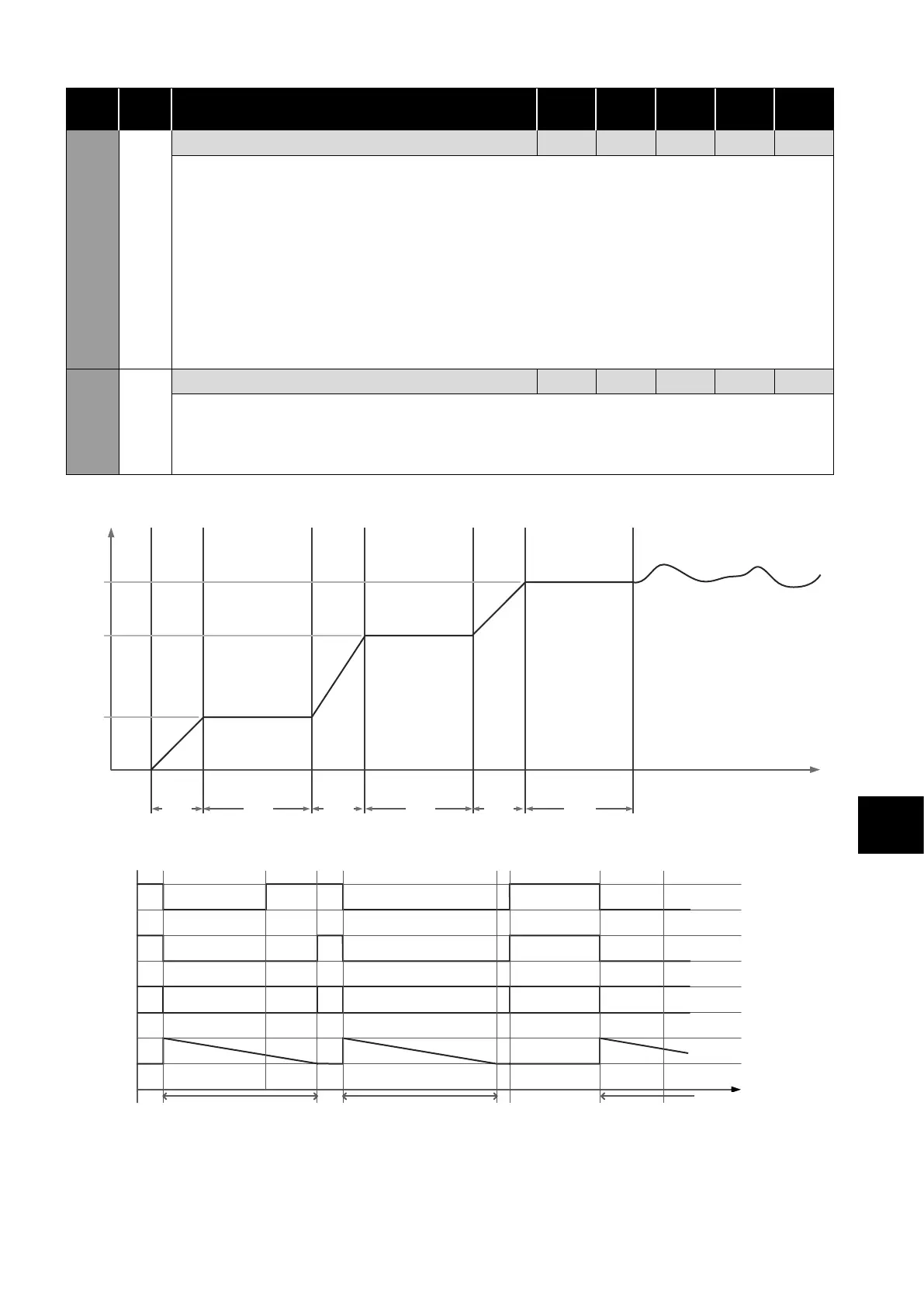
Start-Up Speed Profile
SPEED
TIME
Accel
Time 1
Speed 1 Time
Accel
Time 2
Speed 2 Time
Accel
Time 3
Speed 3 Time
Speed 1
Speed 2
Speed 3
Configured speed
reference
P2-07
P2-04
P2-01
P2-03 P2-02 P2-06 P2-05 P2-09 P2-08
Minimum Off Time Sequencing
Run CMD
Running
Status
Off time
RU ST RU ST RU
Minimum Off Time Minimum Off Time
STWR
TIME
KEY:
RU Running ST Stopped WR Waiting to Run


 To Next Page