Panther Instrument User Manual V1.0
Pioneering Gas Sensing Technology. Page 9 of 24 ionscience.com/usa
Getting Started
Charging your Panther Instrument
To charge your Panther instrument, use a USB A to Type C Charger Cable and connect it to the back of the Panther
device.
The Panther instrument will indicate its charging by showing the following symbol at the top right of the
home screen.
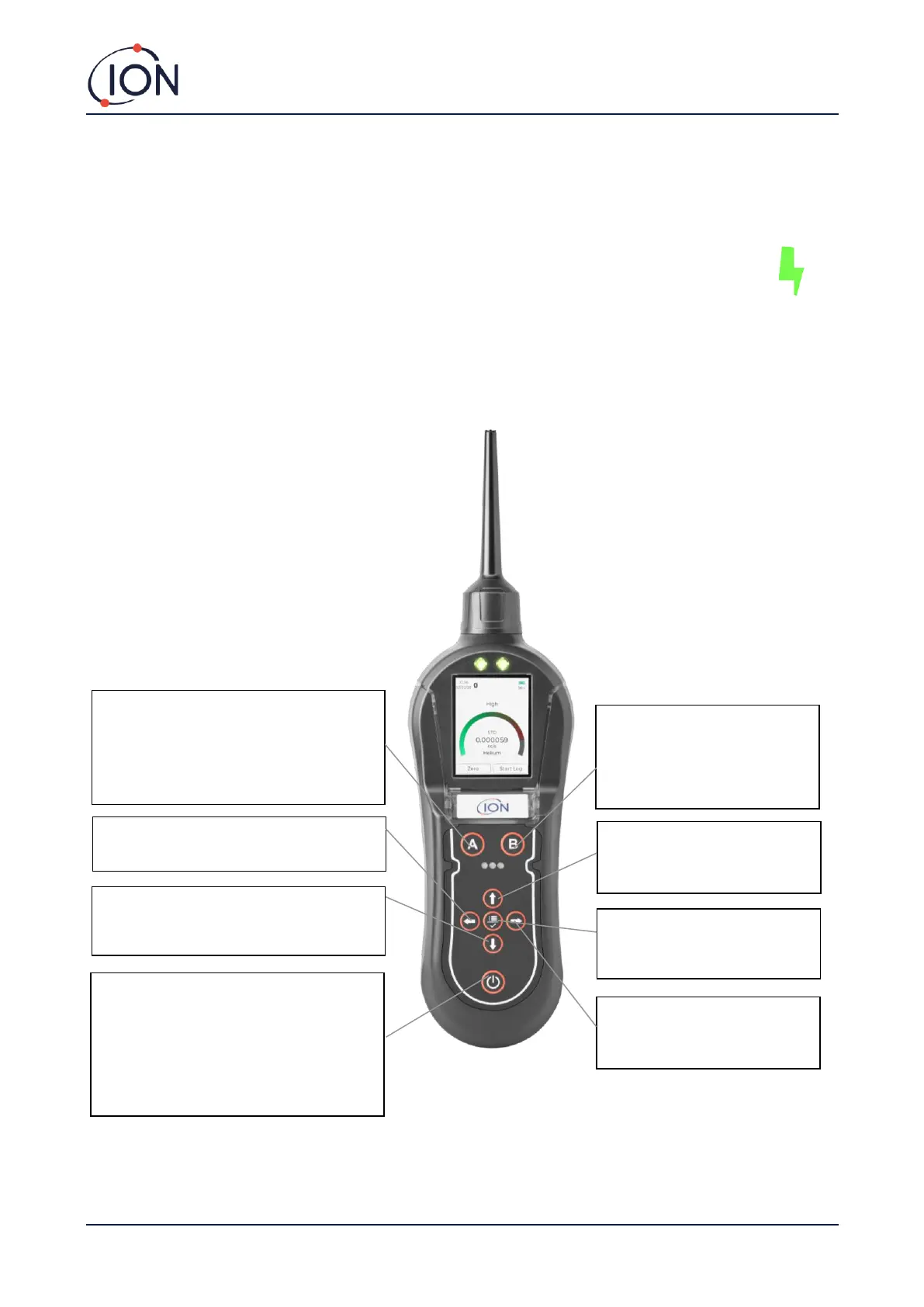
The Keypad
The following section explains the general functionality of each key:-
DOWN
Use to scroll down on the LCD display and
change sensitivity.
On/Off
Press and hold this key for 5 seconds to
switch the instrument 'ON'. To switch the
instrument off, press and hold this key.
This procedure has been designed to avoid
accidental switch OFF.
‘A’
Press ‘A’ to zero the Panther readings.
This will remove any background readings
and return the display back to near zero.
RIGHT
Use to scroll right on the LCD
display.
LEFT
Use to scroll left on the LCD display.
SELECT/MENU
Use this to accept an option and
enter the Main Menu.
UP
Use to scroll up on the LCD
display and change sensitivity.
‘B’
Press ‘B’ to start datalogging.
Press a second time and the
datalogging will finish.



 To Next Page