EasyManua.ls Logo

ION SLIDES 2 PC - User Manual

ION SLIDES 2 PC
24 pages
Print Icon
To Next Page IconTo Next Page
Loading...
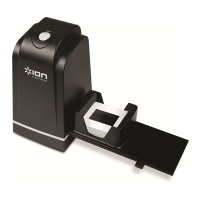
SLIDES 2 PC
35MM SLIDE AND
FILM SCANNER
USER GUIDE
ENGLISH ( 3 – 12 )
GUIDE D’UTILISATION
FRANÇAIS ( 13 – 22 )

Other manuals for ION SLIDES 2 PC

Questions and Answers

ION SLIDES 2 PC Specifications

General IconGeneral
Color scanningYes
Duplex scanning-
Input color depth24 bit
Maximum scan size24 x 36 mm
Optical scanning resolution1800 x 3600 DPI
Scanner typeFilm/slide scanner
Product colorBlack
Built-in displayNo
Scan toUSB
Megapixel5 MP
Sensor typeCMOS
Image sensor size1/2.5 \
Daily duty cycle (max)- pages
USB version2.0
Standard interfacesUSB 2.0
Minimum RAM256 MB
Minimum processorPentium® PIII 800
Minimum storage drive space100 MB
Windows operating systems supportedWindows 7 Enterprise, Windows 7 Enterprise x64, Windows 7 Home Basic, Windows 7 Home Basic x64, Windows 7 Home Premium, Windows 7 Home Premium x64, Windows 7 Professional, Windows 7 Professional x64, Windows 7 Starter, Windows 7 Starter x64, Windows 7 Ultimate, Windows 7 Ultimate x64, Windows Vista Business, Windows Vista Business x64, Windows Vista Enterprise, Windows Vista Enterprise x64, Windows Vista Home Basic, Windows Vista Home Basic x64, Windows Vista Home Premium, Windows Vista Home Premium x64, Windows Vista Ultimate, Windows Vista Ultimate x64, Windows XP Home, Windows XP Home x64, Windows XP Professional, Windows XP Professional x64
Weight and Dimensions IconWeight and Dimensions
Depth166.1 mm
Width104.1 mm
Height90.2 mm
Weight1810 g

Summary

Important Information

Safety Precautions

Essential safety guidelines for operating the SLIDES 2 PC to prevent accidents and damage.

FCC Compliance Notice

Details on the equipment's compliance with FCC regulations for digital devices.

Box Contents

Included Items

Lists and illustrates all components provided in the SLIDES 2 PC package.

SLIDES 2 PC Features

Device Overview

Identifies and labels the main physical parts and connection points of the scanner.

Driver and Software Installation

Install Scanner Driver

Step-by-step guide to install the necessary driver software for the SLIDES 2 PC.

Install PhotoImpression Software

Instructions for installing the bundled ArcSoft PhotoImpression 6 editing software.

Using Film and Slide Holders

Procedure for correctly inserting film or slides into the provided holders for scanning.

Using the SLIDES 2 PC

Connecting and Initial Setup

Steps for connecting the device, inserting media, and launching the software for scanning.

Adjusting Scan Settings

Guide to adjusting brightness, color balance, and selecting scan options.

Transferring Scanned Pictures

Procedure for transferring and saving digitized images to the computer.

Editing Your Pictures

Adjust and Color Correction

Tools for enhancing photo quality, fixing color, and removing red-eye.

Cropping and Straightening

Features for trimming photos, correcting tilt, and blurring backgrounds.

Retouching Tools

Tools for fixing blemishes, cloning elements, and modifying image properties.

Appendix

Specifications

Technical details of the SLIDES 2 PC scanner including sensor, resolution, and dimensions.

System Requirements

Minimum hardware and software requirements for operating the SLIDES 2 PC.

Troubleshooting

Common Issues and Resolutions

Guides to resolving common problems with recognition, installation, and image quality.

Related product manuals