Page 2-4
CORNERMATIC PLUS
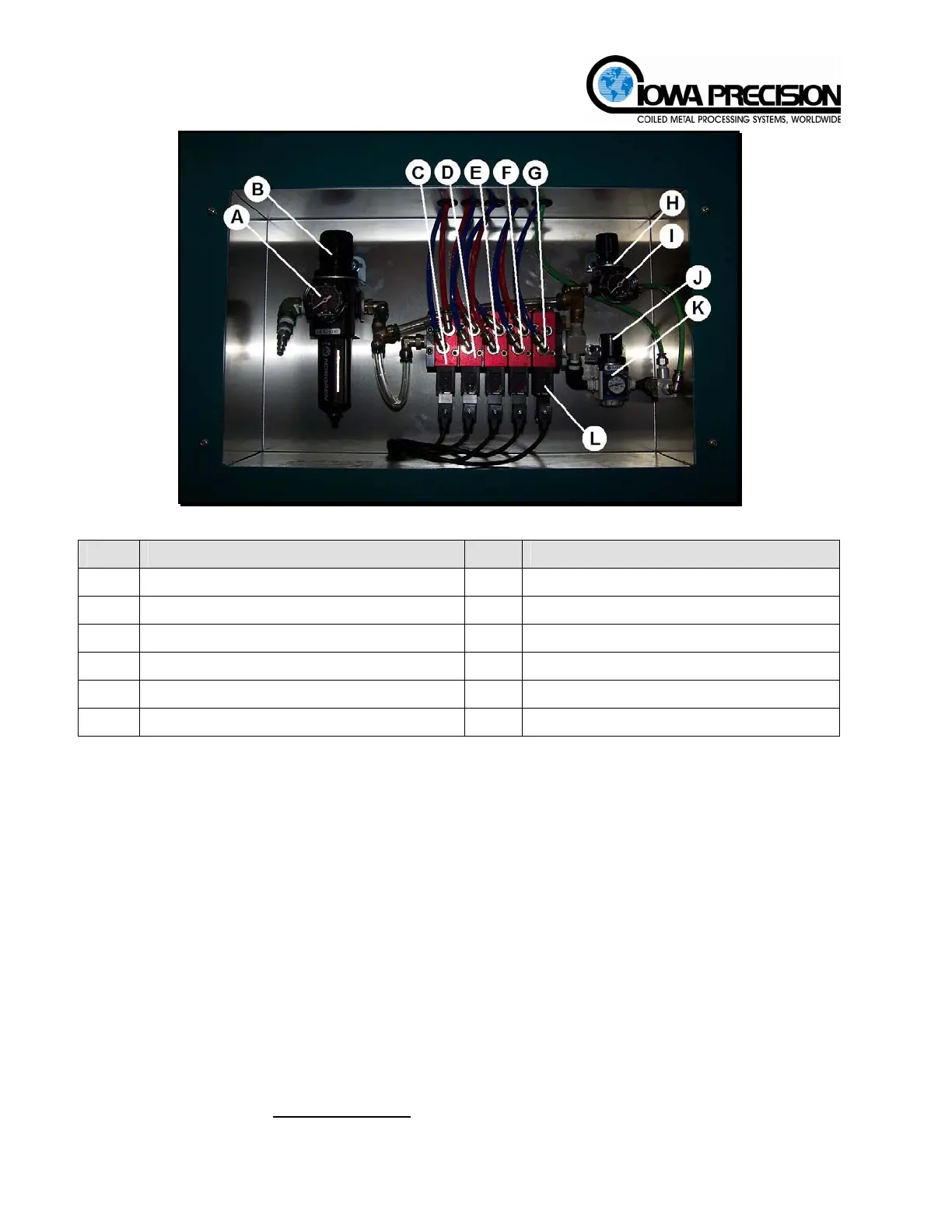
Figure 2-5 Pneumatic Manifold Assembly
Item Description Item Description
A
Incoming air supply gauge
G
Corner elevate valve
B
Incoming air supply regulator
H
Corner elevate pressure regulator
C
Lock valve
I
Corner elevate pressure gauge
D
Feed valve
J
Secondary pressure regulator
E
Press valve
K
Secondary pressure gauge
F
Crimp valve
L
Valve manual override
(1) Pressure settings
The recommended pressure setting for the system pressure is 100 PSI (6.89 bar) and the
corner-elevate pressure setting is 40 PSI (2.70 bar). Refer to the pneumatic schematic for
additional information.
(2) Secondary Pressure Setting
This pressure regulator provides supplemental air to the magazine elevate function during
the time that the main air is turned off. This pressure is used, if required, to ensure the
corners are up in position before they are fed into the duct. If a corner is not up in position
the feed cylinder will not be able to push the corner into the duct.
Initially, the pressure should be set at zero. If, after time, the corners are not being raised
up into position to be fed into the duct, raise the pressure in increments of 3-5 PSI (.21-.34
bar). Adjust as needed.
D. PROGRAMMABLE LOGIC CONTROL (PLC) OPERATING SEQUENCE
The operating sequence of the Cornermatic Plus is controlled by a programmable logic control
(PLC) located within the electrical enclosure on the machine. The unit operates with a
standard 115 VAC (Optional 240 VAC
) outlet circuit. Once the unit is plugged into a power
source, power is applied to the system and PLC by pressing the POWER ON push-button
H. WEISS MACHINERY & SUPPLY
H. WEISS MACHINERY & SUPPLY
PHONE: (718) 605-0395 - www.hweiss.com



 To Next Page