Note:
Jumpers 1 and 2 help you set disk drive modes or,
repsectively, the disk drive compatibility mode. Before you
change the desk drive mode with Jumpers 1 and 2, please
maintain the default setting (J2 2-3) and additionally
connect Jumper 5.
The combination of Jumpers 1, 2 and 5 thus yields five possible
compatibility modes.
Caution:
Please do not ever use J1 and J2 or J3 and J5
simultaneously. Or else your device might be damaged.
Please consult one of our qualified technicians before you make your
own jumper settings. If you open up the device without explicit
instructions, your guarantee and warranty will no longer be valid.
14. FAQ's – Often Asked Questions
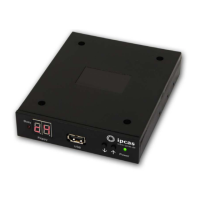
1. The USB Floppy Disk Emulator is connected at the voltage supply.
The LED 2 (green) lights up, LED 1 (red) is off. The display shows
C4. What does that mean?
When the display shows C4 (
), the disk drive is
waiting for a USB Stick to be connected.
2. No USB Stick is connected, the display does not show anything,
and the LED 2 (green) is not on, although the device is connected to
the voltage supply.
What caused this?
Normally, LED 2 (green) is on in the idle state when the
voltage supply is connected. Please check whether the
voltage supply is connected properly. You will find a
detailed description on how to connect the voltage
supply under
Back: Description, connections
in this
manual.
3. The voltage supply is connected, and no USB Stick has been
inserted into the device, but both LED's (LED 1 and LED 2) have lit
up and the display shows C4. Why?
Subject to change without prior notice Date: 09-03-10
ipcas GmbH USB Floppy Disk Emulator – USB Floppy v0.2 Page 14 of 17


 To Next Page