WIT-400HE Installation Manual
Date: 15/M ar/2012
This Document Contains proprietary information and may not be reproduced or copied without express
Written permission of a duly authorized representative of Ericsson-LG Co.Ltd.
12
1.4 iPECS System
The iPECS System is a call controller of the WIT-400HE. WIT-400HE can be registered within a same
LAN subnet or other subnet which is routed to the system network.
2. Wireless Environment Setup
This section describes AP(Access Point) configuration for normal operation of WIT-400HE. The AP
should be plugged into a switch/hub for connectivity with the subnet of office.
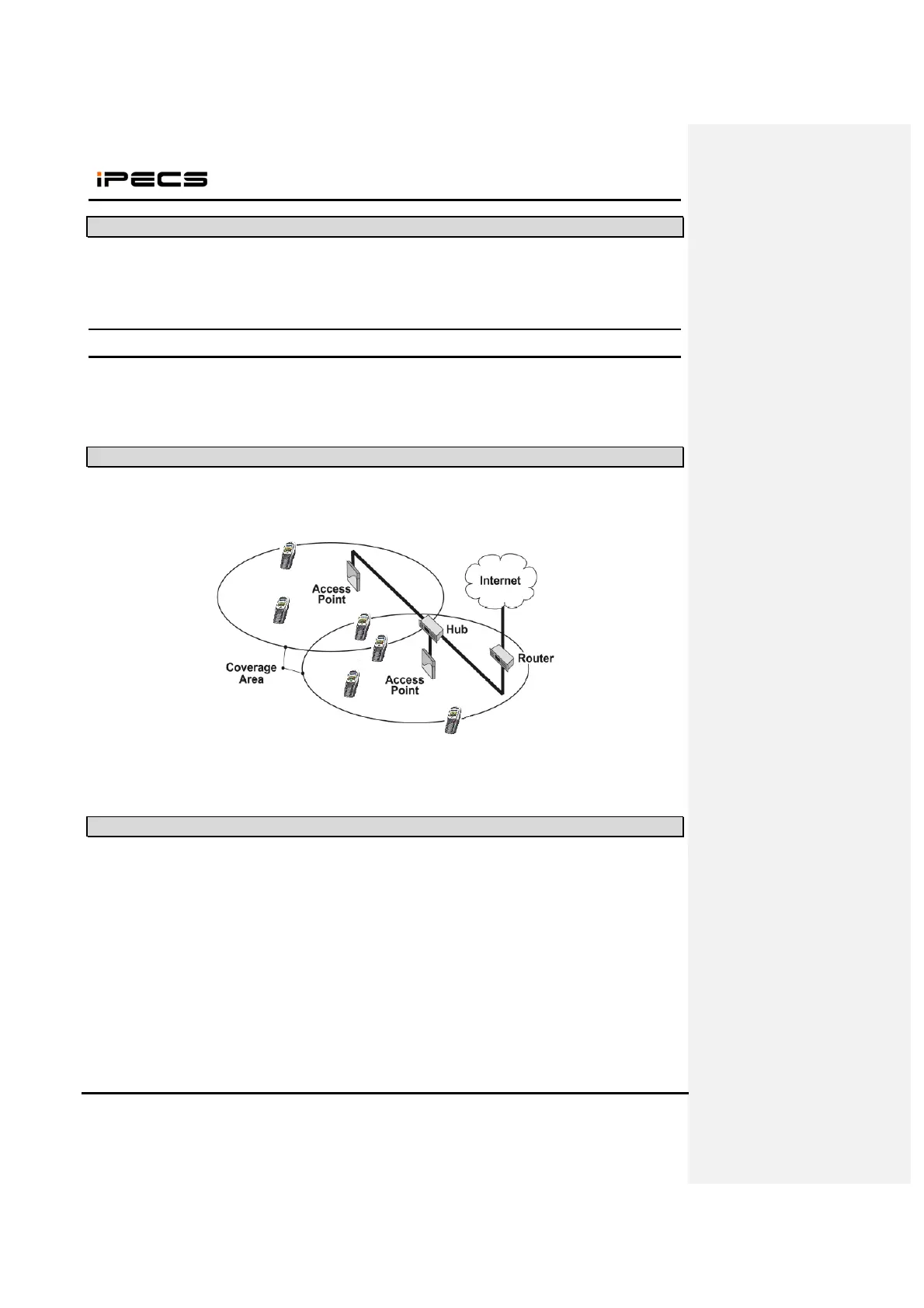
2.1 Basic IEEE 802.11b/g network diagram
The following figure exhibits network infrastructure of 802.11b/g compliant network diagram.
APs are connected to a HUB in subnet, since WIT-400HE is able to access the Internet. The iPECS LIK
and WIT-400HE system work on top of this context.
2.2 Where iPECS System is positioned in the 802.11b/g network.
The following is a basic configuration of IEEE802.11b/g environment to enable WIT-400HE and the
iPECS System.



 To Next Page