4. Electrical Connecons (Should be completed by a licensed
Electrician)
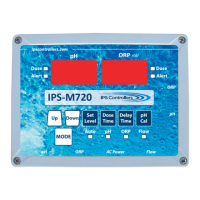
a. Verify that the M720 controller power is OFF.
b. Connect the pH feeder connecon to the appropriate
peristalc pump or other device.
c. Connect the ORP feeder connecon to the appropriate
peristalc pump or other device.
d. Connect the AC power cord to a GFCI power source. For
outdoor installaons, ensure the use of a waterght outlet
cove r.
e. Connect the blue pH sensor connector to the
corresponding port (labeled pH) at the right edge of the
controller.
f. Connect the yellow (or green) ORP sensor connector to the
corresponding port (labeled ORP) at the right edge of the
controller.
13
M720 pH/ORP Controller Owner’s Manual


 To Next Page