h. Press the Mode pushbuon momentarily to place the
controller in ORP standby mode. The yellow ORP standby
LED will illuminate. Select the desired ORP set level and
dose me (connuous or med). Please call us at 877-693-
6903 for assistance with inial sengs.
i. Press the Mode pushbuon momentarily unl the red
Auto LED is illuminated. Note: If pH level in the pool is at
desired set level, and chlorine/bromine level is at desired
PPM level in the pool, the ORP set level should be the
same as the current ORP reading when in Auto Mode.
2. Shutdown
Note: Each me the Mode pushbuon is momentarily pressed,
the mode will cycle from Auto to pH Standby to ORP Standby, and
then return to Auto mode.
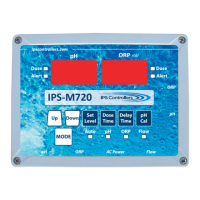
a. Press the Mode pushbuon momentarily to place the
controller in pH standby mode. The green pH standby LED
will illuminate, and both the pH and ORP digital displays
will show dashes.
b. Press and hold the Mode pushbuon for 2 seconds unl
both the pH and ORP digital displays read OFF.
c. Release the Mode pushbuon. The M720 controller will
turn o, and the digital displays and funcon LEDs will go
blank. The green Flow LED will be illuminated if water is
owing through the ow cell.
B. Modes and Adjustments
1. Auto
a. This is the normal operaonal mode of the M720
controller.
b. The controller allows full operaon and monitoring of both
pH and ORP levels.
c. No funcon pushbuons are operaonal in this mode.
d. The red funcon LED next to Auto is illuminated.
e. pH and ORP digital displays monitor the sensor input
levels.
15
M720 pH/ORP Controller Owner’s Manual


 To Next Page