2. pH standby
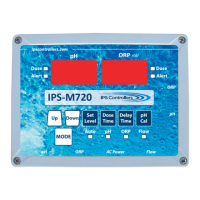
Note: While in this mode, the green pH standby LED will
illuminate, both the pH and ORP digital displays will show
dashes, and all Auto funcons will be disabled. When a funcon
pushbuon is pressed, the corresponding digital display will show
the funcon.
a. Set Level
1. Default: 7.4 pH
2. Selectable range: 7.0 – 8.0 pH (in 0.1 increments)
b. Dose Time
1. Default: Timed dose of 10 second pH feed relay
energized and 5 minutes pH feed relay de-energized.
In the med dose cycle mode, the Dose LED will ash
while dosing and illuminate steadily during the delay
poron of the med cycle. In connuous dose mode,
the Dose LED will ash while dosing.
2. Selectable range: OFF, CON (connuous), and Timed
(0.6 – 900 seconds ON and 5 minutes OFF)
c. Delay Time
1. Default is a 5-minute delay aer dosing
2. Selectable range 1 – 99 minutes
d. Over Timer
1. Preset: 60 med cycles or 60 minutes in connuous
feed.
2. Selectable range in med feed: OFF, 20 – 100 feed
cycles. Selectable range in connuous feed: OFF, 20 –
180 minutes.
3. Changing Over Timer seng
i. Press Mode buon to enter pH standby
ii. Press and hold Mode buon and then press Delay
Time buon (red pH alert LED will come on) release
both buons. You are now in Set Over Timer mode.
16
M720 pH/ORP Controller Owner’s Manual


 To Next Page