20
M720 pH/ORP Controller Owner’s Manual
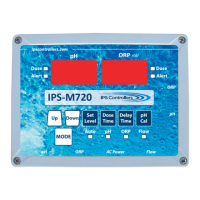
ii. Press and hold Mode buon and then press Delay
Time buon (red ORP alert LED will come on) release
both buons. You are now in Set Over Timer mode.
iii. Use Up/Down buons to increase/decrease Over
Timer
iv. When nished, press Mode buon to connue
4. The Over mer is interlocked with the Dose Time
selecon.
i. If the Dose Time is set to a med cycle, the Over
Timer will count med feed cycles. Every me the set
level is reached the mer will reset its count. If the
preset cycle count is reached, the pH digital display
will ash, and the pH output relay will de-energize.
The controller must be reset manually by cycling out
of and back into Auto mode using the mode buon
(Default: 60 cycles)
ii. If the Dose Time is set to a connuous feed mode,
the Over Timer will count in minutes. (Default: 60
minutes)
5. When the Dose Time is changed from either med or
connuous feed, the Over Timer is reset to Default.
d. High Alert
1. Default: 900 mV
2. Selectable range: 650 mV to 900 mV, no OFF. A high
alert will occur if the ORP level remains above the
High Alert level for 10 connuous minutes, and will
automacally turn o the High Alert when the ORP
level falls below the high alert level for 1 connuous
minute. During High Alert, the ORP1 dose output will be
disabled.
3. Changing High Alert seng
i. Press Mode buon to enter ORP standby


 To Next Page