Better Packages Section 2
Operation
14
X 2
A
+
-
4 5
3 9
4 2
3 6
3 0
2 4
2 7
3 3
2 1
1 5
9
6
1 2
1 8
REPEAT
START
REPEAT 2
ENTER
555
e S A
Better Pack
SELECT THE TAPE LENGTH (AUTOMATIC MODEL)
Pressing a button or combination of buttons allows you to dispense tape in lengths from 4” to a
maximum of 120” in increments of ½”.
See Figure 16b.
TO DISPENSE A RANDOM LENGTH OF TAPE:
Press and hold the manual feed button (down arrow) until the desired length of tape is dispensed.
It will dispense a length of 4” (10 cm) to a maximum of 120” (305 cm) depending upon how long the
button is held down.
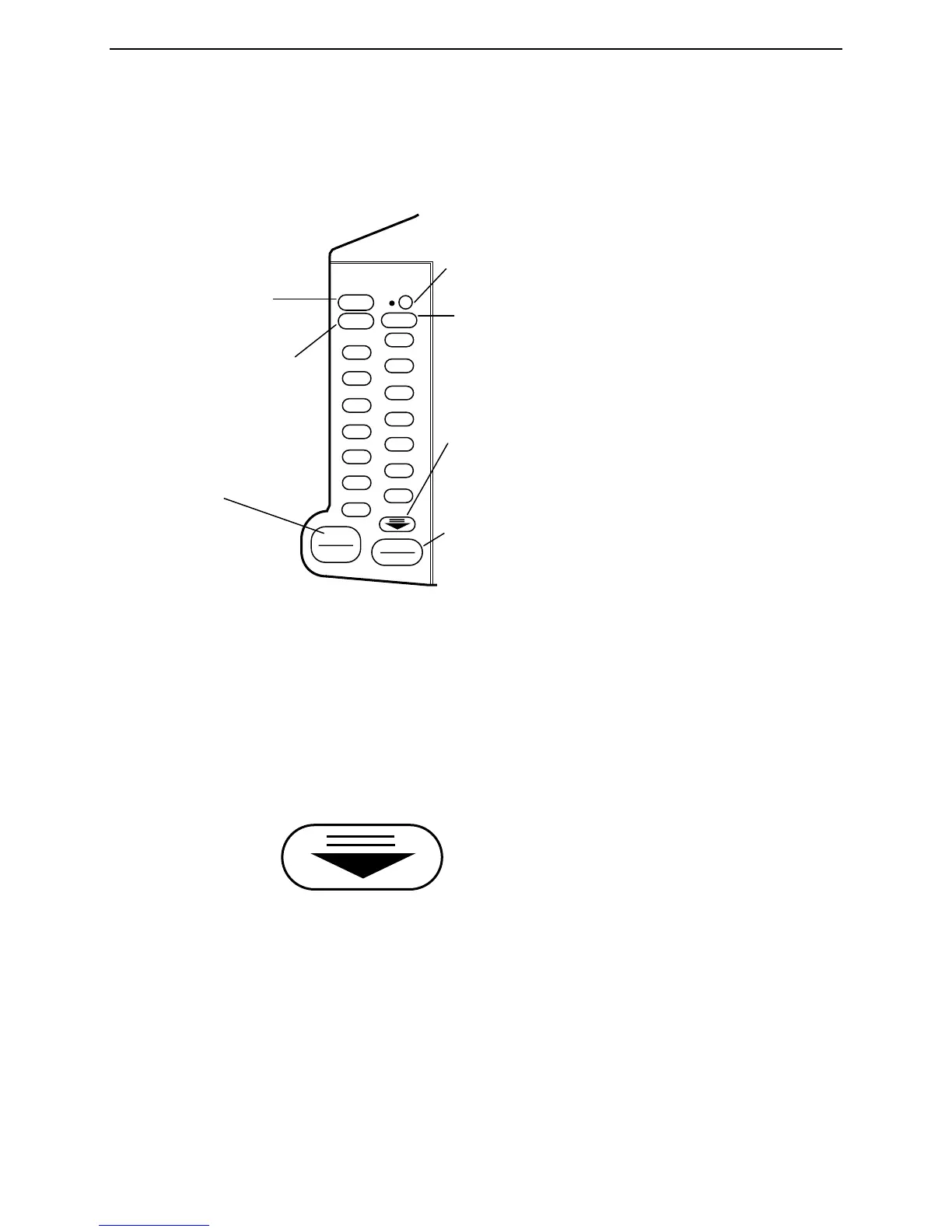
Keypad for Tape Length Selection
Adds ½” (1 cm)
to selected length
Subtracts ½”
(1 cm) from selected length
Repeats length selected before
this button was pressed
Press to place the unit in
Automatic mode (light will be “on”
when unit is in automatic mode)
Select length
of tape
X2 Button Doubles selected length
Dispenses
tape whil
120”) is determined by how long
the button is held
Used for a 2nd length or preset
length.
(lower right on the keypad)


 To Next Page