40
To start a program
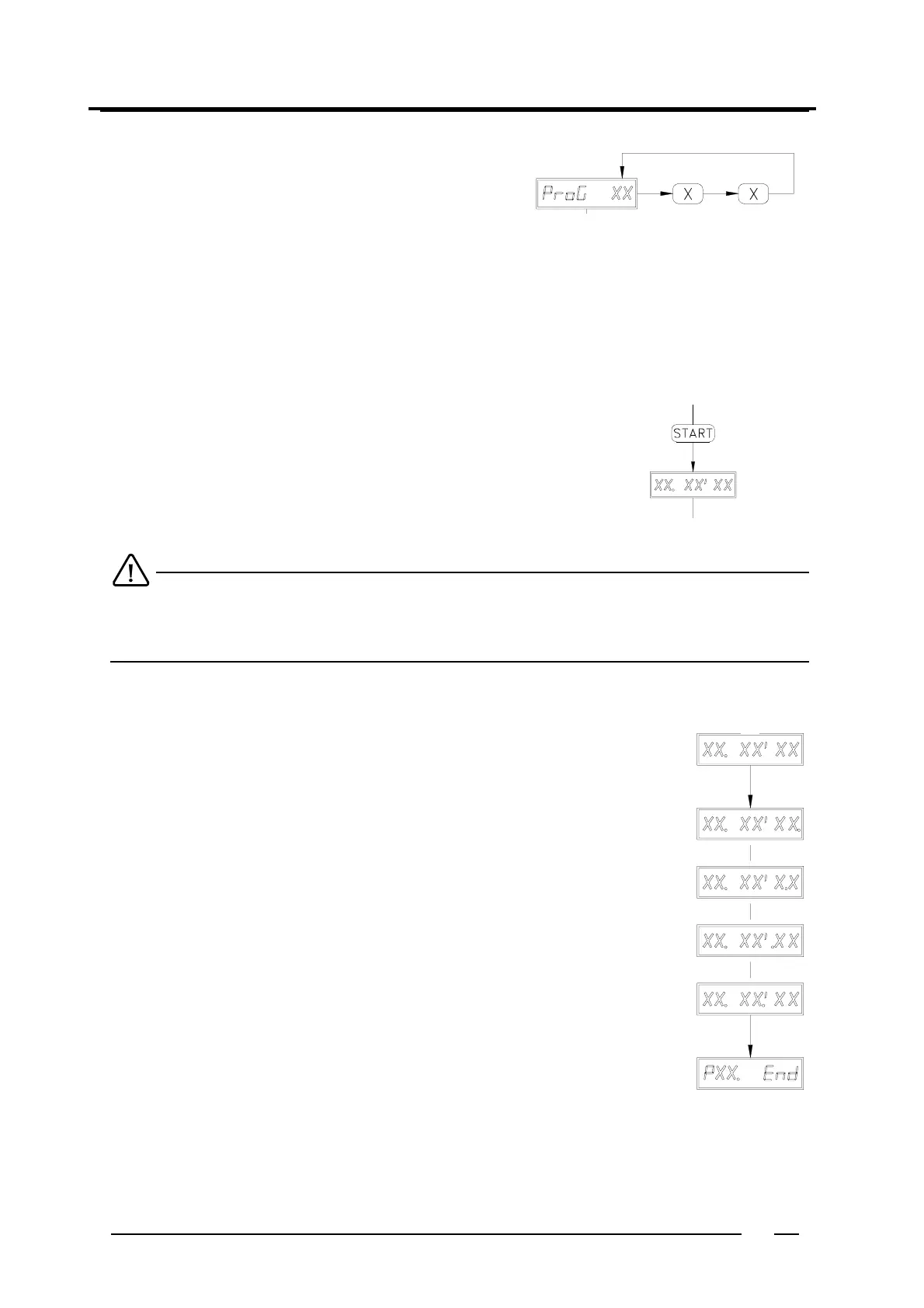
Press " START "
The program has now started.
" XX. XX. XX " will appear on the display (e.g. " 01. 41' 15 ")
01 = program segment number
41' 15 = Total remaining program time
When the door is not properly closed, " door. oPEn " will appear.
When selecting a program number that doesn't contain a program yet, " Error = 02 " (flashing) will appear
for 10 seconds.
Program process
The remaining program time (in seconds) is displayed during the program.
After each program segment appears the next program segment number.
Operating mode 6
To get into the "operating mode": see chapter " Classification according to modes ( 2 )".
To select a program
ProG XX = Program XX (e.g. program 01)
If necessary, select another program.
The led in the button of the selected program on the keyboard lights up.
To select a program number higher than 9 you must put in the number and add " +10 " or " +20 ".
Example: program 15: put in " 5 " and " +10 " (2 leds light up).
To stelect one of the standard programs ( 30 to 39) you must put in " +20 " and "+10" afterwards.
Example: program 35: put in " 5 " + " +20 " + " +10 " (3 leds light up).
å
å
" XX. XX' XX " (e.g. " 01. 41' 15. ")
When the machine is taking water, the first decimal point will light up.
As long as there is also a level control active, this decimal point will flash.
" XX. XX' X.X " (e.g. " 01. 41' 1.5 ")
When the bath is been heated, the second decimal point will light up.
As long as there is also a temperature control active, this decimal point will flash.
" XX. XX' .XX " (e.g. " 01. 41' .15 ")
When the machine is draining water, the third decimal point will light up.
As long as there is also a distribution going on, this decimal point will flash.
" XX. XX'. XX " (e.g. " 01. 41'. 15 ")
When the machine is in high spin, the forth decimal point will light up.
In case of a low spin, the light will flash.
" PXX. End "
When the program has come to an end, " PXX. End " will appear (e.g. " P01. End
").
The buzzer sounds for 10 seconds (when de buzzer " bu= " was activated in the
preprogam).
If the alarm signal was programmed (ALArM.XXX), this will now be executed.
When the door is opened, " StArt " will appear again.



 To Next Page