DO NOT APPLY POWER TO YOUR RASPBERRY PI VIA THE PI’s MICRO USB SOCKET.
The Pi/Pi-DigiAMP+ combination MUST be powered via the Pi-DigiAMP+, not the Raspberry Pi.
Once you are happy with that the Raspberry Pi and Pi-DigiAMP+ are connected correctly you are
nearly ready to apply power.
Power should only be applied to the Pi-DigiAMP+ once speakers have been attached. Powering the
Pi-DigiAMP+ without speakers attached may damage the device.
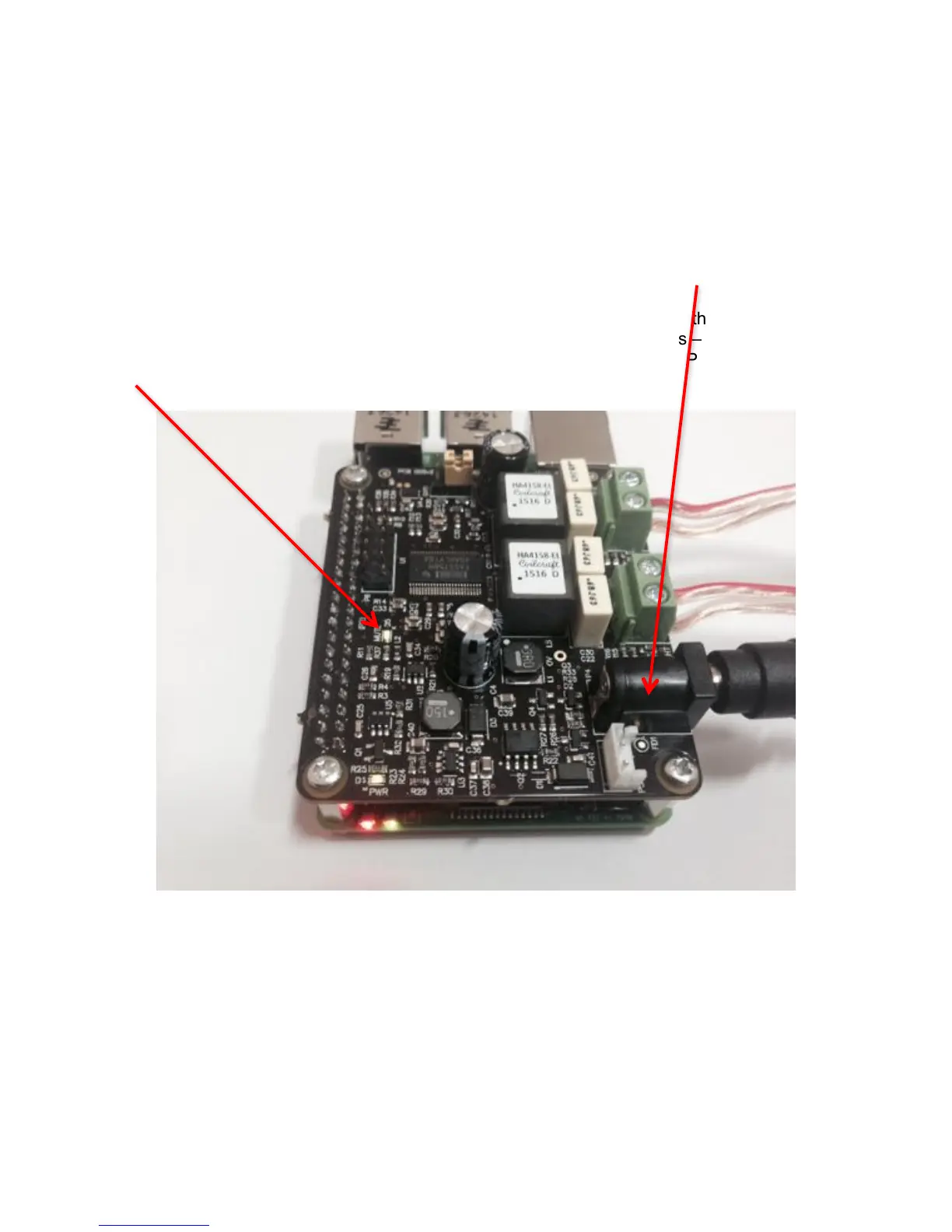
The Pi-DigiAMP+ has been designed to be powered by the recommended XP Power DC supply. The
Power supply’s output connector should be inserted into the Pi-AMP+’s DC input terminal (marked
P4). Only then should the Power supply’s AC input be plugged into the mains.
When power has been applied to the Pi-DigiAMP+ it will also provide power to the Raspberry Pi. You
should see that the Raspberry Pi and the Pi-DigiAMP+ both have power LEDs – when both are lit it
indicates that the power is successfully being applied to the Pi-DigiAMP+ and Pi. The Pi-DigiAMP+’s
Mute LED will also be lit.
You can now remove power and reconnect any necessary peripherals, install in case etc.
For accurate performance, your loudspeakers must be connected in phase. For both left and right
loudspeakers.


 To Next Page