17)
Adding a Rotary Encoder
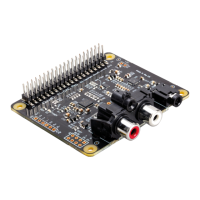
The following section shows the recommended pins / GPIO to use when adding a Rotary Encoder
(physical volume control) and using the IQ_rot utility (from our github site: www.github.com/iqaudio/
tools) to control the ALSA audio volume level.
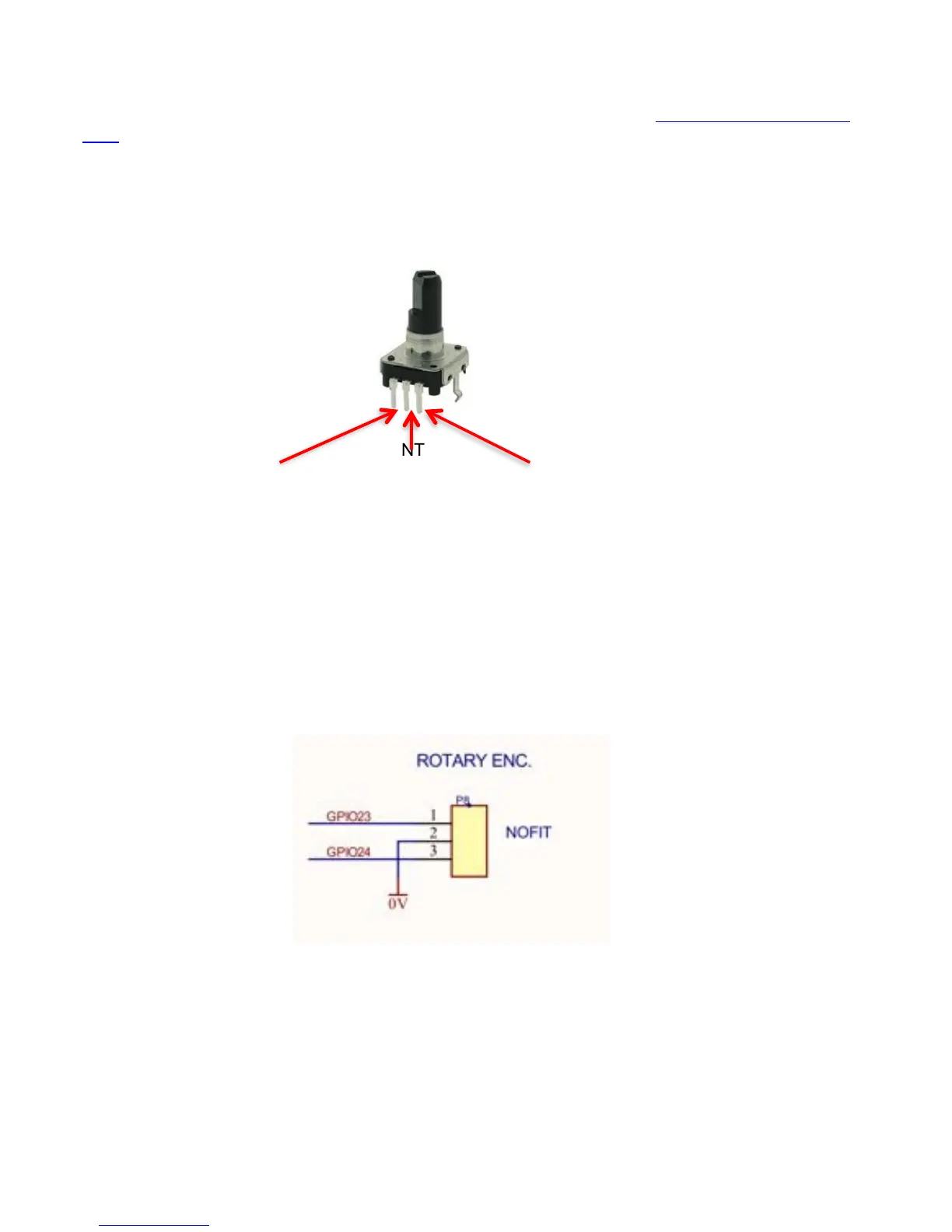
IQ_rot utility assumes that a 3 pin rotary encoder is connected to the Raspberry Pi as follows.
With the rotary encoder shaft facing you and pins facing downwards:
IQ_rot needs to be run with root privileges (sudo IQ_rot) and needs the WiringPi library to be pre-
installed. If being run at startup (in /etc/rc.local) make sure that the call is done as a separate process
(for example as: /usr/pi/iqaudio/tools/IQ_rot&)
By default IQ_rot uses the mixer name PCM – if the driver’s volume control mixer is not “PCM” then
the IQ_rot source code will need to be modified to access the correct mixer.
NOTE: Pi-DAC+ (Black edition) has a suitable 3 pin header socket (P8) for easy connection of a
suitable rotary encoder.


 To Next Page